n8n Workflow Testing Checklist: What to Verify Before Real Use
A practical checklist for testing sample data, branches, API failures, execution details, and automatic error handling before using an n8n workflow.

Checked against the n8n documentation on .
1. Define the expected result before testing
Start by writing down what the workflow should do for each planned test. Specify the expected final output, important intermediate values, intended branch destination, permitted side effects, and pass or fail result. These are editorial testing suggestions, not mandatory n8n standards. Their purpose is to make completion observable instead of relying on whether the canvas appears to run successfully.
Use non-live, non-sensitive test data wherever practical. n8n supports mocked data for simulating inputs and pinned data for reusing mocked or real test data during development. Remember that pinned data is a development aid and is not available during production executions, so a successful pinned-data run does not establish that the live workflow is ready.
Check complete: every planned case has a written expected result, test data is clearly separated from live data, and any allowed side effects are identified before execution. If your plan and permissions support separate development and production environments, you may use them as an additional isolation measure, but this is optional rather than a universal prerequisite.
2. Exercise representative sample data
Build a compact set of inputs that reflects the risks of this particular workflow. Suggested categories include a normal record, missing values, malformed values, empty input, meaningful boundary values, and duplicates. These categories are editorial prompts rather than a validated instrument or an official minimum dataset. Add or remove cases according to the transformations, integrations, and decisions in your workflow.
For every case, inspect more than the last node. Compare the input and output of each important transformation with the expectation you recorded. Check whether field names, data types, empty collections, and duplicate handling remain suitable for the next node. When pinning data, label the scenario clearly enough that another person can understand what condition it represents.
Check complete: ordinary and workflow-relevant exceptional inputs have been run, observed outputs match the written expectations, and every mismatch has either been corrected or recorded as an accepted limitation with a reason.
Sources: S6
3. Verify every conditional route
Create an input that deliberately enters each branch rather than waiting for varied sample data to reach every route by chance. For each route, verify the terminal node, transformed output, and intended side effects. Also confirm that nodes on other routes did not perform an unintended action.
Account for execution order when interpreting results. Workflows created from n8n 1.0 run branches one at a time in canvas order, although older workflows or changed settings may behave differently. If two branches can affect the same external record, record the workflow version and relevant settings instead of assuming that visual placement alone proves the order.
Check complete: every route has been observed with a recognizable input, its destination and output are correct, and no unexpected branch or side effect occurred.
Sources: S8
4. Test relevant API failure cases
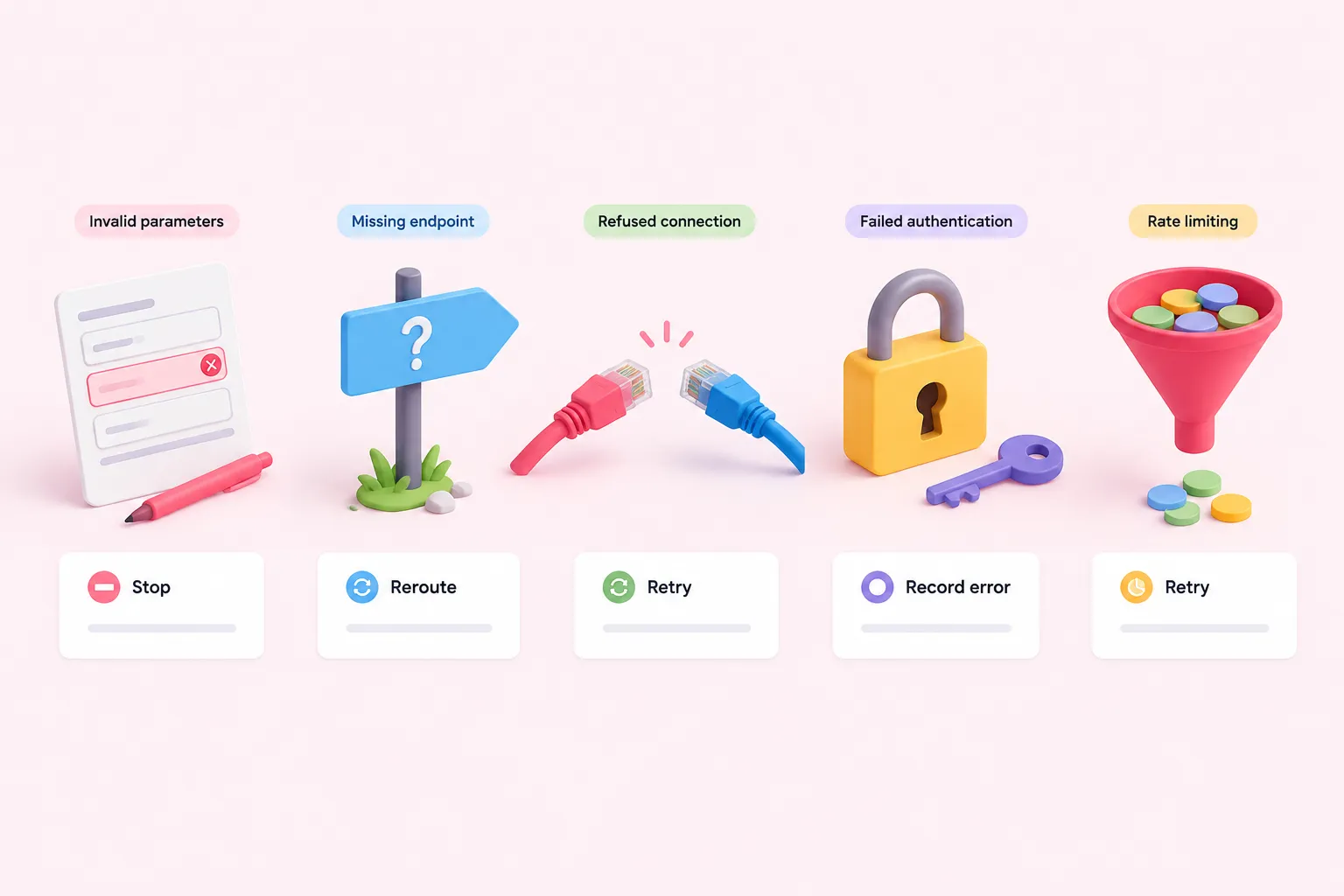
List the failures that matter to each API integration, then create controlled tests where doing so is safe. Useful suggested cases include invalid parameters, a missing or invalid endpoint, refused connections, failed authentication, and rate limiting. The HTTP Request node documentation distinguishes these kinds of failures, but their relevance and safe test method depend on the API being called.
For each case, decide the intended behavior before running it: stop immediately, retry, follow an alternate route, or record an actionable error. Then verify the observed behavior against that decision. Do not treat a generic failure message as sufficient if the workflow was expected to preserve context or avoid a partial side effect.
Check complete: each relevant and safely reproducible API failure has an expected response, the observed stop, retry, alternate route, or error record matches it, and untested cases are listed explicitly as unresolved risks.
Sources: S4
5. Inspect executions and retry behavior
Review the execution after every case. Record its status, the last successful node, the failure location when applicable, and the significant node inputs and outputs. The executions list can be filtered to a particular workflow, which can make this review easier when an instance handles several automations.
Where supported and properly configured, previous execution data can be loaded into the editor to debug and rerun a failed production execution. Availability depends on the n8n plan or registration and on whether the execution was saved, so do not make this the only debugging method in your checklist.
When testing retries, distinguish a reproducible workflow correction from a transient success. Note what data was reused, what changed, and whether another attempt produced the expected result without repeating an unwanted side effect.
Check complete: every test has a traceable execution result, failure locations are understood, and any retry behavior has been observed and documented rather than assumed.
6. Trigger and verify the automatic error workflow
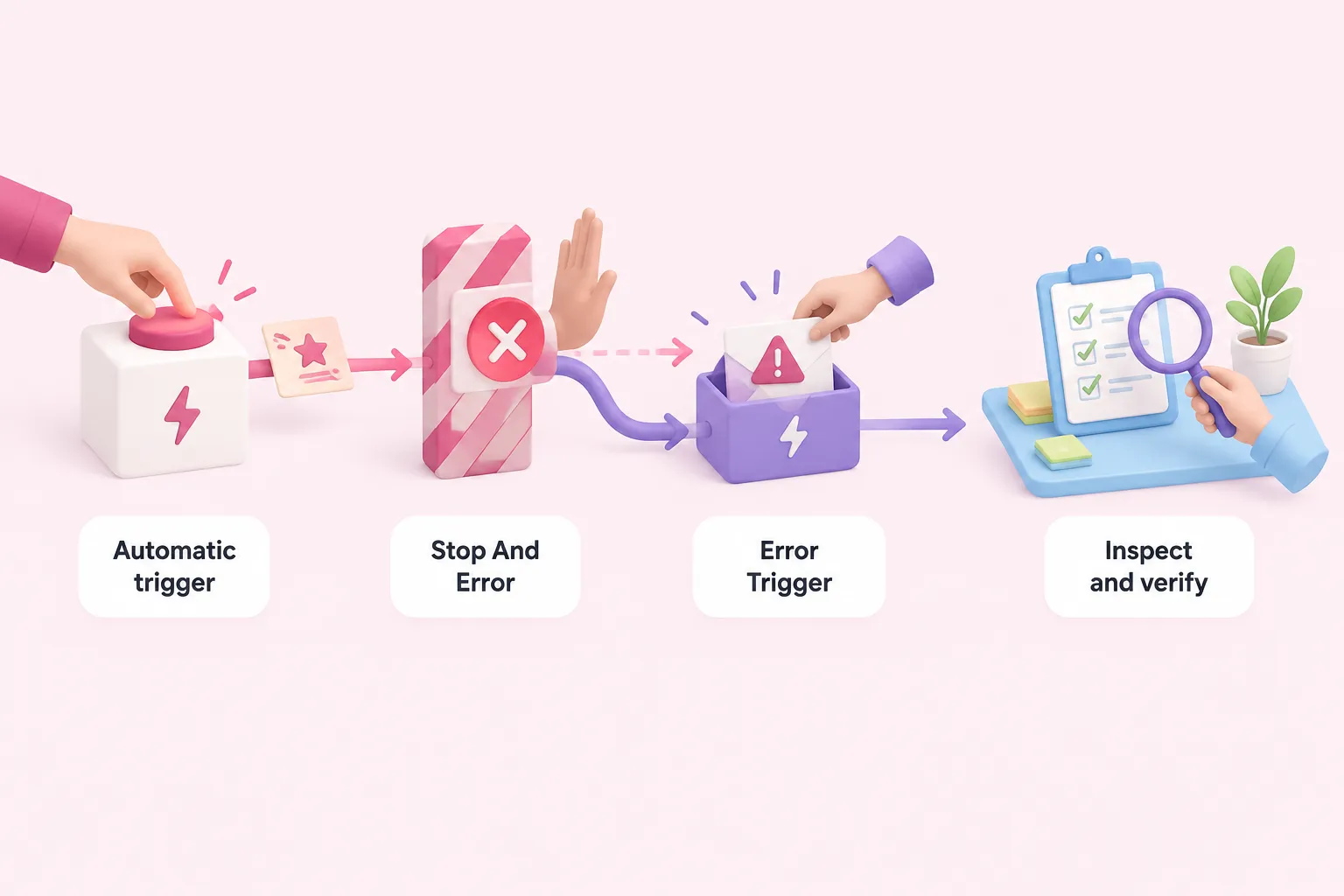
Select an error workflow in the main workflow’s settings and ensure that the error workflow begins with an Error Trigger. Its job is to run after an execution failure, but its configured presence alone does not prove that a notification, recovery step, or other response will succeed.
Test through an automatic execution context because manually running a workflow does not activate Error Trigger. When controlled failure is appropriate, a Stop And Error node can deliberately fail the main execution and pass recognizable test information to the error workflow. Use clearly marked test context so the resulting execution can be distinguished from a real incident.
Inspect both sides of the test. Confirm that the main execution failed at the intended point, then confirm that the error workflow received enough context and performed its intended response. Verify notification delivery or recovery separately; deliberately causing an error does not prove that those downstream actions worked or that partial side effects were safely handled.
Check complete: an automatic test execution fails as intended, the Error Trigger starts the configured error workflow, the expected context arrives, and each intended downstream response is independently observed.
7. Make an explicit readiness decision
Gather the results in a simple test record containing the case, expected result, observed result, pass or fail status, and any unresolved risk. Testing is complete for this editorial checklist only when every documented case has passed or has an explicitly accepted limitation, every intended route has been observed, relevant API failures behave as designed, and an automatic failure activates the error workflow.
A completed checklist is evidence of what you examined, not proof that incidents cannot occur. The supplied documentation describes n8n features and mechanics but does not provide controlled evidence that these checks prevent production failures. Dataset coverage, permitted side effects, retry policy, alert destination, and the release threshold remain decisions for the people responsible for the workflow.
If an unresolved item could alter data or trigger an external action, record who accepts that risk and why before relying on the workflow in a real process. End with one clear decision: ready for the defined use, ready with accepted limitations, or not ready pending specified work.