n8n Webhook Not Working: A Step-by-Step Debugging Checklist
A practical checklist for isolating n8n webhook issues across URL modes, publication, HTTP methods, authentication, responses, and execution records.

Checked against the cited sources on .
Before you start: capture the request and expected result
Begin with one reproducible request. Record whether you are calling the test or production URL, the HTTP method, the selected authentication mode, the response mode, the returned status and body, and whether an execution appears in n8n. Remove passwords, tokens, authorization headers, and other secrets before sharing the record with a mentor or workshop group.
Write down the result you expected in concrete terms. For example: “A POST request should start the workflow and return the final node’s output.” This separates three questions that are easy to confuse: Did the request reach the webhook? Did the workflow execute? Did the caller receive the intended response?
Resend the same controlled request after each change. This sequence is an editorial debugging suggestion, not a mandatory n8n standard. Its purpose is to help you identify the first mismatched setting instead of changing several variables and losing track of what fixed the problem.
Check 1: Match the test or production URL to the workflow state
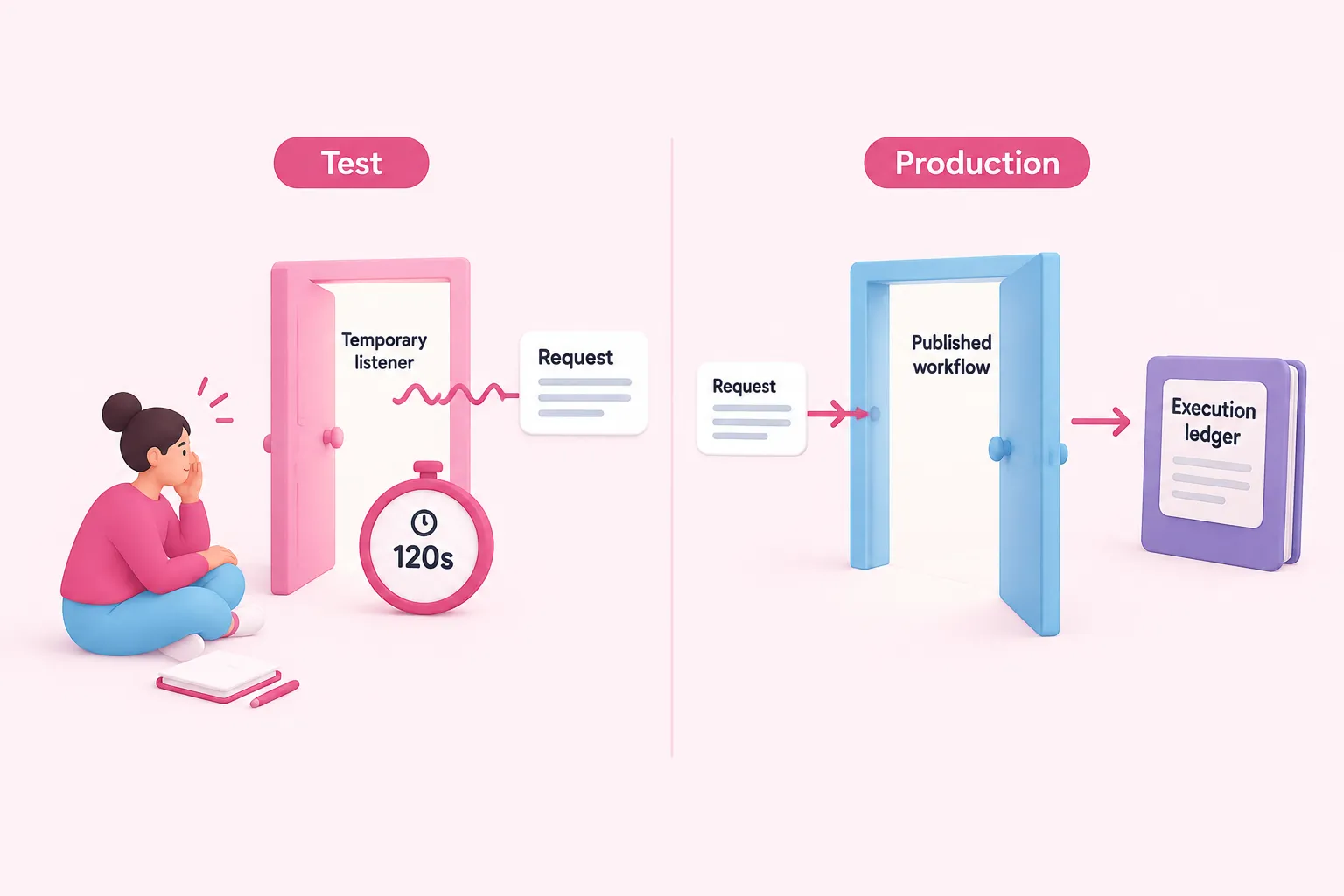
First confirm which webhook URL the caller is using. For a test request, select “Listen for test event” before sending the request. The registered test webhook remains active for 120 seconds, so a request sent before listening begins or after that window may not reach the temporary listener.
For production use, publish the workflow and call its production URL. Publishing registers the production webhook. Do not use the absence of request data on the workflow canvas as proof that production failed: production request data is not displayed there. Look for the resulting run in the execution records instead.
Completion for this check depends on the intended mode. In test mode, the listener is active when the matching request arrives and the incoming data becomes observable in the editor. In production mode, the workflow is published, the caller uses the production URL, and you inspect the run through Executions.
Check 2: Verify the HTTP request method
Compare the sender’s actual method with the method configured in the Webhook node. A Webhook node accepts a single method by default, such as GET or POST, unless support for multiple methods has been enabled. A correct URL does not compensate for a method mismatch.
Inspect the request itself rather than relying only on the calling tool’s label or your memory. If possible, preserve a sanitized version of the command or request configuration. Then verify the Webhook node setting and resend the same request with the matching method.
Consider this check complete when the configured method and the transmitted method agree. If that change causes an execution to appear, record the mismatch before continuing. The supplied evidence does not provide a complete status-code matrix for incorrect methods, so avoid treating one particular error code as universal.
Sources: S3
Check 3: Verify the configured authentication and credentials

Next, compare the Webhook node’s authentication choice with what the calling service sends. The documented choices are Basic authentication, Header authentication, JWT authentication, or no authentication. The selected approach must match the method required by the caller or integrated service.
Check both sides carefully. Confirm the authentication mode in n8n, then inspect how the request supplies credentials. For header-based approaches, verify that the caller sends the intended header without exposing its value in notes or screenshots. For Basic or JWT authentication, verify that the caller is configured for that same category.
This checklist cannot prescribe service-specific credential values or header formats because those depend on the selected method and calling service. Completion means the modes align and a sanitized comparison reveals no missing credential field. If uncertainty remains, consult the relevant service’s requirements rather than trying unrelated secrets.
Sources: S4
Check 4: Separate workflow execution from webhook response behavior
A webhook can start a workflow even when the caller receives an unexpected, empty, or delayed response. Before concluding that the trigger failed, determine whether an execution exists. If it does, shift your attention from URL and trigger settings to response configuration.
When the Webhook node is configured to delegate its response, the workflow must include a Respond to Webhook node. Configure the Webhook node to use that response path, then ensure the response node is part of the workflow. If data produced by other steps should be returned, structure the workflow so the intended data is available to the response step.
Another documented mode responds after the last node finishes. In that mode, the webhook returns the final node’s output data along with the response code. Completion means you can explain which node controls the response and confirm that the received body is consistent with that selected mode.
Check 5: Inspect the execution record
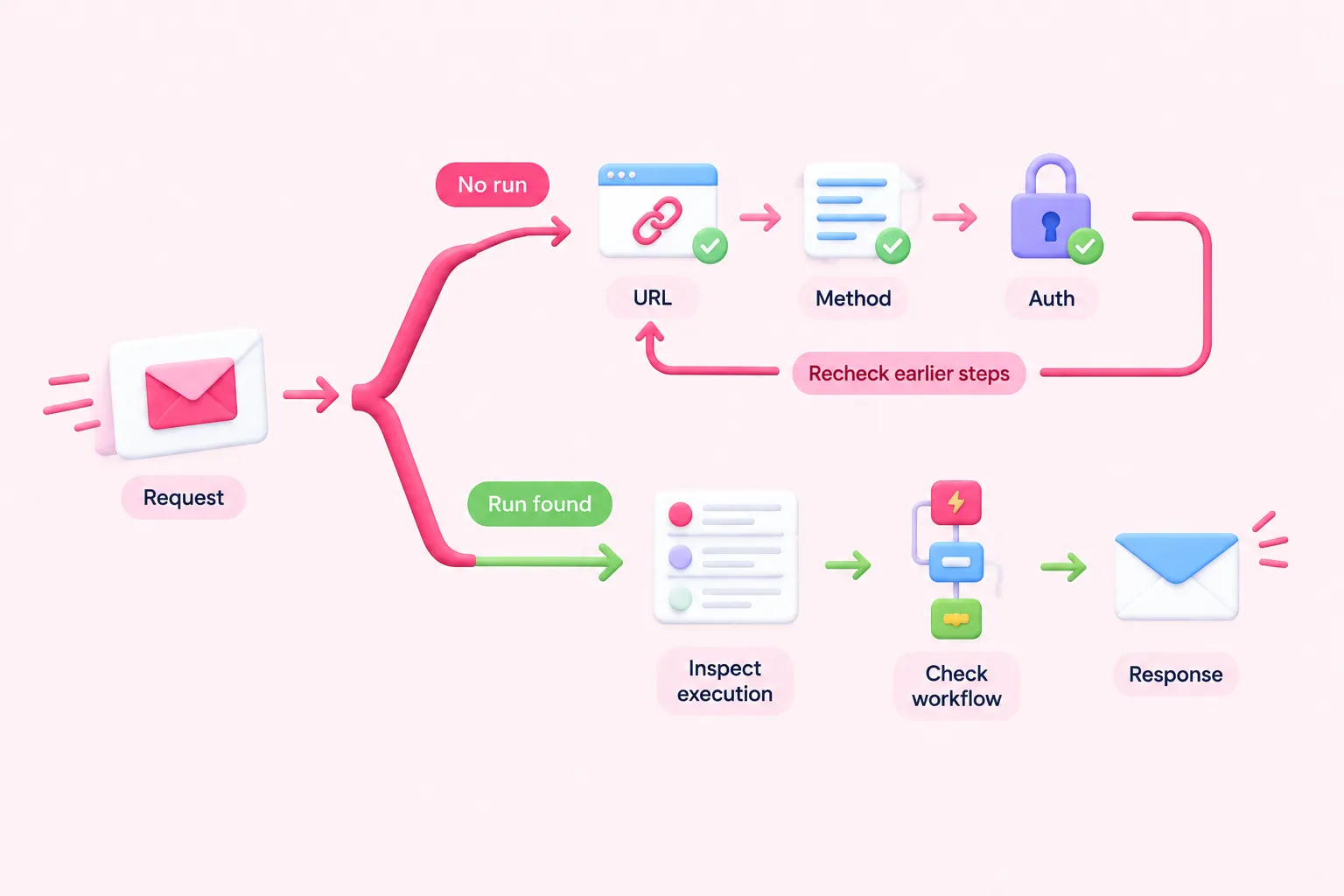
Open the n8n instance Overview page and select the Executions tab. Use the execution list to answer the most useful branching question in this checklist: did the controlled request create a run? Access depends on which workflows are available to you, and the supplied evidence does not establish retention or logging behavior.
If no execution appears, return to the earlier checks: URL mode, listener or publication state, request method, and authentication. If an execution does appear, inspect where its behavior diverged from your expectation. In particular, an existing run paired with an incorrect caller response points toward workflow logic or response-mode configuration rather than proof that the webhook trigger failed.
Record whether a run appeared after every controlled attempt. This produces a compact diagnostic trail that a mentor can review without needing credentials or sensitive request contents.
Completion criteria: identify the first mismatched setting and reproduce the request successfully
Finish when you can name the first mismatched setting and reproduce the request after correcting it. Your record should show the URL type, workflow state, HTTP method, authentication mode, response mode, returned status and body, and whether an execution appeared. Keep all secret values redacted.
For test mode, successful reproduction means the listener is active when the request is sent and the incoming data is observable in the editor. For production mode, it means the workflow is published, the production URL is called, and the run is checked in Executions rather than expected on the canvas.
Treat this order as a suggested diagnostic routine, not a validated instrument or mandatory standard. The supporting sources document n8n configuration behavior, but they do not demonstrate that this sequence causes faster debugging or improved learning outcomes. If several settings were changed together, restore a controlled setup and vary one non-secret setting at a time.
Sources: S2, S1, S3, S4, S5, S6, S11
Practice the diagnosis with an n8n challenge
To turn the checklist into a practice exercise, deliberately create one safe configuration mismatch in a non-production workflow, predict whether an execution should appear, and then use the checklist to isolate it. This is a suggested learning activity, not a validated assessment.
The n8n Balloon Challenges website provides practical automation challenges with progressive tips. Participants build workflows in their own n8n environment, so keep responsibility for credentials, test data, and safe execution within that environment. In the in-person event format, work can be shared with a mentor for manual verification.
When explaining your diagnosis, state the evidence plainly: what request you sent, which setting differed, whether an execution appeared, and how the corrected request behaved. Avoid sharing secrets or claiming that completing the exercise provides certification or a measured learning result.