n8n vs Zapier: A Practical Webhook-to-API Comparison
Compare n8n and Zapier for the same webhook-to-API workflow, including credentials, mapping, debugging, deployment, and billing units.

Checked against the cited sources on .
Define one fair webhook-to-API build test
A useful n8n-versus-Zapier comparison begins with the same workflow, inputs, and acceptance criteria in both tools. As a suggested test, receive a representative webhook, validate its payload, map and transform selected fields, call the same authenticated API, and record or return an explicit result. Declare the payload schema, authentication scheme, expected response, traffic assumption, and recovery objective before building; the supplied documentation does not define those inputs for you.
Inject the same failure cases into both builds: an unauthorized request, an invalid payload, a rate-limit response, and a server error. Record setup steps, where credentials live, how many transformation operations are required, what diagnostic evidence is visible, and what an operator must do to recover. These are proposed evaluation criteria, not a validated scoring instrument. No supplied source reports a controlled same-workflow test, so relative speed, usability, maintainability, throughput, latency, and reliability remain unknown.
Sources: S1, S6, S8, S5, S12, S13
Compare webhook setup and response behavior
For n8n, the documentation describes built-in webhook authentication and states that a caller with mismatched credentials receives a 401 before the workflow executes. That gives the test a concrete behavior to verify: send valid and invalid credentials, then inspect whether the rejected request created an execution and what the caller received. The source does not establish configuration effort or guarantee identical behavior across versions.
Zapier documentation establishes that the platform can receive webhooks and make arbitrary API calls. Its credential implications depend on the chosen tool: API by Zapier uses app connections, while credentials entered into Webhooks by Zapier step fields may be readable by people who can access the Zap. This is a configuration-specific warning, not evidence that every Zapier authentication path stores credentials that way.
The fair comparison is therefore not simply whether each tool can accept a webhook. It should ask which authentication mechanism was selected, where secrets were placed, what happened before workflow execution, and what access boundaries applied. Zapier’s customer-controlled hosting options and an equivalent deployment model are not established by the supplied documentation, so they should remain unknown rather than be scored as absent.
Compare authenticated API calls and credential placement
n8n’s HTTP Request node is documented for REST API calls and, in the retained documentation text, supports predefined credentials as well as generic methods including Basic, Header, OAuth1, and OAuth2 authentication. The source is truncated, so F2 supports only that retained text. It does not identify the target API in this proposed test and cannot establish which credential type will fit, how it should be configured beyond the captured methods, or how long setup will take.
Zapier also documents arbitrary API calls, but the credential location changes with the tool used. When the authentication method permits it, a suggested safer comparison configuration is to prefer an app connection over placing a secret in plaintext Webhooks step fields. On the n8n side, use a documented credential type rather than constructing an improvised header check inside workflow logic.
During the build, note who can inspect or change each connection, how credential rotation would be performed, and whether a failed authentication attempt exposes useful diagnostic information without exposing the secret. These are suggested review questions. The supplied sources do not provide a firsthand security test or comparative security outcome, so credential safety should be treated as a configuration decision rather than a platform-wide verdict.
Compare field mapping and transformation
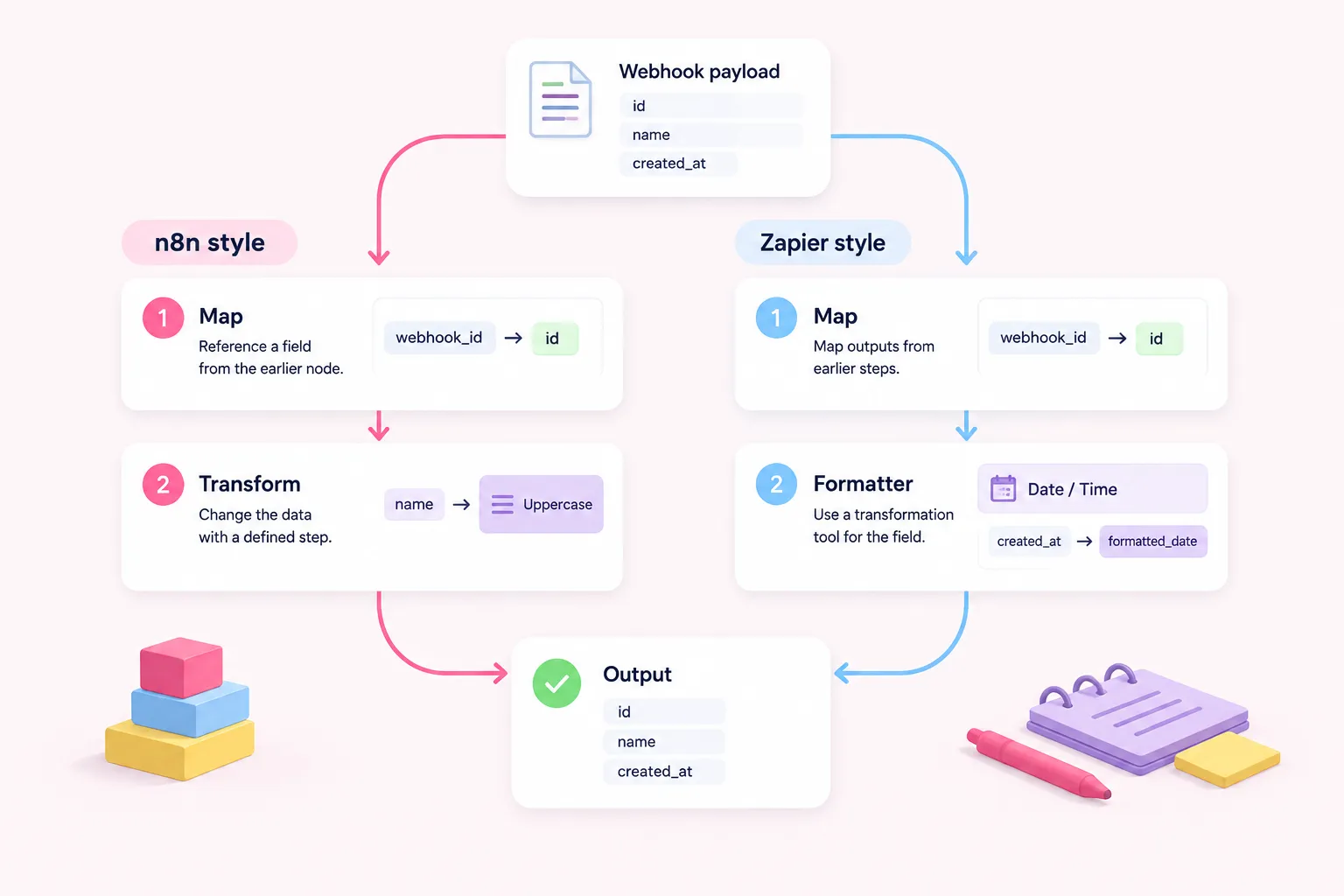
n8n documentation distinguishes mapping from transformation: mapping references data produced by an earlier node, while transformation changes that data. The test should therefore count these separately. For example, map a webhook identifier directly into the API request, then apply an explicitly declared change to another field before sending it.
Zapier similarly maps outputs from earlier steps into later inputs. Its documentation warns that some changes involving an app, version, or step structure can require fields to be mapped again. Zapier also supplies Formatter actions for date and time, number, text, and utility transformations, although the evidence does not show whether those actions cover the proposed payload without additional steps.
Use the same input and required output in both builds, then record direct mappings, transformation operations, remapping after a controlled structural change, and any assumptions about missing or malformed fields. Do not treat fewer visible steps as proof of easier maintenance: the documentation supplies no comparative timing or maintenance-effort measurement.
Compare debugging and error recovery
n8n documents accessible execution records and the ability to retry a failed workflow using either the saved workflow or the original workflow. Availability and retention may vary by edition or plan, and no supplied evidence gives a recovery success rate. The test should capture what data is available after each injected failure and whether a retry uses unchanged or revised logic.
Zapier documents run statuses, HTTP logs, replay, automatic retry, and custom error handlers that can start an alternative path after a failed step. Its history is described as retaining no more than a guaranteed 60 days and displaying no more than 10,000 runs. The sources do not compare exports, external logging, plan-specific alternatives, or recovery latency.
For every injected 401, 422, 429, and 500-class response, record detection, diagnostic visibility, manual actions, automatic behavior, and final disposition. Separate observed results from documented capabilities. A successful replay in a small test would be an observation about that configuration, not proof of general reliability.
Compare publishing, versions, and deployment ownership
n8n documents Git-based environments for Business and Enterprise plans, with setup performed by an instance owner or administrator. That evidence concerns a particular source-control feature; it does not describe every possible n8n deployment or promotion approach. If this capability matters, record the tested edition, roles, repository process, and promotion path.
Zapier supports editing a draft while the published Zap continues to run and creates a version each time a Zap is published. Version-history windows can vary by plan. The supplied evidence does not establish Git-based promotion or customer-controlled deployment for Zapier, so those points must remain unknown instead of being converted into negative capability claims.
Compare how a change moves from editing to production, how rollback would work, who owns hosting and operational intervention, and which parts depend on a particular plan. This criterion may matter greatly to a technical lead, but the supplied documentation cannot determine which operating model is preferable for a specific company.
Compare billing units without declaring a price winner
The documented units differ. n8n’s listed commercial model counts a complete workflow execution with unlimited steps, and a standard self-hosted Community Edition is also listed. The cited excerpt supports the unit for the referenced Starter offer, not total ownership cost, future plan contents, or suitability for a workload.
Zapier counts successful action steps as tasks; triggers and failed or halted actions do not count toward task usage. A single webhook event can therefore map to a different number of units depending on how many successful actions its Zap performs. The supplied evidence contains no current Zapier plan prices and no workload-specific task total.
Estimate units only after the workflow shape and event volume are declared. For n8n, estimate executions per webhook event. For Zapier, count successful billable actions in a representative run. Apply current quotes or plan prices separately, and include hosting and operational responsibilities where relevant. Without those inputs, neither product can be named the lower-cost option.
Turn documented differences and unknowns into a decision scorecard
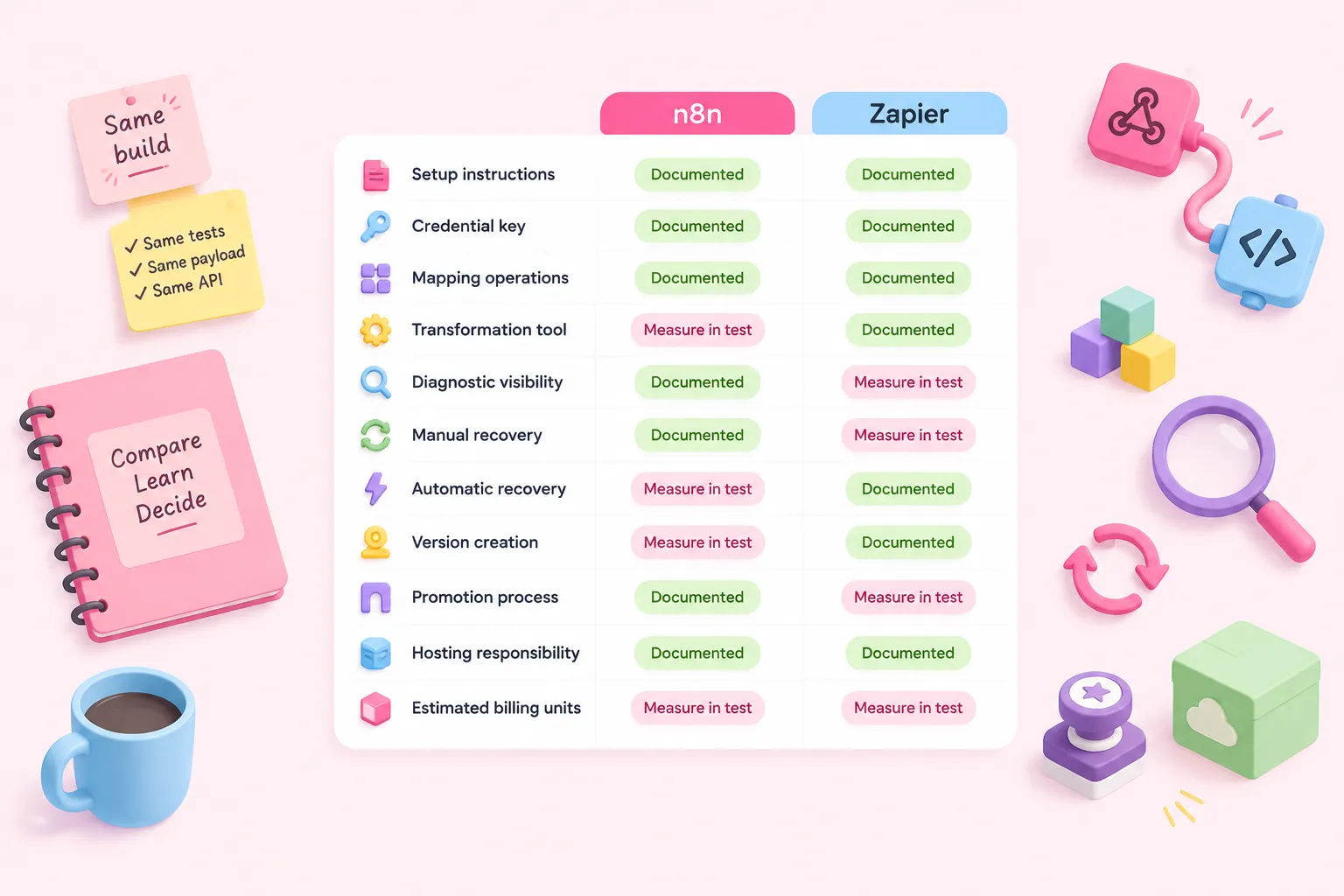
A practical scorecard can list setup steps, credential location, mapping operations, transformation operations, diagnostic visibility, manual recovery, automatic recovery, version creation, promotion process, hosting responsibility, and estimated billing units. Use the same definitions and test cases for both builds. This is a suggested editorial framework, not a validated assessment instrument.
The documentation supports several concrete comparisons: n8n describes pre-execution webhook rejection for mismatched authentication, generic credential choices, execution retries, and a plan-limited Git environments feature. Zapier describes tool-dependent credential placement, remapping after certain structural changes, Formatter actions, several recovery mechanisms, retained run history limits, and publish-created versions. The two billing units are also documented differently.
Important outcomes remain unknown until measured in the shared build: configuration time, operator effort, maintenance burden, latency, throughput, and recovery performance. Record these as observations with the tested versions, plans, payload, API, and traffic assumptions. Keep security conclusions scoped to the chosen configuration, and avoid turning one participant’s preference into proof that either platform produces better productivity or reliability.
Sources: S1, S6, S7, S8, S2, S4, S5, S11, S12, S13, S14, S15, S10