n8n SSO Self-Hosted: Licensing and Setup Checklist
A practical checklist for n8n SSO self-hosted setups: which edition and license you need, how SAML and OIDC enable differ, and where community workarounds fit.

Checked against the cited sources on .
Confirm Which n8n Deployment and Edition You're On
If you're an ops or IT lead trying to enable n8n SSO self-hosted, the licensing fork comes before any configuration fork. Single sign-on is not something every self-hosted instance can turn on. n8n's own documentation lists SSO, covering both SAML and LDAP, among the features the free Community edition does not include. If your team is still on Community, that's the first wall you'll hit before any SAML or OIDC setting matters.
n8n's guidance on choosing how to use the product confirms the same pattern from the other direction: organizations that need enterprise features such as SSO, environments or projects get them through a paid plan, whether that plan runs on n8n Cloud or on your own self-hosted infrastructure. So the real question isn't just self-hosted versus cloud; it's whether you're on a paid, licensed edition at all.
This checklist covers SAML and OIDC only, the two protocols n8n's documentation names as supported for single sign-on; it doesn't cover LDAP-specific setup steps, since no LDAP setup documentation was part of what we reviewed.
Sources: Configure SSO | Deploy | n8n Docs, Compare editions | Deploy | n8n Docs, Choose how to use n8n | n8n Docs
License n8n SSO Self-Hosted: Business vs Enterprise

Turning on n8n SSO self-hosted starts with picking a protocol, because that decides which plan you actually need. n8n's own setup documentation states that SAML SSO is available on self-hosted Business and Enterprise plans, while its OIDC documentation limits OIDC to Enterprise plans only. A 2025 n8n community forum post summarized the same split for other self-hosters: SAML sits in the Business plan, OIDC is Enterprise-only. If OIDC is your identity provider's preferred protocol, budget for Enterprise, not Business.
| Protocol | Minimum plan | Source |
|---|---|---|
| SAML | Business or Enterprise | n8n's Set up SAML documentation |
| OIDC | Enterprise only | n8n's Set up OIDC documentation |
Licensing itself is a short, documented step. n8n's license-management docs describe subscribing to a paid plan to receive a license key, then activating it inside the product through Settings, Usage and plan, and Enter activation key.
Two operational details are easy to miss. n8n's docs note that your instance needs to reach n8n's license server, which means allowlisting Cloudflare's IP range on your firewall. And if auto-renewal is ever disabled, someone on your team has to manually renew the license every 10 days, in Settings and Usage and plan, or every licensed feature, SSO included, gets disabled.
One independent developer's December 2025 blog post reported a 'Startup' license starting at $400 a month as the tier that unlocks SSO, though that plan name doesn't match the Business and Enterprise terms used in n8n's own docs, so it couldn't be cross-checked against official pricing. In our view, it's more useful to budget against the documented Business-versus-Enterprise split than against a figure that couldn't be confirmed, and to check n8n's current pricing page before committing.
Sources: Set up SAML | Administer | n8n Docs, Set up OIDC | Administer | n8n Docs, OIDC Auth with Self-hosted license Business - Questions - n8n Community, Compare editions | Deploy | n8n Docs, Manage your license | Deploy | n8n Docs, License | Deploy | n8n Docs, Announcing n8n-oidc • Cameron Eagans
Choose Your Protocol: SAML vs OIDC, and What Each Needs From Your IdP
n8n's Configure SSO page states plainly that SAML and OIDC are the two protocols the product supports for single sign-on; nothing else is documented as supported.
For SAML, n8n's setup docs walk through an in-app flow: open Settings, go to SSO, note the n8n Redirect URL and Entity ID the instance generates, then hand those two values to your identity provider while you configure the matching settings on n8n's side.
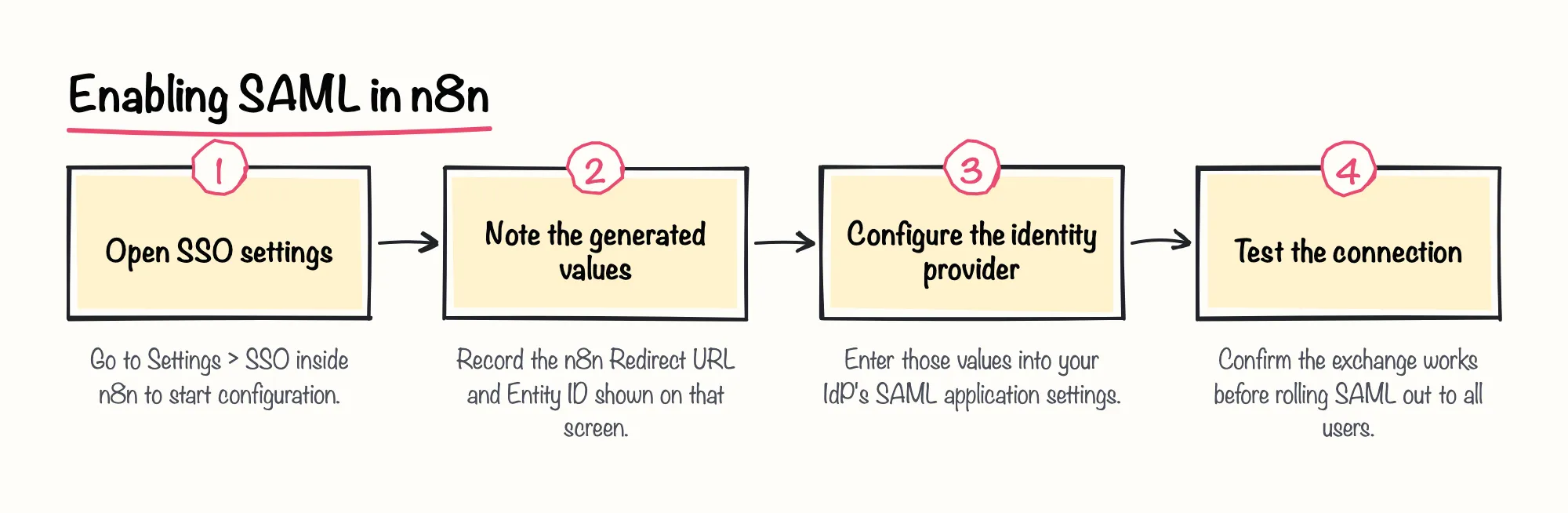
For OIDC, n8n's docs are explicit that only an instance owner or admin can enable and configure it, which matters when you're deciding who on the team actually does this work.
Sources: Configure SSO | Deploy | n8n Docs, Set up SAML | Administer | n8n Docs, Set up OIDC | Administer | n8n Docs
Enable SSO via Environment Variables and Role Provisioning (Version-Gated)
If you'd rather manage SSO as code than click through the UI, n8n's environment-variable documentation states that managing SSO from environment variables became available starting in n8n version 2.18.0. On older self-hosted versions, SAML and OIDC configuration has to go through the Settings UI instead.
The switch itself is one variable: n8n's SSO environment-variable docs say setting N8N_SSO_MANAGED_BY_ENV to true hands SSO configuration to your environment variables. The same page warns that the SAML metadata XML variable and the SAML metadata URL variable are mutually exclusive, so set one or the other, never both.
Role provisioning is a separate, newer capability. n8n's docs state that automatic SSO-based role provisioning, mapping instance and project roles from your identity provider, is available from n8n version 1.122.2, with an instance_role option that provisions only the instance-level role and leaves project access to be managed manually. We're optimistic that version-gated steps like this point to n8n continuing to invest in identity management, which should make rollouts easier over time. Teams still running an older self-hosted version simply assign roles by hand instead.
Sources: Manage settings using environment variables | Deploy | n8n Docs, SSO | Deploy | n8n Docs, Set up OIDC | Administer | n8n Docs
Confirm Your Use Stays Within n8n's Sustainable Use License
Licensing isn't only a technical switch; it's also a terms question. n8n's Community license FAQ states that using enterprise features that require a license key, such as SSO, without holding an Enterprise license falls outside what the free Sustainable Use License permits.
The same FAQ clarifies scope: the free Community license applies only to the self-hosted version of n8n. n8n Cloud runs under its own separate paid terms, so self-hosted and free aren't automatically the same bucket once SSO or other licensed features are involved.
Sources: License FAQ | n8n Community license | n8n Docs
The Unofficial Workaround Landscape, and Its Trade-Offs
Because OIDC sits behind an Enterprise plan, some self-hosters look for a way around it before buying. A December 2025 blog post by an independent developer describes n8n-oidc, a community-built tool that uses n8n's external hooks system to add OpenID Connect login to a self-hosted instance without an enterprise license.
A later March 2026 post by the same developer revisits that setup, built against Pocket ID, a self-hosted identity provider he also built, as the personal homelab configuration he was testing against.
We'd be cautious about leaning on a community workaround like this for anything beyond a lab or evaluation environment. It sits outside n8n's own licensing model and support, so a regulated or production rollout is exactly where that gap matters most.
Sources: Announcing n8n-oidc • Cameron Eagans, Authentication with Pocket ID • Cameron Eagans
Pre-Rollout Checklist for Self-Hosted n8n SSO
Use this checklist as the final pass before you flip n8n SSO self-hosted on for everyone. None of these steps replace checking n8n's current pricing and documentation pages directly, since several of the sources behind this checklist point there as the definitive reference.
Sources: Set up SAML | Administer | n8n Docs, Set up OIDC | Administer | n8n Docs, Manage your license | Deploy | n8n Docs, License | Deploy | n8n Docs, Manage settings using environment variables | Deploy | n8n Docs, License FAQ | n8n Community license | n8n Docs, Announcing n8n-oidc • Cameron Eagans