n8n Queue Mode Not Working: A Troubleshooting Checklist
A practical checklist for n8n queue mode not working situations, where healthy workers still leave jobs stalled, covering EXECUTIONS_MODE, Redis and worker health.

Checked against the cited sources on .
Before You Start: Confirm the Symptom and Gather Instance Details
If you're seeing n8n queue mode not working — the workers show as online, yet jobs sit in the queue or never leave the 'running' state — resist the urge to restart everything first. Spend five minutes confirming what you're actually seeing: which workflow and trigger type is affected, how long jobs have been stuck, and whether the stall started after a deploy, a Redis restart, or no change you're aware of. Write down your n8n version, your EXECUTIONS_MODE setting on main and on each worker, and whether you run single-main or multi-main, before working through the checks below.
Having these details on hand turns each check into a quick comparison instead of a fresh investigation — and it's usually the difference between a five-minute fix and an afternoon of guessing.
Check 1–2: Is n8n Queue Mode Not Working Because of EXECUTIONS_MODE or Redis?

n8n queue mode not working often traces back to one mismatched setting: whether EXECUTIONS_MODE=queue is set the same way on the main process and on every worker. Queue mode depends on that setting matching across every process. A 2026 vendor blog post from Elestio describes what happens when that's missed: when EXECUTIONS_MODE=queue is set on the main process but left unset, or set differently, on a worker, that worker never looks at the Redis queue at all. Executions keep running locally on main, the queue stays empty, and the workers you see as 'up' are healthy processes doing nothing useful.
It helps to see what a correctly configured setup is supposed to do instead. As n8n team member Yulia Dmitrievna describes it on the n8n Blog,
Once EXECUTIONS_MODE is confirmed on every process, check whether main and each worker can actually reach Redis. n8n's official environment-variable reference documents QUEUE_BULL_REDIS_TIMEOUT_THRESHOLD as the configurable timeout for that connection, which is worth comparing against your real network latency, especially across containers, VPCs or regions.
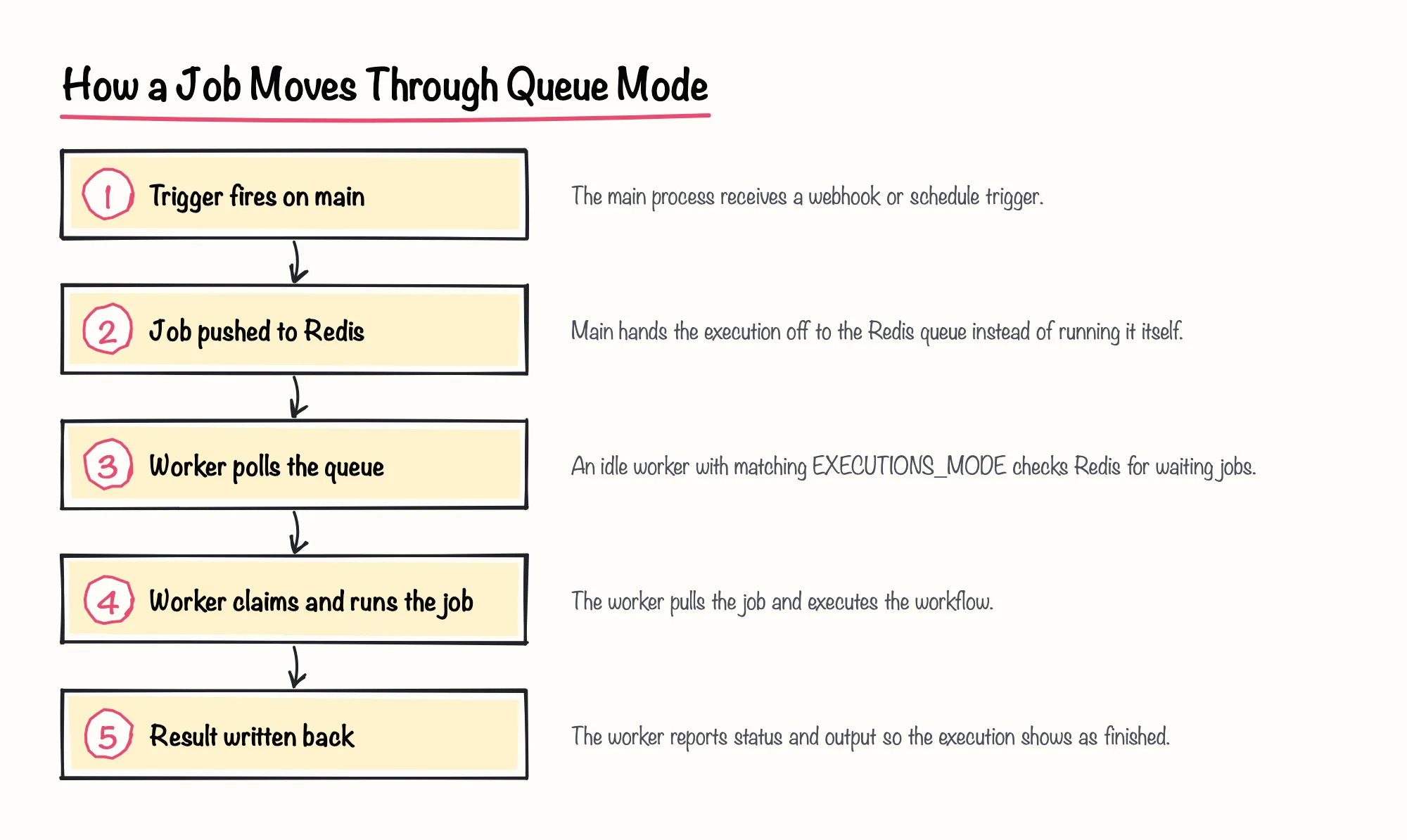
We'd treat write-ups like Elestio's as a useful second opinion rather than the first place to look: they describe real production symptoms, but the mode and variable requirements themselves come straight from n8n's own documentation, so check that first.
Sources: How to Scale n8n with Redis Queue Mode for Parallel Workflow Execution, Queue mode | Deploy | n8n Docs
Check 3–4: Encryption Key Mismatches and Worker Health

A second, sneakier cause is an encryption key mismatch. A 2026 vendor blog post from Elestio states that when N8N_ENCRYPTION_KEY differs between main and a worker, every workflow that uses stored credentials fails silently — a worker that can't decrypt a credential simply can't run the node that needs it, with nothing obvious pointing you at the key itself.
Next, confirm workers are genuinely registered, not just running. n8n's official docs note that viewing connected workers through Settings > Workers in the UI is a self-hosted Enterprise feature, so teams on Community edition won't have that view and need another way to check worker health.
That other way is n8n's own health endpoints, and they behave differently depending on what you're inspecting. The official monitoring docs state that for worker servers in queue mode, the health check endpoint is disabled by default, unlike the main server's endpoint, which is always on. Separately, a worker's readiness endpoint reports whether that worker's own database and Redis connections are ready, but only once QUEUE_HEALTH_CHECK_ACTIVE is turned on.
| Endpoint | Default state | What it reports |
|---|---|---|
| Main server health endpoint | Enabled by default | Confirms the main process is up |
| Worker health endpoint | Disabled by default | Confirms a worker process is up, once enabled |
| Worker readiness endpoint | Opt-in via QUEUE_HEALTH_CHECK_ACTIVE | Whether that worker's DB and Redis connections are ready |
| Settings > Workers UI | Self-hosted Enterprise only | Live list of connected workers |
Sources: How to Scale n8n with Redis Queue Mode for Parallel Workflow Execution, Enable queue mode | Deploy | n8n Docs, Monitor n8n | Deploy | n8n Docs
Check 5–6: Concurrency Settings and Trigger Scheduling
If workers are healthy and reachable but jobs still back up, look at concurrency next. n8n's official docs recommend setting worker concurrency to 5 or higher, and warn that pairing many workers with very low concurrency can exhaust your database's connection pool instead of speeding anything up.
Also check N8N_CONCURRENCY_PRODUCTION_LIMIT on the main process. The official docs state that in queue mode, this variable overrides a worker's --concurrency flag whenever it's set to anything other than -1, so a forgotten low value here can silently cap throughput no matter how individual workers are configured.
Community members report in a 2026 Medium post that jobs piling up exactly at your concurrency limit, with the waiting queue still growing, is the clearest sign you need more workers rather than more tuning. In our view, that's the right order to reason in: rule out configuration mismatches first, and only add worker capacity once you've confirmed the bottleneck is genuinely throughput.
Finally, if triggers themselves have stopped firing rather than jobs sitting unexecuted, check leadership. n8n's official durable scheduler docs state that in a multi-main setup, only the leader instance fires schedules, so losing leadership can look identical to queue mode being broken. Where the durable scheduler and its Prometheus metrics are enabled, a climbing n8n_scheduler_oldest_pending_age_seconds value, or a nonzero n8n_scheduler_tasks_due count, both point at scheduling rather than execution as the real problem.
- Jobs sit unexecuted while concurrency is below your worker's limit: likely a scheduling or leadership issue, not concurrency.
- Jobs queue up exactly at your concurrency ceiling, with waiting items growing: likely genuine capacity, consider more workers.
- No new runs appear at all for scheduled workflows: check multi-main leadership first.
Sources: Enable queue mode | Deploy | n8n Docs, Control concurrency | Deploy | n8n Docs, n8n Queue Mode Explained: Setup, Scaling, Monitoring | Medium, Durable scheduler | Deploy | n8n Docs
Check 7 and Ongoing Monitoring: Stalled Jobs and Catching This Earlier

Not every case of n8n queue mode not working comes from configuration — some come from jobs that started but never finished. A 2026 vendor blog post from Elestio states that executions stuck in a 'running' state indefinitely are usually caused by a worker crashing mid-execution, leaving the job orphaned with nothing to update its status.
Community members report in a 2026 Medium post that when this happens, the in-progress job gets marked 'stalled' in Redis and is later retried by another worker. n8n's own environment-variable reference documents QUEUE_WORKER_STALLED_INTERVAL as the setting controlling how often a worker checks for exactly this kind of stalled job, worth reviewing if retries feel too slow or too aggressive for your workload.
We think it's worth turning on health and metrics endpoints before you're mid-incident, not after. n8n's official monitoring docs note that the /metrics endpoint is disabled by default on self-hosted instances and has to be explicitly enabled, so a stall-free week is exactly the right time to turn it on rather than the night something gets stuck.
Sources: How to Scale n8n with Redis Queue Mode for Parallel Workflow Execution, n8n Queue Mode Explained: Setup, Scaling, Monitoring | Medium, Queue mode | Deploy | n8n Docs, Monitor n8n | Deploy | n8n Docs, Enable queue mode | Deploy | n8n Docs