n8n User Management Reset: A Troubleshooting Checklist
A practical checklist for an n8n user management reset that locks you out or leaves accounts broken, covering SMTP, owner-email, MFA and JWT_SECRET checks.

Checked against the cited sources on .
Before You Touch Anything: Confirm the Symptom and Protect Your Data
If n8n user management reset is what brought you here, you're probably staring at a sign-in screen you can't get past on a self-hosted n8n instance, with a team that needs access back today. Before running any command, it helps to separate two different problems: being unable to sign in at all, and being unable to reset a forgotten password because self-service reset depends on email delivery working. The checklist below walks through both, in the order we'd check them on a shared instance other people also rely on.
The one step we'd never skip is backing up before touching user accounts. n8n's own CLI documentation describes a backup export for workflows and credentials, and separately describes what the user-management reset command does to accounts; running the wrong command first can turn a login problem into a data problem. We're strong believers in backing up before any reset — it's the cheapest insurance you'll ever buy against a troubleshooting session that goes sideways.
Sources: Use the command line | Deploy | n8n Docs, Back up and restore | Deploy | n8n Docs
Step 1 and 2: Check Whether This Is Really a User-Management Lockout
Not every "locked out" report is a user-management bug. n8n's official documentation states that if SMTP is never configured, users can't reset their own passwords, which looks identical to a lockout from the outside. It also states that no supported way exists to disable the login screen in recent n8n versions, so a stray N8N_USER_MANAGEMENT_DISABLED setting left over from an old guide, local test or migration script will not do what some admins expect. Confirm SMTP status and any disable-login attempts before assuming user management itself has broken.
If the problem is really that the instance owner's email address is wrong, stale, or unreachable, n8n documents a built-in fix: the owner can be changed through Settings > Personal, or pre-provisioned from environment variables, a capability available from n8n version 2.17.0. One limit matters here: the owner email must be unique, and changing it never transfers ownership to another existing account or merges two accounts together. Trying to create a second owner to work around a locked one will not help.
| Symptom | Likely cause | What n8n's docs say to check |
|---|---|---|
| Users can't reset their own password | SMTP was never configured | Self-service password reset depends on SMTP being set up |
| No sign-in screen ever behaves as expected | An attempted login-screen bypass | No supported way exists to disable the login screen in recent versions |
| Owner account is unreachable | Stale or wrong owner email | Change it via Settings > Personal or owner-email variables; ownership can't be transferred to another existing account |
Sources: User management | Deploy | n8n Docs, Change instance owner email | Deploy | n8n Docs
Steps 3 and 4: Running the n8n User Management Reset Command, and What to Do if It Reports Success but You're Still Locked Out
When nobody can sign in and SMTP isn't an option, n8n's CLI documentation describes a dedicated command for an n8n user management reset, user-management:reset, built for exactly this: forgotten credentials with no SMTP configured. It returns user management to its pre-setup state and removes every existing user account, after which the instance should show the initial owner sign-up screen again on next load.
In practice, several self-hosted admins have reported a frustrating variant: the command prints a success message, but the sign-in screen never changes. In a January 2025 community forum thread, two Docker users described this exact pattern after running an n8n user management reset, and one of them, Eric_Shieh, reported that restarting the server or container afterward made the reset take effect. A personal blog post from April 2025 describes the same pattern on a Hetzner server: restarting resolved it, with existing workflows left intact. In our view, restarting the n8n process before digging further is worth doing every time, even though n8n's own documentation doesn't list it as an official step.
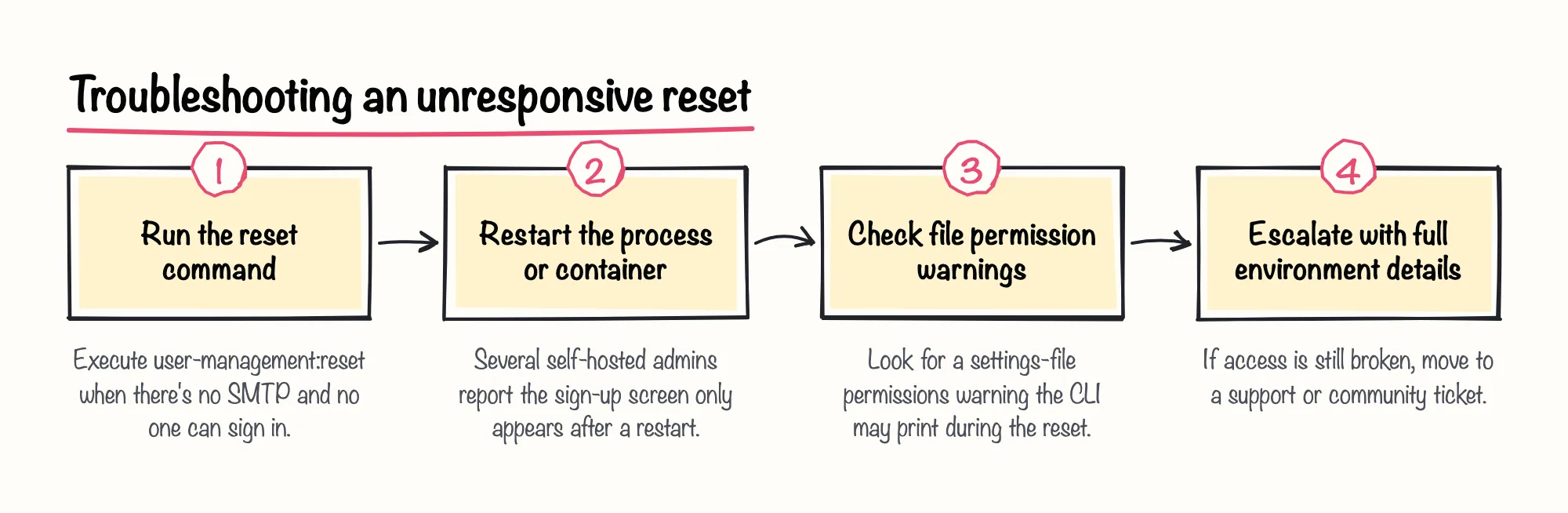
Restarting doesn't always fix it. A November 2025 community thread from a Proxmox-hosted install describes the same success message with no change, even after a reboot and a private-browser attempt; the same thread shows the CLI printing a warning that the settings file permissions were too wide (0644) before finishing. That permissions warning isn't confirmed as the cause, but it's worth checking before escalating.
Sources: Use the command line | Deploy | n8n Docs, CLI command "n8n user-management:reset" - Questions - n8n Community, Self-hosted n8n password reset | DeepakNess, N8n user-management:reset not working - Questions - n8n Community
Steps 5 and 6: MFA Lockouts and the n8n User Management JWT_SECRET Trap
A full reset is the wrong tool for an MFA lockout, since it wipes every account. n8n's CLI documentation describes a narrower command, mfa:disable, for a user who lost their recovery codes: it disables MFA for that one account, after which they can sign back in and set MFA up again. Use it instead of the full reset whenever the lockout is specifically about a lost MFA device or codes.
Environment variables cause a different class of lockout. n8n's documentation states that N8N_INSTANCE_OWNER_PASSWORD_HASH must be a genuine bcrypt hash; setting a plaintext password there breaks login outright. It also documents N8N_USER_MANAGEMENT_JWT_SECRET, which lets an admin set a specific JWT secret instead of letting n8n generate one automatically on start. We'd treat changing that secret on a live instance with real caution: the documentation doesn't say what happens to existing sessions when it changes, so testing it on staging first is the safer call.
| Variable | Requirement | Risk if misconfigured |
|---|---|---|
| N8N_INSTANCE_OWNER_PASSWORD_HASH | Must be a genuine bcrypt hash | A plaintext value breaks login outright |
| N8N_USER_MANAGEMENT_JWT_SECRET | Optional; n8n generates one on start if unset | Documentation doesn't state the effect on existing sessions when it changes |
Sources: Use the command line | Deploy | n8n Docs, User management and 2FA | Deploy | n8n Docs
Step 7 and When to Escalate: Restoring from Backup Without Recreating the Lockout
Restoring from backup has its own trap. n8n's documentation states that a CLI backup export doesn't include users and their roles, so importing that backup into a fresh instance brings back the owner setup screen rather than any previous account; whoever completes that screen first becomes the new owner. Plan for that before you restore on a shared instance; if several people can reach the restored instance right after import, decide in advance who should claim ownership.
Self-service troubleshooting has a reasonable limit. The unresolved Proxmox case described earlier shows that some install methods can leave a reset non-functional with no documented fix available yet. If you've confirmed SMTP, tried the reset, restarted, and checked permissions, and you're still locked out, the next move is a support or community ticket with your exact version, install method, and database type attached, rather than repeating the same steps.
Sources: Back up and restore | Deploy | n8n Docs, N8n user-management:reset not working - Questions - n8n Community