n8n workflow best practices for teams: practice to production
n8n workflow best practices for teams: error handling, environments and review, and credentials, so a practice workflow can run reliably inside an organization.

Checked against the cited sources on .
Why a working workflow is not yet production-ready
n8n workflow best practices matter most at the moment a practice workflow gets a second user, a real schedule or a customer-facing trigger. Until then, a run that succeeds on your own screen is enough. After that, the questions change: who finds out when it fails, who is allowed to change it, and which credentials does it touch?
This guide follows those questions through four areas: structure and naming, error handling, environments with review, and credentials. It is written for teams running n8n at a company and for engineering managers who want to standardize how automation gets built. It is a web article, not an n8n best practices PDF, so treat it as raw material for a short team document of your own.
A note on evidence first. Most of what follows comes from n8n's official documentation, which describes how features behave rather than whether they reduce incidents. Some advice comes from consultancy blogs, and we label it as practitioner opinion. Several features also depend on an Enterprise plan or a minimum n8n version, and we name those where they appear.
n8n workflow best practices: naming, structure and validation
Naming is the cheapest habit to adopt, and the first of the n8n workflow best practices worth writing down. The table below collects naming and size suggestions from Till Freitag's 2026 blog and Michael Ito Back's 2025 blog, both written by consultancies.
Size is the second habit. Freitag suggests reviewing a workflow for splitting once it passes 15 nodes and splitting it beyond 25, while Ito Back suggests sub-workflows of roughly 5 to 10 nodes and a centralized error workflow. Treat all of these as consultancy rules of thumb, not n8n requirements or limits.
| Convention | Suggestion | Status |
|---|---|---|
| Workflow names | Area, description and version | Consultancy suggestion |
| Node names | Name by what the node does | Consultancy suggestion |
| Credential names | Environment plus service, e.g. prod-hubspot-api | Consultancy suggestion |
| Review for splitting | Around 15 nodes | Author's rule of thumb |
| Split a workflow | Around 25 nodes | Author's rule of thumb |
| Sub-workflow size | Roughly 5 to 10 nodes | Consultancy suggestion |
We think the exact thresholds matter less than having one written rule that every reviewer can apply in seconds. Pick numbers your team can live with, label them as team policy, and revisit them if they cause friction.
Validation is the third habit, and the sources we reviewed do not cover it, so treat this as our editorial advice. Check incoming data at the start of a workflow, before it reaches a node that writes, sends or charges anything. Decide what happens to a record that fails the check, because a bad record that silently passes through is harder to find later than one that stops loudly.
- Validate required fields and types before any node with side effects.
- Route invalid records to a visible place instead of dropping them.
- Write down what counts as invalid, so reviewers can check it.
- Keep validation near the start so later nodes can trust their input.
Sources: n8n Best Practices – 10 Rules for… – Till Freitag, Seven N8N Workflow Best Practices for 2026
Error handling that tells you when something breaks
n8n's documentation says you can pick an error workflow for each workflow in its Workflow Settings. That error workflow runs when an execution of the workflow fails, and the docs give sending an email or Slack alert as a typical use.
Our editorial recommendation is to treat that setting as a launch gate. No production workflow goes live until an error workflow is selected and a deliberately triggered test alert has reached a real person. The next two subsections cover the setup and the failure types that the error workflow alone does not catch.
Sources: Handle errors gracefully | Build | n8n Docs
Setting up an error workflow with Error Trigger
According to the n8n docs, an error workflow must start with the Error Trigger node. A single error workflow can serve several workflows, so one shared alerting workflow can give your team one consistent alert format instead of many hand-built ones.
The data the trigger provides has limits. The execution ID and execution URL need the execution to be saved in the database, and they are missing when the main workflow's own trigger node is what fails. Trigger failures send different data. Design the alert message so it still makes sense without a link.
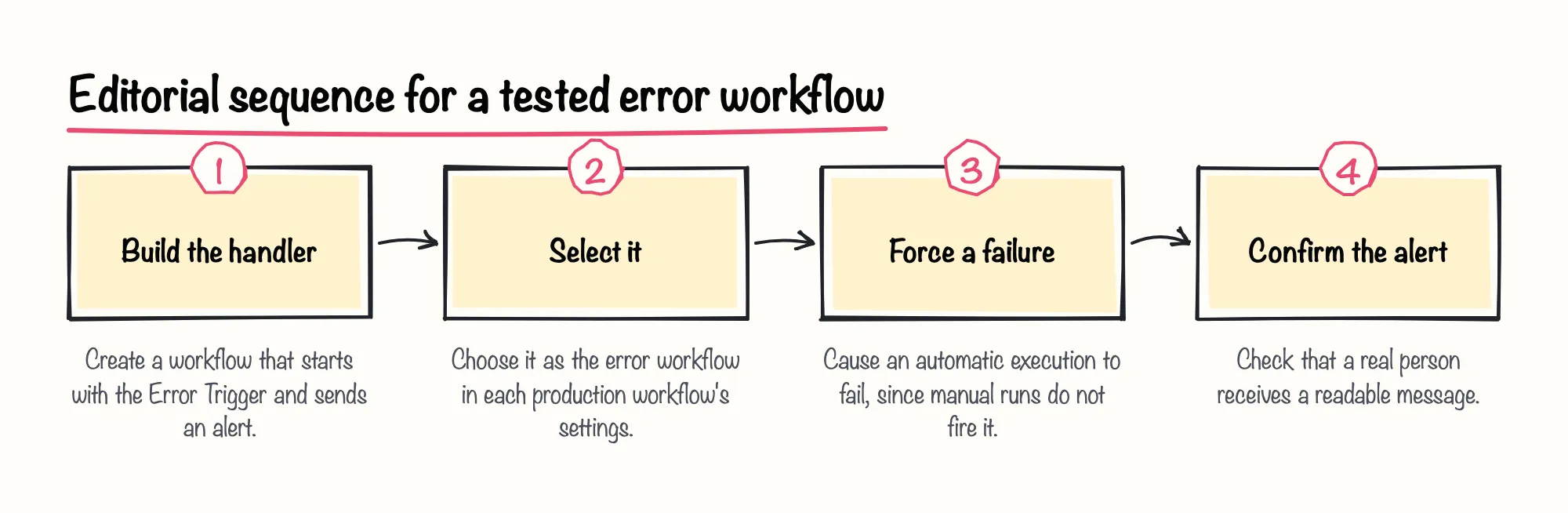
Two more caveats come from the Error Trigger node documentation. A workflow that contains the Error Trigger uses itself as its error workflow by default. And you cannot test an error workflow by running a workflow manually: it only runs when an automatic execution errors.
A practical alert, as our suggestion, names the workflow, the failing node and the message, and includes the execution link when it exists. The diagram shows an order of work that respects the manual-run limitation.
Sources: Handle errors gracefully | Build | n8n Docs, Error Trigger | Nodes | n8n Docs
Stop And Error, retries, idempotency and silent failures
The Stop And Error node lets you force an execution to fail under conditions you choose, which then triggers the error workflow. That makes business-rule violations visible, such as a record that fails validation. It has two operations: Error Message, and Error Object, which takes a JSON object of error properties to pass to error workflows.
Retries need more care. A 2026 blog by consultant Rajsuyash advises against Retry on Fail for nodes with side effects, such as sending an email or creating a record, because a retry can repeat the action and create duplicates. The blog suggests idempotency checks come first. This is practitioner advice, not measured evidence.
In our view, retries are a tool for steps that are safe to repeat, and we'd skip them as a blanket default. A retry on a read is harmless; a retry on a payment or a notification deserves a deliberate check first.
The same blog points out that error workflows catch failures, not absences. A scheduled workflow that never started produces no error and so no alert, which is why it recommends a separate heartbeat check. It also advises testing error paths on purpose, for example with a Stop And Error node in a test workflow. The table summarizes what surfaces each kind of failure.
| Situation | What surfaces it | Basis |
|---|---|---|
| A node or execution fails | Error workflow | n8n docs |
| A business rule is violated | Stop And Error, then the error workflow | n8n docs |
| The trigger node itself fails | Error workflow with different data | n8n docs |
| A workflow never ran | Separate heartbeat check | Consultant blog |
For hands-on practice, the restaurant orders challenge on n8n Balloon Challenges uses Manual Trigger, HTTP Request, Split Out, IF, Loop Over Items, Wait, Data Table and Error Trigger nodes, so error handling is part of the build.
Sources: Handle errors gracefully | Build | n8n Docs, Stop And Error | Nodes | n8n Docs, n8n Error Handling: Error Trigger, Retries and Alerts
Environments, source control and review
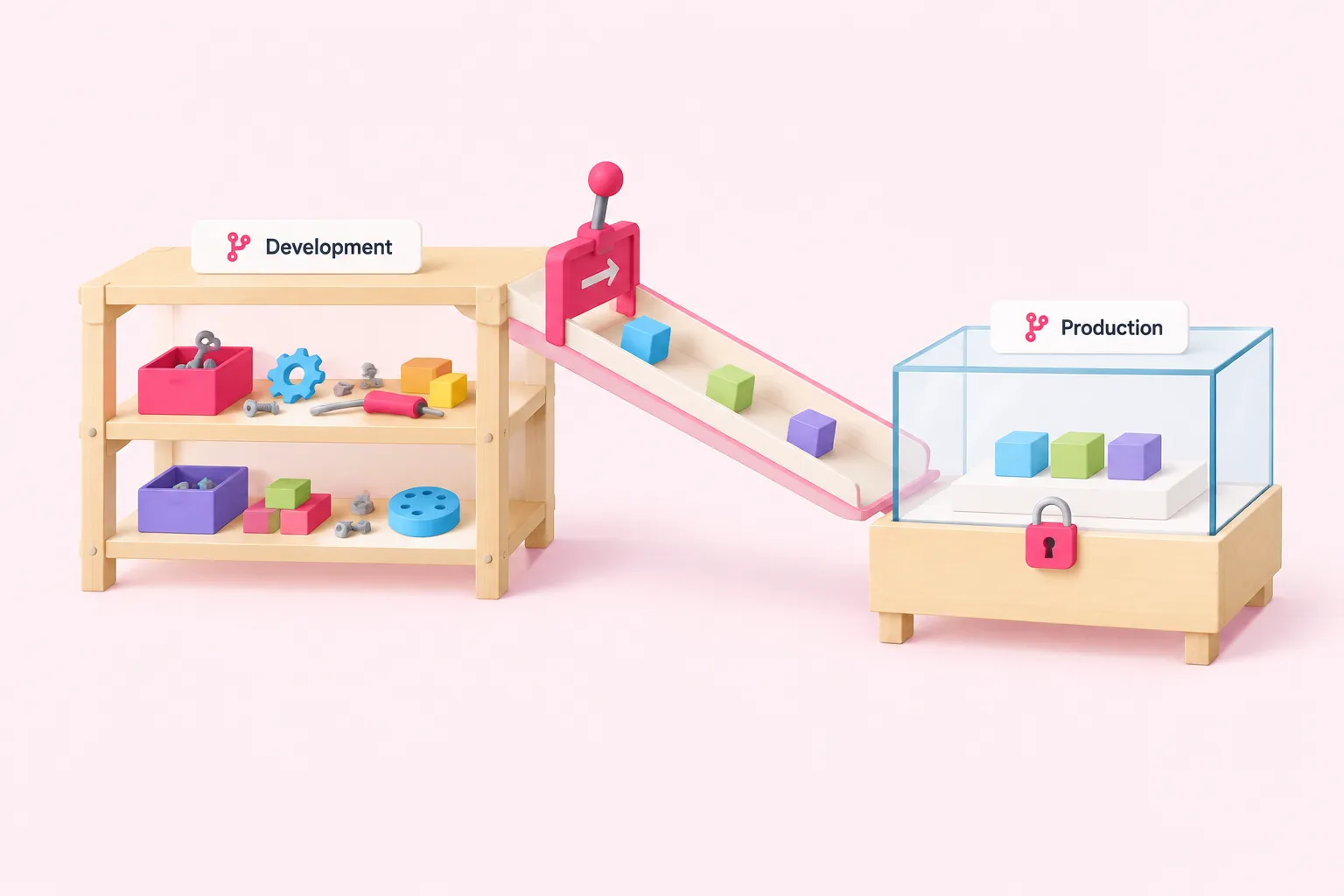
n8n's documentation describes environments as built on Git: an environment is an n8n instance paired with a Git branch. A common pattern separates development from production, so edits made while building cannot break workflows that are running live.
This section keeps to what a team needs for promotion and review, not the whole version-control topic. Check your plan before designing around it: the environments public API is documented as an Enterprise feature, and the other source-control details below come with version notes.
Sources: Work with environments | Administer | n8n Docs, Use environments programmatically with the public API | Administer | n8n Docs
Development and production environments on Git
Source control setup needs a Git repository that n8n can reach, either through SSH deploy keys with write access or through HTTPS personal access tokens. There is also an optional Protected instance setting that stops users from editing source-controlled resources on that instance, which the docs note is useful for production.
What Git does not carry matters just as much. It stores workflows, tags and stubs for variables and credentials, but n8n does not sync credential values or variable values. Each new instance needs them set up by hand, so a freshly pulled workflow will not run until its credentials exist on that instance.
The numbered list below is our suggested order of work, not a documented procedure.
- Connect the development instance to its own branch.
- Connect the production instance to the production branch and mark it Protected.
- Create the credentials and variable values on each instance by hand.
- Promote changes through a reviewed merge, never by editing production.
Sources: Work with environments | Administer | n8n Docs, Set up source control | Administer | n8n Docs
Promoting changes with the public API and scoped keys
The environments public API, with status and push operations from n8n 2.39.0, is an Enterprise feature. On Enterprise plans, scoped API keys with source-control permissions to pull, push or read can enforce direction. The docs give the example of a production key that can only pull, so production only ever receives changes.
The docs advise checking status before you push, because a push commits only the files you list in its file names array. Skipping that check means a change you expected to ship may simply not be in the commit.
A push that conflicts is rejected with a 409 response unless force is set to true. The documentation's scheduled backup example uses force and warns that this risks overwriting more recent changes in Git. As our editorial advice, avoid force in any automated job unless overwriting is exactly what you want.
| Behavior | Detail | Applies to |
|---|---|---|
| Status and push endpoints | Available in the environments public API | n8n 2.39.0+, Enterprise |
| Scoped keys | Pull, push and read permissions can be separated | Enterprise plans |
| Push contents | Commits only the listed files | n8n 2.39.0+, Enterprise |
| Conflicting push | Rejected with 409 unless force is true | n8n 2.39.0+, Enterprise |
Sources: Use environments programmatically with the public API | Administer | n8n Docs
Sharing and reviewing workflows
With multiple instances and multiple branches, promoting a change requires a pull request and merge in your Git provider. That gives you a natural review point. The docs do not prescribe a review policy, so your team has to decide who reviews and what they look for.
Workflow sharing has its own roles. The creator can share and delete a workflow, while editors can view, update, run and export it but cannot share or delete it. Sharing is available on all n8n Cloud plans and on Business and Enterprise self-hosted plans.
One detail deserves a review rule: editors can use all the credentials used in a shared workflow, including those not explicitly shared with them. Check who gets editor access with that in mind.
The checklist below is our suggested review list, not a validated instrument.
Sources: Work with environments | Administer | n8n Docs, Share with others | Build | n8n Docs
Credentials and secrets
By default, n8n stores credentials encrypted in its database. The 2025 consultancy blog by Michael Ito Back recommends using the credential manager rather than hardcoding secrets into workflows, which fits that design.
Till Freitag's 2026 blog adds three habits: separate staging and production credentials, regular key rotation and credential sharing for teams. These are consultancy opinions, but they match the environment split described earlier, where credentials never travel with the workflow anyway.
Sources: Work with environments | Administer | n8n Docs, Use external secret stores | Administer | n8n Docs, n8n Best Practices – 10 Rules for… – Till Freitag, Seven N8N Workflow Best Practices for 2026
Credential sharing and least privilege
Beyond workflow sharing, n8n documents custom project and instance roles. Instead of giving someone full Admin access, you can create a role with only the capabilities they need. This is available on Enterprise plans, on Cloud and self-hosted.
We think least privilege is worth the setup effort early, because tightening access after a team has grown is far harder than starting narrow. Give builders what they need in development and keep production changes behind the review step.
Without Enterprise, you still have choices: share workflows deliberately, keep the editor group small, and name credentials by environment so nobody mistakes a production one for a test one.
Sources: Custom roles | Administer | n8n Docs, n8n Best Practices – 10 Rules for… – Till Freitag
External secret stores and per-environment secrets
External secrets are available on Enterprise, on n8n Cloud and self-hosted. Supported providers include 1Password, AWS, Azure, GCP, HashiCorp Vault and Infisical.
They also solve the per-environment problem. Source control does not support different credentials per instance, so the docs suggest connecting each n8n instance to a different vault or a different environment in your secrets provider. External secrets resolve only in credential fields, so they will not fill other parts of a workflow.
Vaults are global by default and can be restricted to a project, with project-scoped vaults available from n8n 2.11.0. Multiple vaults per provider arrived in 2.10.0, and project role access in 2.13.0. Check your version and plan before you plan around them.
| Feature | Documented threshold |
|---|---|
| External secrets | Enterprise, Cloud and self-hosted |
| Multiple vaults per provider | n8n 2.10.0+ |
| Project-scoped vaults | n8n 2.11.0+ |
| Project role access | n8n 2.13.0+ |
Sources: Work with environments | Administer | n8n Docs, Use external secret stores | Administer | n8n Docs
Pre-launch checklist and conclusion
Pulling the pieces together, here is a pre-launch checklist. It is our editorial suggestion for you to adapt, and a team document built from it is the closest thing this article offers to a downloadable best-practices file.
Till Freitag's 2026 blog also recommends monitoring, a pre-launch checklist and keeping execution data for a limited time: 7 to 14 days for successful runs and 30 to 90 days for failed ones. Treat those figures as one consultant's starting point, not an n8n recommendation.
Applying n8n workflow best practices does not require anything exotic. A workflow becomes production-ready when someone is told about failures, changes pass through review, and credentials are scoped to the environment. It is a small set of habits that a team agrees on once and then repeats.
Sources: n8n Best Practices – 10 Rules for… – Till Freitag, n8n Error Handling: Error Trigger, Retries and Alerts
Where to get help
If your team would rather practice these habits than read about them, n8n Balloon Challenges also runs company programs that rebuild its balloon format around your own tools, data and workflows.