n8n vs Zapier pricing: cost of one migrated workflow
n8n vs Zapier pricing for one migrated workflow: count Zapier tasks and n8n executions, compare options on the same criteria, and check hosting and licence costs.

Checked against the cited sources on .
n8n vs Zapier pricing starts with the billing unit
Any n8n vs Zapier pricing comparison for a migrated workflow starts with what each tool counts. Zapier's own pricing page, dated 13 October 2026, describes self-serve plans as a plan level plus a monthly task tier, and says each successful step draws tasks from that allowance.
Zapier's help documentation adds the detail: triggers, Filter and Paths steps, and errored steps are not tasks, while successful action steps are. Its example is a Gmail-to-Dropbox-to-Slack Zap run ten times, which uses 20 tasks. Some products, including AI by Zapier, Code by Zapier and MCP, use different task rates.
n8n's own pricing page defines an execution as one run of the whole workflow, regardless of step count or data volume. That is the vendor's description of its model. So billable action-step count drives Zapier usage, while run count drives n8n usage.
Sources: Zapier Pricing, How is task usage measured in Zapier? – Zapier, n8n Plans and Pricing - n8n.io
Worked method: one workflow, two formulas

The following is editorial advice, not a validated calculator. Follow the steps below to turn one workflow into a Zapier task count and an n8n execution count.
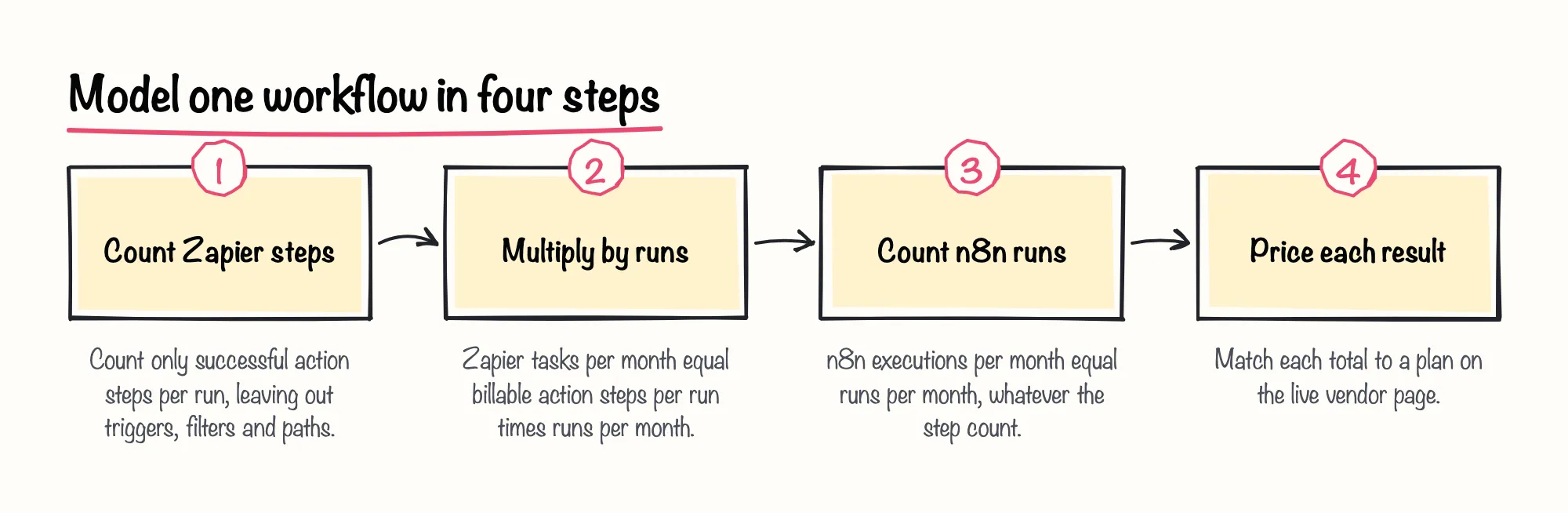
Illustrative example: a workflow has a trigger, a filter and three successful actions, and runs 600 times a month. On Zapier that is 3 × 600 = 1,800 tasks. On n8n it is 600 executions. For run counts, n8n's estimation guidance says a daily schedule is 30 or 31 executions a month, a five-minute schedule is about 8,600 to 8,900, and webhook workflows count one per triggering event.
Now price it, using each vendor's own page for n8n vs Zapier pricing. The table lists figures from Zapier's pricing page, dated 13 October 2026, in USD, and from n8n's pricing page, retrieved 13 October 2026, in EUR. Both n8n Cloud plans include unlimited steps.
| Option | Allowance | Billed annually | Billed monthly |
|---|---|---|---|
| Zapier Professional | 2,000 tasks | $49.00 a month | $73.50 a month |
| Zapier Team | 2,000 tasks | $69.00 a month | $103.50 a month |
| n8n Cloud Starter | 2.5K executions | 20€ a month | Not documented |
| n8n Cloud Pro | 10K executions | 50€ a month | Not documented |
Outcome for the example: 1,800 tasks fits the 2,000-task Zapier tier, so about $49.00 a month on Professional billed annually, in USD. 600 executions fits n8n Cloud Starter's 2.5K allowance, so 20€ a month billed annually, in EUR. The amounts are in different currencies and cannot be compared directly without a conversion, which we do not make. Hosting, licence scope and upkeep, covered below, are what can change the answer.
Then add headroom. Zapier's documentation says replaying a whole run counts previously successful steps again, and steps inside error-handler paths count too. In our view, budgeting for replays and error paths matters more than shaving one task off the base count, because retries are where a tidy estimate tends to drift.
Sources: How is task usage measured in Zapier? – Zapier, Zapier Pricing, n8n Plans and Pricing - n8n.io
Compare the options on the same criteria
The table applies the same criteria to Zapier and three n8n routes. Our view: compare Cloud, Community and a paid self-hosted tier side by side rather than settling on a single n8n number. Where the supplied sources are silent, the cell says so.
| Criterion | Zapier | n8n Cloud | Self-hosted Community | Paid self-hosted |
|---|---|---|---|---|
| Billing unit | Successful action steps (tasks) | Whole-workflow executions | No n8n fee (internal use); no execution quota in the sources | Business: 40K executions; Enterprise: custom |
| Overage | Pay-per-task if enabled, up to 3x limit; else held | Unknown | Unknown | Unknown |
| Hosting | Unknown | Hosted by n8n | You host it | Business self-hosted only; Enterprise hosted or self-hosted |
| Licence | Unknown | Unknown | Internal business use; commercial licence for outside builders | Enterprise agreement; Business: Unknown |
| Maintenance | Unknown | Unknown | Your team; queue mode needs extra infrastructure | Enterprise terms require prompt release installs |
On overage, Zapier's help center says that when a plan reaches its task limit, pay-per-task billing, if enabled, continues runs at a plan-dependent rate up to three times the plan limit. Otherwise runs are held. It is not available on the Free plan, and the exact per-task rate is not stated. Overage behaviour for n8n is not covered by our sources.
Sources: How is task usage measured in Zapier? – Zapier, How pay-per-task billing works in Zapier – Zapier, n8n Plans and Pricing - n8n.io, FAQs - General FAQ - Which license do I need for my use case? | n8n Help Center, Enable queue mode | Deploy | n8n Docs, n8n Self-Hosted Enterprise Terms
Hidden costs: hosting, licence scope and upkeep
According to n8n's 2026 help-center article, the free self-hosted Community edition runs under the Sustainable Use License: free for internal business use, but a commercial license is needed if people outside your organisation can build or configure workflows, or to host n8n as a service. n8n says it cannot confirm specific use cases, and this is not legal advice.
For scaling, n8n's docs describe queue mode for self-hosted n8n, which needs Redis as a message broker, a database other than SQLite, and worker processes. Multi-main setup is Enterprise-only for self-hosted. The docs describe configuration, not cost, so price servers, backups, upgrades and engineer time with your own internal rates.
A self-hosted Enterprise agreement also asks customers to install new releases promptly; otherwise the supplier gives no warranty on outdated versions. That applies to those terms, not to Community or Cloud. We'd be cautious about writing zero for Community in a business case: the licence fee may be nothing, but the hosting and upgrade time still belong in the model.
On the Zapier side, hidden cost shows up in task rates. Zapier's help documentation says some products, including AI by Zapier, Code by Zapier and MCP, use different task rates, so check them for your workflow. Which hidden costs change the answer in n8n vs Zapier pricing? On our reading of the sources, these:
- Zapier: replays, error-handler steps and products with special task rates
- Self-hosted n8n: hosting and scaling infrastructure such as Redis, a non-SQLite database and workers
- Self-hosted n8n: upgrade time and engineer time
- Community edition: licence scope if outsiders will build workflows
Vendor pages show what each vendor states, not independent proof, and we did not test either product ourselves. Our sources do not settle Make pricing, n8n Cloud monthly-billed prices, Pro tiers above 10K executions, or Zapier tiers and add-ons beyond the part of the page we could read. Prices change, so recheck the live pages, and treat third-party savings stories as anecdotes, not benchmarks.
Sources: How is task usage measured in Zapier? – Zapier, n8n Plans and Pricing - n8n.io, FAQs - General FAQ - Which license do I need for my use case? | n8n Help Center, n8n/LICENSE.md at master · n8n-io/n8n · GitHub, Enable queue mode | Deploy | n8n Docs, n8n Self-Hosted Enterprise Terms