n8n MCP vs API: Choosing How an AI Agent Calls a Tool
A guide to the n8n MCP vs API decision: when to use HTTP Request, MCP Client Tool or MCP Server Trigger, and what changes in maintenance and security.

Checked against the cited sources on .
n8n MCP vs API: the decision in one sentence
In n8n MCP vs API decisions for an AI agent's tools, the question that matters is whether the agent needs to perform one predictable action or choose among several live options. n8n's own 2026 blog guidance frames it plainly: use a direct API call for straightforward, predictable integrations, and reach for MCP when you cannot predict the call sequence an agent will need ahead of time.
Underneath an MCP layer, the API still does the actual work — MCP standardizes how an agent discovers and calls that work rather than replacing the API itself. We think the simplest version of this question is: if you could write the call sequence as a numbered list before the agent ever runs, you don't need MCP yet.
Sources: MCP vs. API: Key Differences and When To Use Each – n8n Blog
Option A: HTTP Request node — direct, predictable API calls
The HTTP Request node makes direct, documented REST calls to any app or service, and the same node can be attached to an AI agent as a callable tool instead of sitting in a plain workflow path.
This is the right default when one agent needs one known endpoint with a fixed sequence, such as always checking an order's status before calling a refund action: it is the simplest to configure, trace through execution logs, and paginate, per that same n8n guidance.
Sources: HTTP Request | Nodes | n8n Docs, MCP vs. API: Key Differences and When To Use Each – n8n Blog
Option B: MCP Client Tool — consuming an existing external MCP server
The MCP Client Tool is n8n's built-in MCP client: it lets an agent use the tools exposed by an external MCP server, and n8n also maintains a registry of such servers alongside other tool nodes like the HTTP Request Tool.
Reach for this option when you are consuming a third-party service's existing MCP server and want the agent to discover and pick from its tools at runtime, rather than you hand-coding every branch yourself. We like this pattern for assistants that genuinely need to improvise across a handful of related actions, rather than ones that always follow the same two or three steps.
Sources: MCP Client Tool | Nodes | n8n Docs, How tools work | Build | n8n Docs, MCP vs. API: Key Differences and When To Use Each – n8n Blog
Option C: MCP Server Trigger — exposing your own n8n workflow as an MCP server

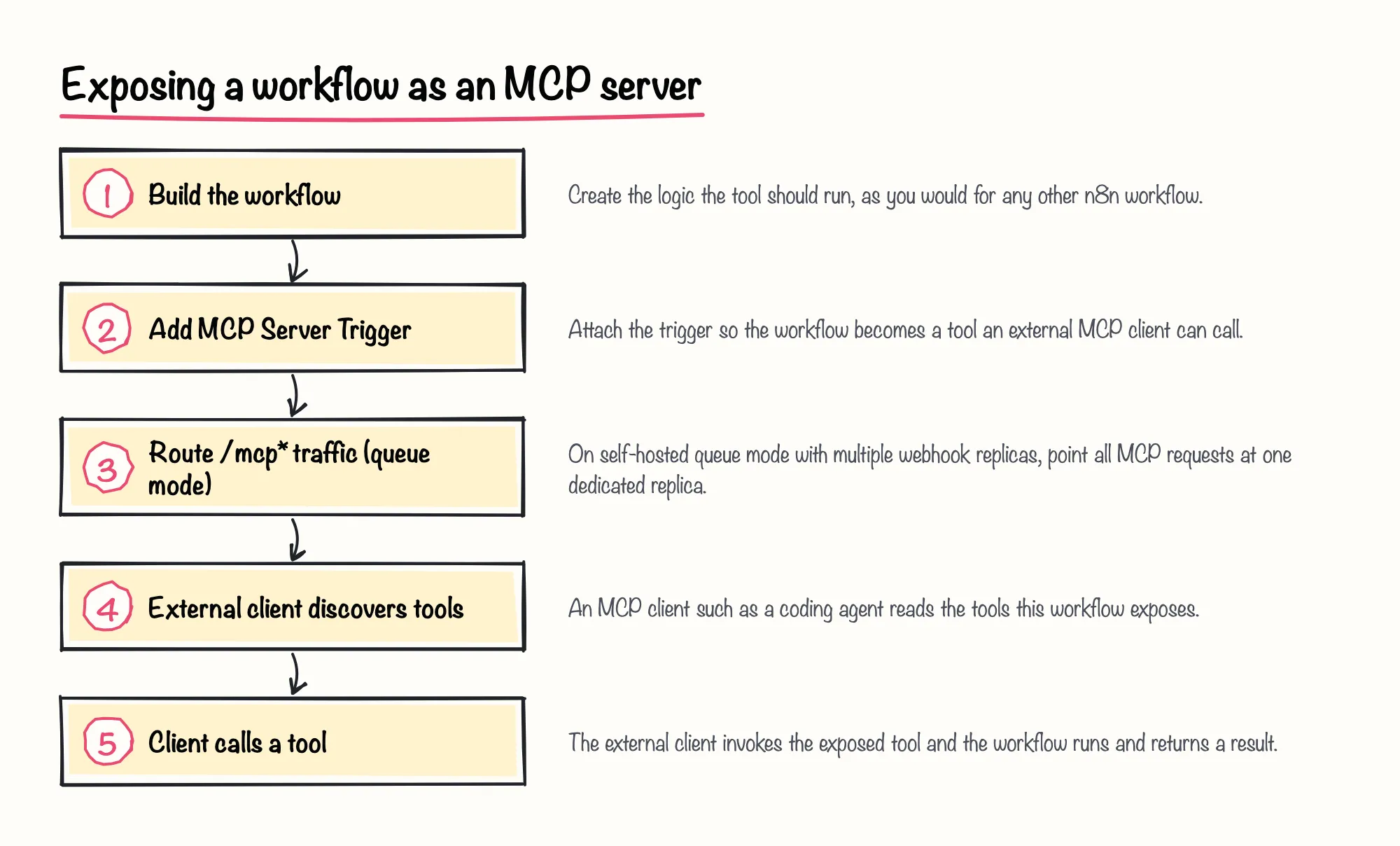
The MCP Server Trigger lets n8n itself act as an MCP server, turning a workflow into tools that external MCP clients — a coding agent, Claude Desktop, or another assistant — can call.
A single MCP Server Trigger node only exposes tools from the workflow it lives in; that is different from n8n's separate instance-level MCP server setting, which can centrally expose multiple enabled workflows and let you review or revoke each connected client's permissions, on n8n versions that support that setting.
If you self-host n8n in queue mode with more than one webhook replica, all MCP traffic has to be routed to one dedicated replica or the client connection breaks; that requirement doesn't apply to a single-instance setup or to n8n Cloud.
Sources: MCP Server Trigger | Nodes | n8n Docs, Connect to n8n MCP server | Connect | n8n Docs
Maintenance differences across the three options
Maintenance differences also shape the n8n MCP vs API decision well after the first version ships. Each option pushes the ongoing work to a different place, summarized below.
| Option | What you maintain | Example signal |
|---|---|---|
| HTTP Request node | Endpoint URLs, auth and pagination logic you wrote yourself | A broken call shows up directly in the node's execution log and error message |
| MCP Client Tool | The external MCP server's availability and the tool list it exposes | The agent's available tools depend on that external server staying reachable |
| MCP Server Trigger | Your own workflow logic, plus replica routing if you run queue mode | See the queue-mode routing requirement described above for self-hosted setups |
Sources: MCP Server Trigger | Nodes | n8n Docs, HTTP Request | Nodes | n8n Docs, Connect to n8n MCP server | Connect | n8n Docs, MCP vs. API: Key Differences and When To Use Each – n8n Blog
Security and credential-handling differences across the three options

n8n's instance-level MCP server setting gives each connected client only the permissions you granted at connection time, and you can review or revoke those permissions individually; that feature describes the instance-level MCP server, not the MCP Client Tool or MCP Server Trigger nodes on their own, and its availability depends on your n8n version.
Outside n8n's own documentation, a community newsletter post from 2026 argues that MCP's architecture keeps credentials on the server so the agent itself never sees raw API keys, and that for a small number of tools, direct function calling is simpler to debug than MCP — treat both as one practitioner's engineering opinion rather than documented n8n behavior.
A 2025 write-up published by Glama, an MCP-focused company, makes a related argument: deterministic tool execution lets developers test and sanitize inputs in code instead of trusting an LLM to format every request correctly, though it also notes that most MCP servers are thin wrappers around an API that already existed. In our view, neither node is automatically safer by default — authentication still depends on the credentials you configure, so the real security gain only shows up once you actually curate and audit what each client is allowed to call.
Sources: Connect to n8n MCP server | Connect | n8n Docs, When to use - MCP vs API vs Function/Tool call in your AI Agent, Why AI Agents Need a New Protocol | Glama
A practical decision checklist
The checklist below turns the n8n MCP vs API comparison into concrete triggers you can check per workflow. No source here measures latency, token cost or debugging time for these three options inside an actual running n8n workflow, so treat it as a planning aid rather than a benchmark.
Sources: MCP vs. API: Key Differences and When To Use Each – n8n Blog, MCP Client Tool | Nodes | n8n Docs, MCP Server Trigger | Nodes | n8n Docs, Connect to n8n MCP server | Connect | n8n Docs
Where to practice this and get team training
n8n Balloon Challenges includes a hands-on exercise, What's for Dinner?, that teaches building an MCP server in n8n that AI clients can discover and call tools through — a direct way to feel the MCP Server Trigger tradeoffs described above in your own n8n environment.