n8n Hardware Requirements: Sizing a Self-Hosted Server for Production
A practical guide to n8n hardware requirements, n8n server requirements and configuration choices when workflows move from local practice to real production workloads.

Checked against the cited sources on .
Why local n8n hardware requirements don't transfer to production
When you learn how to run n8n locally, the n8n hardware requirements barely matter: a laptop container handles a webhook and a few API calls. Production is different, because the same process now carries scheduled runs, concurrent webhook traffic, execution history and credentials for a whole team, and the n8n requirements change with it.
Before quoting any numbers, it helps to know what evidence exists. n8n's own prerequisites page publishes an illustrative baseline — a minimum of 10 CPU cycles scaling as needed, a 512 MB to 4 GB SSD database and 320 MB to 2 GB of memory — but states plainly that this is an example based on n8n Cloud, for illustration only, and that real needs vary by users, workflows and executions. Hosting vendors publish n8n server requirements as tiers instead: Cherry Servers' Self-Hosting Requirements Guide (published May 2026, updated July 2026) and Hostinger's VPS tutorial (August 2026) both sell servers, so treat their figures as commercially motivated rules of thumb.
No supplied source benchmarks n8n at a defined workload, so every number below is a starting point to monitor and adjust, not a measured capacity.
| Source | Development | Production |
|---|---|---|
| n8n prerequisites page | Illustrative: 320 MB–2 GB memory, 512 MB–4 GB SSD database | Same table, stated as a Cloud-derived example only |
| Cherry Servers, 2026 | 2 cores, 2 GB RAM, 20 GB SSD, SQLite | 4+ cores, 8–16 GB RAM, 50–100 GB NVMe, PostgreSQL |
| Hostinger, 2026 | Minimum 1 vCPU, 2 GB RAM, 20 GB SSD | 2–4 vCPU, 4–8 GB RAM, 40–80 GB NVMe |
| Community thread, 2023 | Anecdote: 1 shared CPU and 1 GB RAM reported as workable | Same responder notes no buffer for peak loads |
Sources: Prerequisites | Deploy | n8n Docs, n8n Self-Hosting Requirements Guide (2026) | Cherry Servers, What are the VPS requirements for n8n?, Hardware For Self Hosting - Questions - n8n Community
Memory first, CPU second
n8n's documentation advises prioritising memory over CPU when planning infrastructure, because n8n is not CPU intensive, and notes that the Code node creates pre- and post-processing copies of your data. That is qualitative vendor guidance rather than a measurement, but it points at the right dimension for n8n hardware requirements: size RAM for your heaviest single workflow plus headroom for whatever else runs at the same time.
When self-hosted n8n runs out of memory, the docs offer two directions: give the process more memory, or consume less by chunking data, avoiding the Code node, avoiding manual executions over large datasets, and splitting work into sub-workflows. For a JavaScript heap out of memory error specifically, n8n suggests allocating more V8 old space with the max-old-space-size option, set on the CLI or through NODE_OPTIONS; no recommended value is documented.
Sources: Prerequisites | Deploy | n8n Docs, Fix memory issues | Deploy | n8n Docs
Database and retention: SQLite, PostgreSQL and pruning
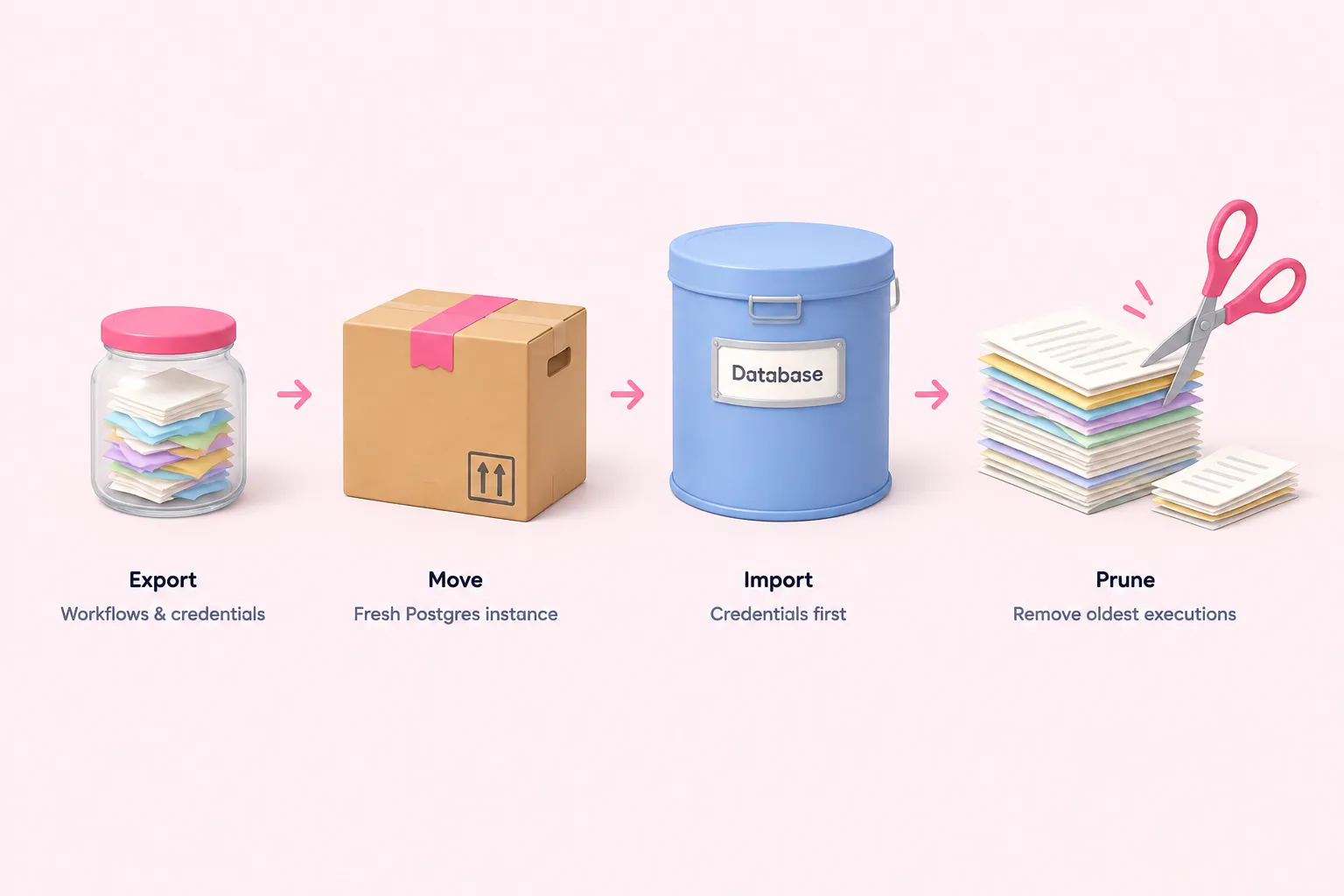
Self-hosted n8n defaults to SQLite and optionally supports PostgreSQL. As of July 2026 the docs list the two actively maintained majors, 17 and 18, plus 16 for compatibility, note that the supported range shifts each November, and mark Aurora experimental while AlloyDB, CockroachDB and YugabyteDB are unsupported. Because that list is explicitly time-bound, check the page rather than pinning a version from an article.
Moving to PostgreSQL is not an in-place upgrade. A practitioner guide (LumaDock, December 2025) describes exporting workflows and credentials with the n8n CLI, starting a fresh Postgres-backed instance with the same encryption key, and importing credentials before workflows; execution history does not come across, and the author notes he did not test the entity export at scale. n8n also recommends a dedicated database per instance to avoid dependencies and performance degradation, along with SSD storage, persisted container volumes, IP allow lists and backups.
Editorial view of a SQLite to PostgreSQL move
- Export: Use the n8n CLI to export workflows and credentials from the SQLite instance.
- Provision: Stand up a dedicated PostgreSQL database on a supported major version.
- Start fresh: Launch a new Postgres-backed n8n instance with the same encryption key.
- Import: Import credentials first, then workflows.
- Accept the gap: Expect execution history to stay behind on the old instance.
Execution data is the other growth driver. Pruning is on by default, removing executions once they exceed EXECUTIONS_DATA_MAX_AGE (336 hours, or 14 days) or EXECUTIONS_DATA_PRUNE_MAX_COUNT (10,000), oldest first, while annotated executions are never pruned. On the default SQLite database the freed space is reused rather than returned to the filesystem unless you enable DB_SQLITE_VACUUM_ON_STARTUP or run a manual VACUUM. Decide retention deliberately instead of inheriting the defaults.
Sources: Choose n8n's database | Deploy | n8n Docs, Prerequisites | Deploy | n8n Docs, Manage execution data | Deploy | n8n Docs, PostgreSQL vs SQLite for n8n: When to switch and how - LumaDock
One instance with concurrency control, or queue mode
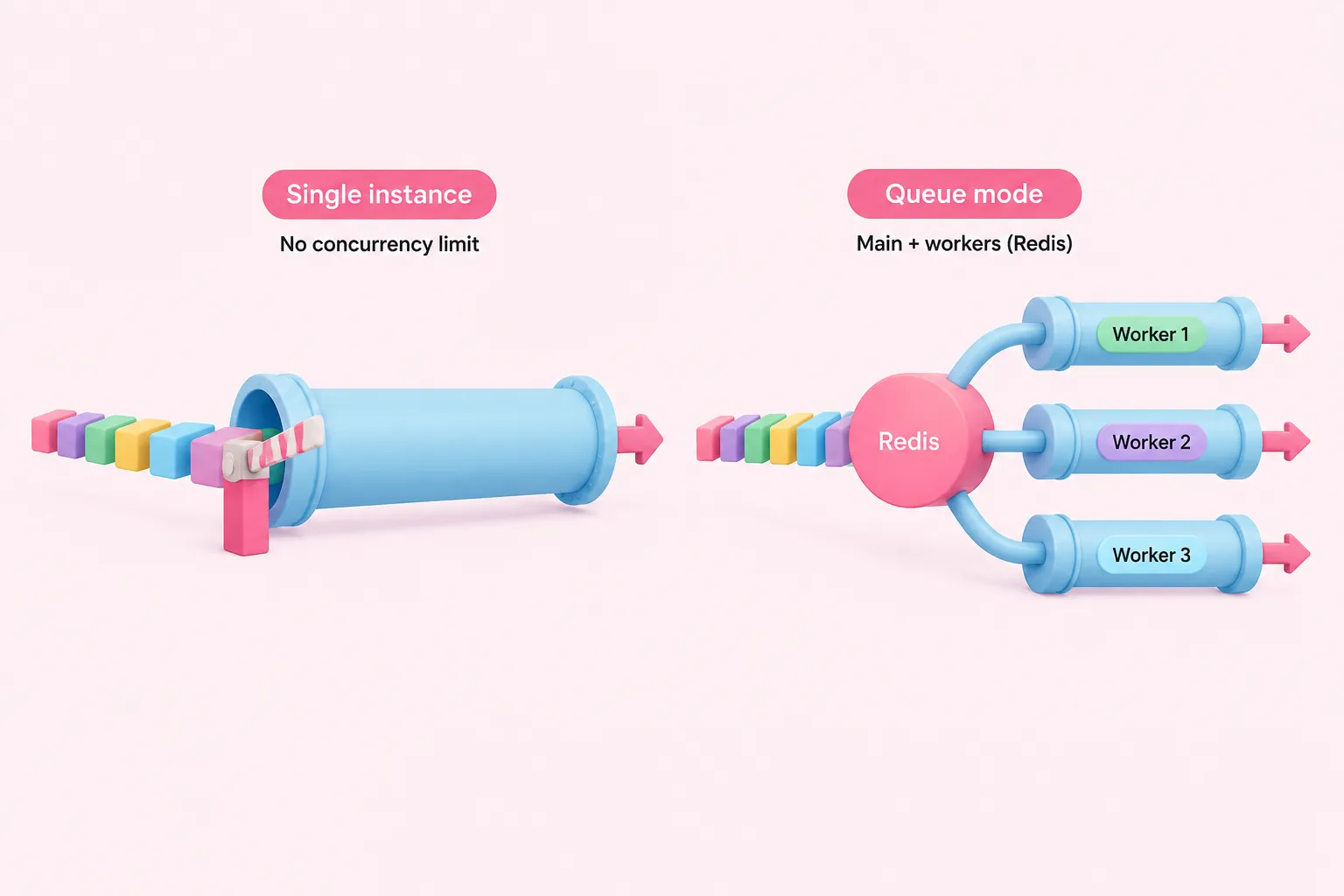
In regular single-instance mode, self-hosted n8n does not limit how many production executions run concurrently, which can thrash the event loop under bursts. N8N_CONCURRENCY_PRODUCTION_LIMIT queues the excess in FIFO order; it applies only to webhook- or trigger-started runs, is disabled by default, and queued executions cannot be retried. Set it before you need it.
When one process can no longer keep the editor responsive, n8n presents queue mode — a main instance plus worker instances coordinated through Redis — as its best-scaling option, since you add or remove workers to match workload. This is an architectural claim in vendor documentation, not a benchmark. Queue mode requires Redis and a shared database; running it over SQLite is not supported.
| Dimension | Single instance | Queue mode |
|---|---|---|
| Default limit | No limit on concurrent production executions | Worker concurrency defaults to 10 |
| Control | N8N_CONCURRENCY_PRODUCTION_LIMIT, disabled by default | Worker concurrency, recommended 5 or higher |
| Database | SQLite or PostgreSQL | Shared database; SQLite not supported |
| Extra services | None documented | Redis as message broker |
| Retry of queued runs | Queued executions cannot be retried | Not documented in these sources |
Worker concurrency defaults to 10 and n8n recommends 5 or higher, warning that many workers at low concurrency can exhaust the database connection pool and cause delays and failures. Separate webhook processor instances behind a load balancer are an optional extra layer, and n8n advises keeping the main process out of that pool because heavy load degrades editing and UI performance.
Large webhook responses deserve attention: in queue mode the response travels back through Redis under N8N_WEBHOOK_RESPONSE_RELAY_SIZE_MAX, default 64 MiB, and n8n advises budgeting roughly 1.5 times that per in-flight response. Offloading bodies to storage is available from n8n 2.34.0 on every main and webhook instance, needs storage all instances can read, and filesystem mode is not recommended. Multi-main high availability is a self-hosted Enterprise feature requiring Postgres, Redis, matching n8n versions, N8N_MULTI_MAIN_SETUP_ENABLED and a load balancer with sticky sessions, and is not available on n8n Cloud.
Sources: Control concurrency | Deploy | n8n Docs, Enable queue mode | Deploy | n8n Docs
A starting configuration you can monitor
A defensible starting point for n8n hardware requirements: PostgreSQL on a dedicated database, SSD or NVMe storage with persisted volumes, RAM sized around your heaviest workflow rather than a core count, a production concurrency limit set deliberately, and a retention window you chose. Then watch real memory use and resize.
- Move to PostgreSQL before adding a second n8n process.
- Choose a retention age and count, and stop saving successful runs if you only debug failures.
- Set the production concurrency limit on the single instance.
- Switch to queue mode with Redis and workers at concurrency 5 or higher when the editor slows.
- Add webhook processors behind a load balancer that excludes the main process.
One more availability detail matters before you promise uptime: executions missed by Cron or Webhook nodes while the instance is down or restarting are not recoverable, so uptime-sensitive deployments need a caching proxy in front. Backups, reverse-proxy and TLS setup and monitoring tooling sit outside what these sources cover and need their own research.
Sources: Prerequisites | Deploy | n8n Docs, PostgreSQL vs SQLite for n8n: When to switch and how - LumaDock, Manage execution data | Deploy | n8n Docs, Control concurrency | Deploy | n8n Docs, Enable queue mode | Deploy | n8n Docs