Choosing a Small, Testable First n8n Workflow
A practical checklist for beginners and workshop facilitators who want to define a manageable first automation with clear inputs, rules, outputs, and tests.

Checked against the cited sources on .
Start with a Real, Repetitive Task
A good first workflow starts with a task you can observe, describe, and complete. Instead of choosing a broad ambition such as “improve our operations,” name one activity with a recognizable beginning and end. For example, you might choose: “When a registration form arrives, copy selected fields into a contact list.” The boundary makes it easier to decide what belongs in the workflow and what should wait.
Look for work that someone currently performs by hand, especially repeated movement of structured data between two tools. This gives you a concrete sequence to inspect. Write down what starts the task, what the person does next, and where the information ends up. Treat this as practical selection guidance, not a formula proven to improve learning or reliability.
Define the Goal and Boundaries
Describe the goal in one sentence from the user’s point of view: “I want new registration details to reach the contact list without copying them manually.” Then name the start and finish. The start might be a webhook receiving a form submission; the finish might be one new record in a destination tool.
Set exclusions as well. A first version might deliberately omit confirmation emails, duplicate detection, team notifications, reporting, and additional destinations. These could all become useful later, but including them immediately makes testing and troubleshooting harder. Keeping one trigger, one main path, and one useful output is an editorial scoping suggestion rather than an n8n requirement.
Sources: S5
Write Down Inputs, Rules, and Outputs
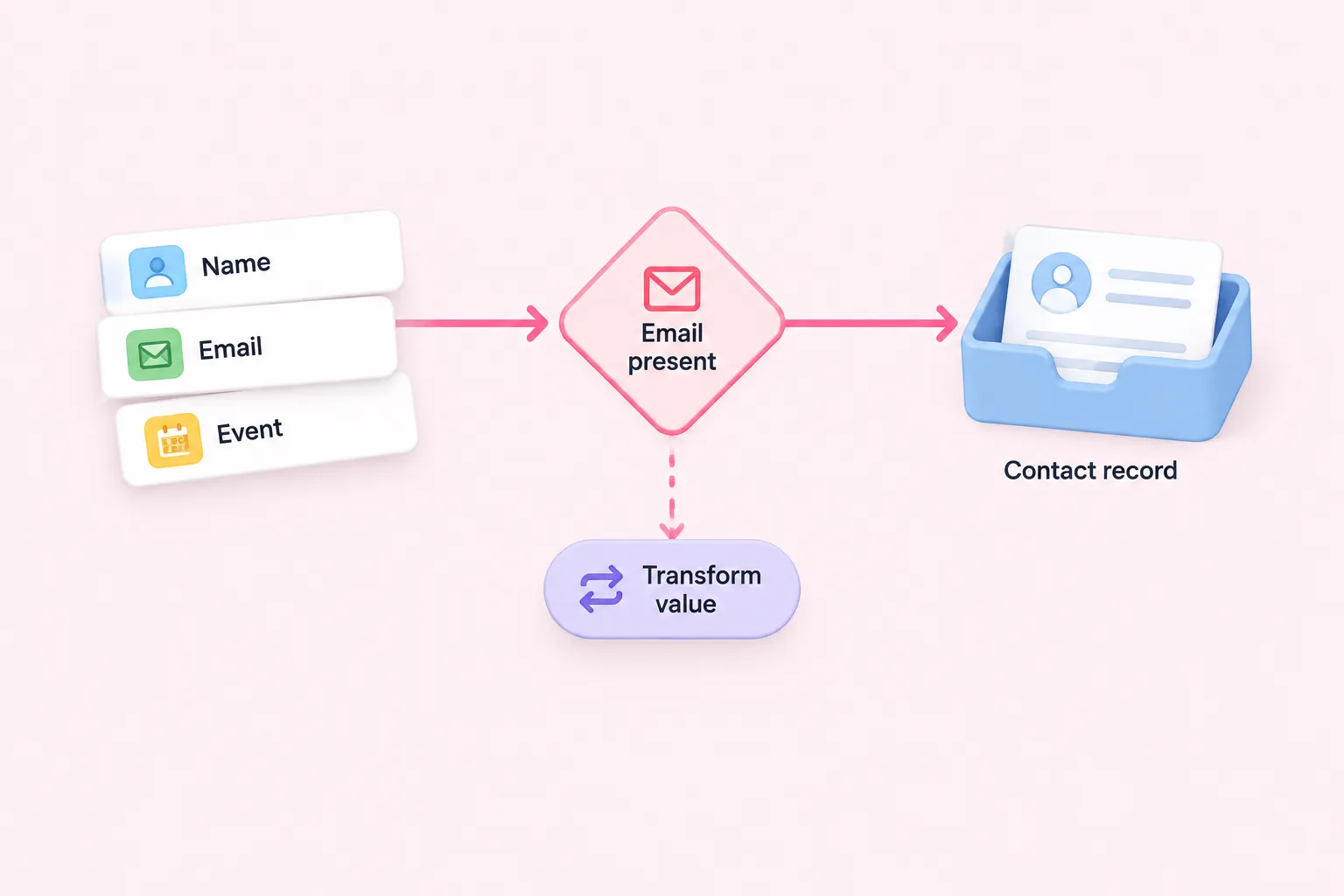
Before opening the workflow editor, create one representative example input. List the exact fields the trigger will receive, such as name, email address, event choice, and submission time. Use safe fictional values rather than sensitive live information. A concrete example exposes missing fields and inconsistent formats before they become workflow problems.
Next, express the rules as short decisions. Suggestions might include: “Continue only when an email address is present” or “Use the selected event value to choose a category.” If the task needs many exceptions, subjective judgment, or several branching paths, reduce its scope or save it for a later workflow.
Finally, specify one output and its destination. List the output fields and identify which earlier-node fields each one references. In n8n, mapping references data from previous nodes; mapping alone does not change those values. If a value needs reformatting or calculation, describe that as a separate transformation rather than hiding it inside the output description.
Sources: S2
Keep the First Workflow Small
Count the essential stages. A compact candidate usually has a trigger, a small amount of deterministic handling, and one destination. The aim is not to demonstrate every available technique. It is to make the flow understandable enough that a beginner can predict what each step should receive and produce.
Ask what can be postponed without losing the core value. Logging to another system, sending secondary notifications, supporting multiple destinations, and handling every unusual input may be later additions. For a workshop, also check that participants have the necessary credentials and access before the session. Reject or redesign candidates that depend on sensitive live data, irreversible actions, or lengthy setup.
This narrow shape is suggested editorial guidance, not a validated instrument or evidence that small workflows guarantee better outcomes. Its practical advantage is simply that fewer moving parts give learners and facilitators a clearer object to inspect.
Prepare a Repeatable Test
Build a safe test fixture from the example input. When appropriate, mocked or pinned data can provide a consistent development dataset without repeatedly contacting live systems. Pinned data is intended for development rather than production executions, so treat it as a building aid rather than part of the live workflow.
Prepare at least two suggested cases. The normal case should contain valid representative values and produce the expected output. The failure or edge case might omit a required field, use an unexpected value, or make a controlled destination step fail. For each case, record the input, the expected route, and the expected output before running it.
Repeatability matters because it lets you change one part of the workflow and run the same case again. This is documentation-based practical guidance; the supplied sources do not quantify how much time it saves or prove that it improves beginner outcomes.
Sources: S3
Decide What Success and Failure Look Like
Define success before pressing execute. State the expected output values, their destination, and the visible execution status you expect. Then compare the actual result with that prediction. A completed execution is not enough if the wrong fields were mapped or the record reached the wrong destination.
Define a response to failure as well. Note which node you will inspect, what input and output data you will compare, and whether the error suggests a credential, mapping, rule, or destination problem. n8n supports recognizing failed executions and retrying them from the execution list, but a retry by itself is not a complete test strategy. Inspect the cause and decide whether retrying is safe before doing so.
For actions that could send messages, overwrite records, or affect live systems, use a safe destination or non-destructive fixture where possible. Facilitators can make this safety check part of candidate selection rather than discovering the risk during the session.
Sources: S1
First-Workflow Checklist
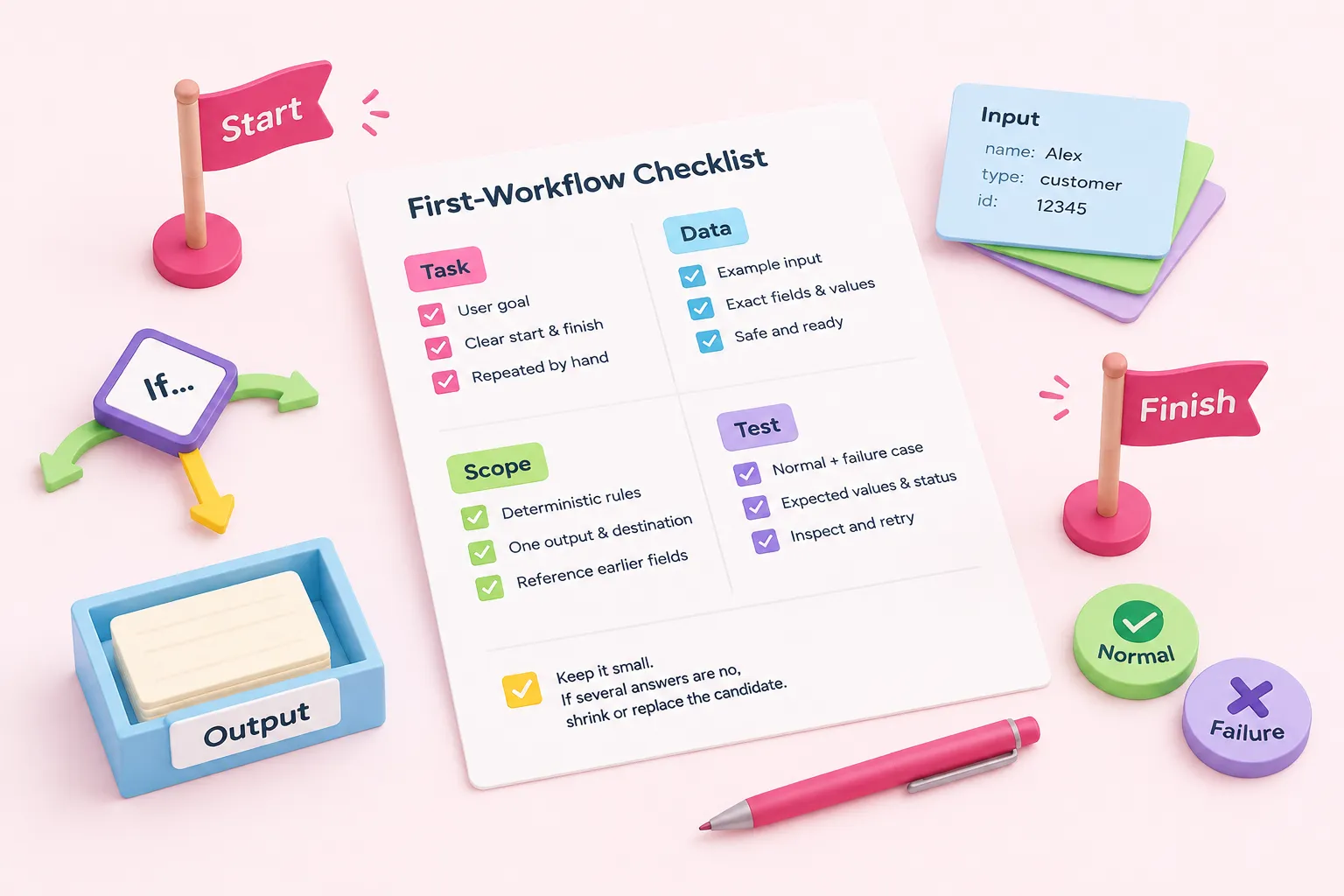
Use the following as an editorial checklist, not a validated assessment: Can you name one user goal? Is the task observable, with a clear start and finish? Is it currently repeated by hand? Can you provide one safe example input with exact fields and representative values? Can the rules be written as a short sequence of deterministic decisions?
Continue the check: Is there one concrete output and destination? Have you identified the earlier-node fields that the output will reference? Are transformations described separately from mapping? Can the first version use one trigger, one main path, and one useful output? Have optional notifications, extra destinations, and complex exceptions been deferred?
Finally, ask: Can you run a normal case and an expected failure or edge case? Have you written the expected values, destination, and execution status? Do you know how you will inspect a failed run and decide whether to retry it? For a workshop, are credentials available, data safe, actions reversible, and setup short enough for the session? If several answers are no, shrink or replace the candidate before building.
Practice the Skill with n8n Challenges
Once you have selected a candidate, build only the defined first version and test it against the cases you prepared. After it behaves as expected, add one improvement at a time and rerun the same fixture. This preserves a clear connection between each change and what you observe, without claiming that the process guarantees a particular learning result.
n8n Balloon Challenges is a hands-on learning website and event format, distinct from the n8n platform itself. Its practical challenges can provide a bounded setting in which to apply this selection and testing mindset while building workflows in your own n8n environment.