Build a Human-Reviewed AI Support Workflow in n8n
An editorial exercise for classifying synthetic support messages, reviewing sensitive cases, drafting replies, and demonstrating an n8n error workflow.

Checked against the n8n documentation on .
Editorial exercise: Task and learning objective
This is an editorial exercise, not a validated customer-service workflow. Your task is to create a main n8n workflow that classifies invented support messages, prepares structured reply drafts, and directs sensitive or unmatched cases to a human reviewer. You will also create a second workflow that handles a deliberate failure from the main workflow.
The learning objective is to practise classification, conditional routing, human oversight, structured drafting, and error handling without contacting real customers. Success in this small exercise does not demonstrate classification accuracy, reply safety, production resilience, or readiness for live support.
Prerequisites, inputs, and safety constraints
Use your own n8n environment and obtain permission to create and configure two workflows. You will need access to a compatible chat model and its credentials. If you choose to demonstrate a Gmail-based approval gate, you will also need Gmail credentials and a facilitator-controlled test address. Gmail approval is an optional suggestion here, not a claim that this exact workflow has been tested.
Prepare a small synthetic input set. Suggested categories are ordinary question, account-sensitive request, payment-sensitive request, and abusive or threatening message. Include at least one deliberately ambiguous message for the unmatched route and one item carrying an explicit failure-test marker. These categories are editorial suggestions rather than a universal support policy.
Use no real names, email addresses, account identifiers, payment information, secrets, or customer histories. Keep ordinary outputs in a preview-only branch, and do not configure automatic customer delivery. A human should review every sensitive or unmatched case. Facilitators should choose conservative rules appropriate to their fictional scenario because the supplied documentation defines no universal confidence threshold or escalation policy.
Classify messages and preserve unmatched cases
Start the main workflow with a trigger suitable for automatic execution, followed by your synthetic message source. Add a Text Classifier and define each category with a clear name and description. The node categorizes incoming items according to the categories configured in its parameters, but that capability does not establish accuracy or suitability for production support.
Enable the separate Other output and use it as a safety route rather than discarding messages that do not fit the proposed categories. Connect Other directly to the human-review path. For the planned sample set, check that each ordinary and sensitive message reaches its intended category or Other. If an item disappears, inspect the Other configuration and revise category descriptions without treating a successful sample run as proof of general reliability.
Sources: S4
Draft a structured reply without sending it
On each classified branch that needs a draft, add a Basic LLM Chain connected to the chosen model. Build its prompt with a dynamic expression that includes only the synthetic message and the assigned category. Ask for structured output containing at least a category and a draft. Requiring an output parser is a useful suggested constraint when you want predictable fields.
State in the prompt that the response is a draft for review, not a verified answer. Do not tell the model to invent policies, account facts, refunds, or commitments. Send ordinary drafts to a preview step only. The node’s ability to accept dynamic prompts or require parsed output does not validate the quality, factual correctness, or safety of the generated reply.
If the draft is missing, inspect the prompt expression, model connection, credentials, and parser configuration. Consider how your workflow should handle malformed structured output; the supplied capabilities do not establish that every model response will follow the requested shape.
Sources: S5
Route sensitive and unmatched cases to human review
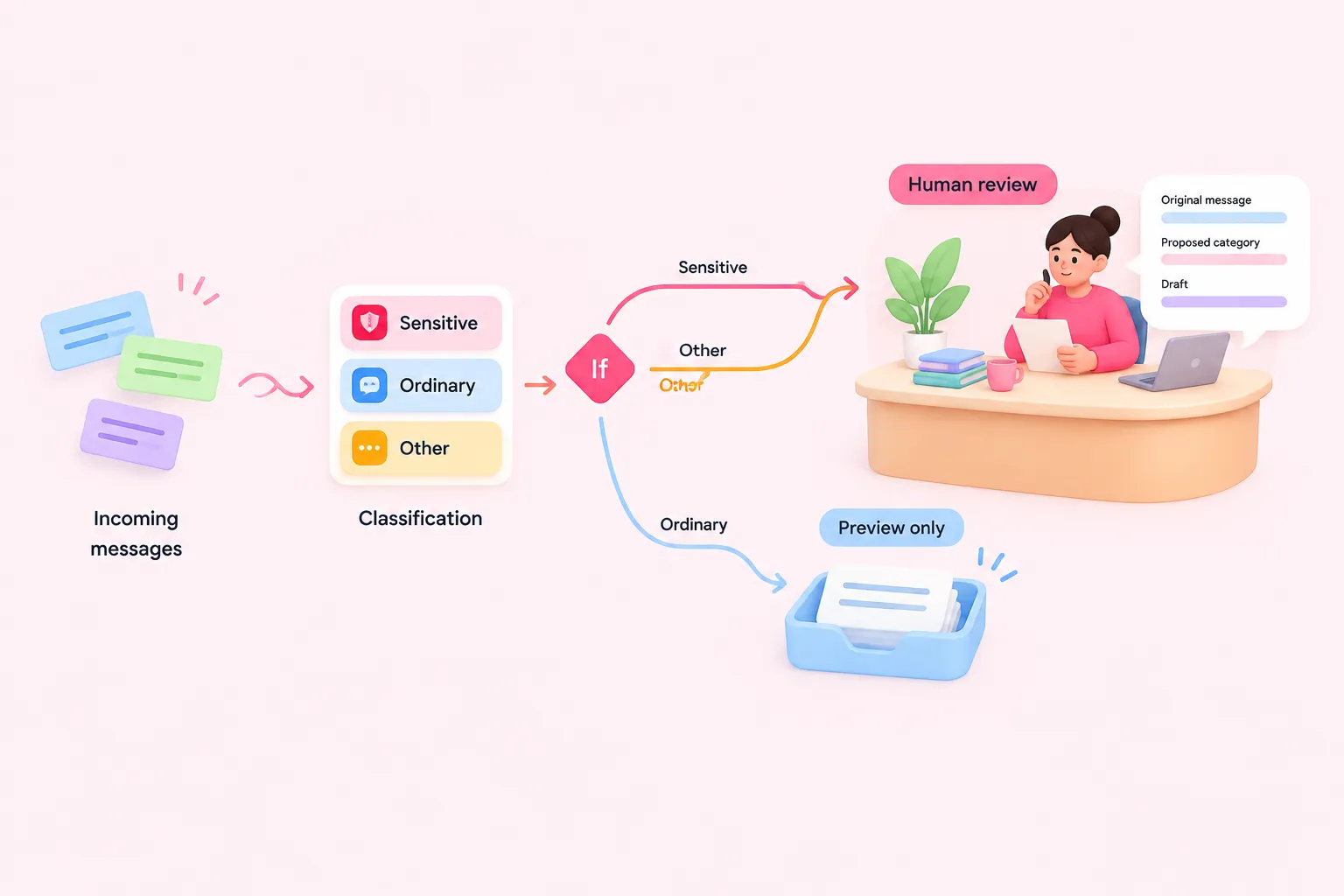
Add an If node after classification or drafting to evaluate the assigned category. Use comparison conditions that send the proposed sensitive categories to a review branch and ordinary questions to the preview-only branch. Connect the classifier’s Other output to the same review destination. These conditions implement your editorial policy; n8n’s conditional routing capability does not supply or validate that policy.
The review record should show the synthetic input, proposed category, and reply draft so the reviewer has enough context to decide what to do. Do not send sensitive, ambiguous, or unmatched drafts automatically in this exercise. If you demonstrate Gmail approval for an overseen AI tool, treat it as an optional approval gate and restrict any message to a facilitator-controlled test address. The documented approval mechanism can pause an AI tool call before an overseen tool executes, but the proposed setup has not been tested here.
Create and demonstrate the linked error workflow
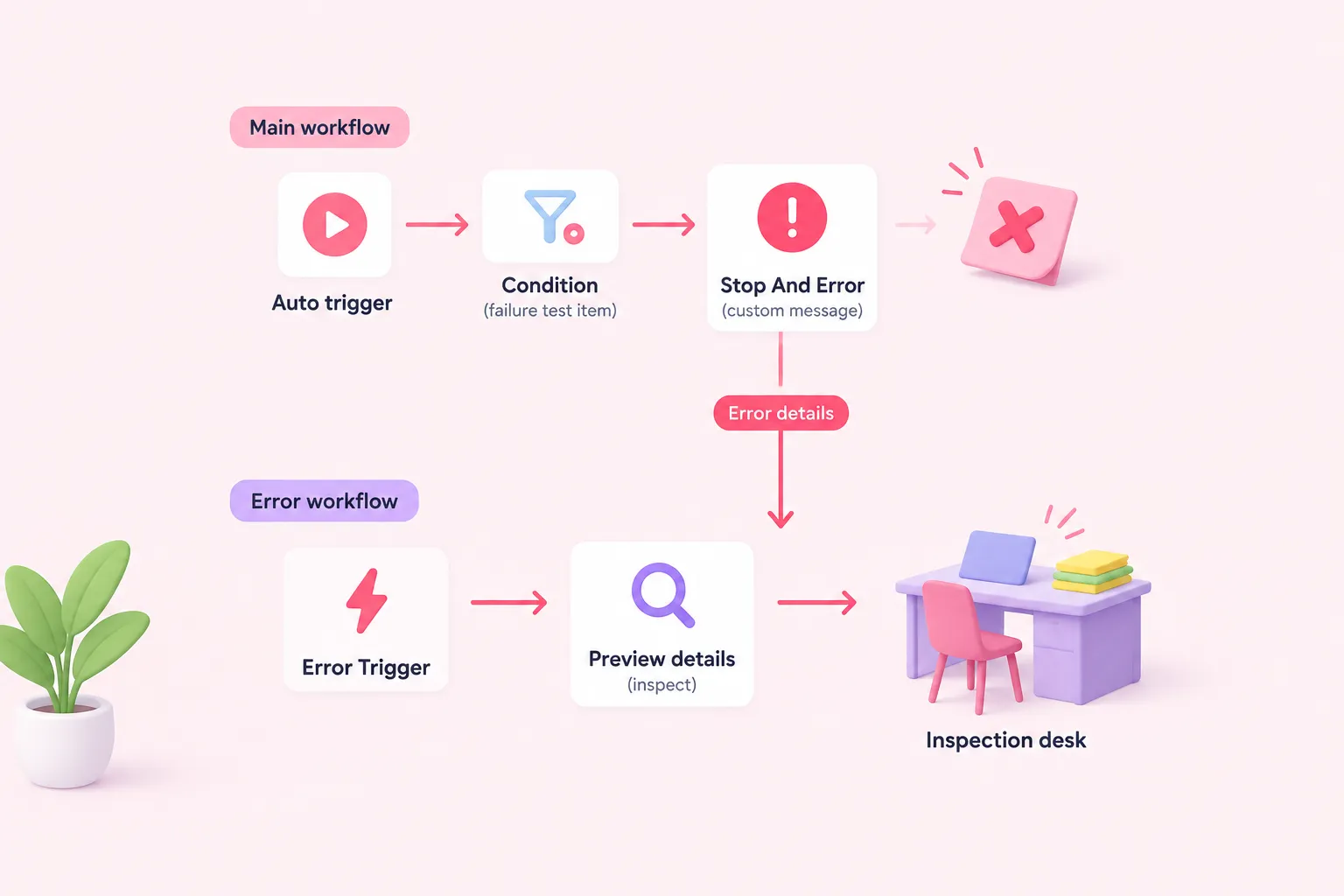
Create a second workflow that begins with Error Trigger, then add a preview or inspection step for the received failure details. Save this workflow and select it in the main workflow’s Error workflow setting. A linked error workflow runs when the main workflow errors and provides information about the failed workflow and its error.
In the main workflow, place Stop And Error behind a condition that matches only the explicit failure-test item. Configure a short custom error message that clearly identifies the exercise. This node can deliberately fail an execution and pass custom error information to an error workflow; it does not prove that recovery or downstream notification will succeed.
Run the failure path through an automatic trigger. A manual workflow run does not activate the linked Error Trigger workflow. Confirm that the second workflow runs and that the failed main execution is available for inspection. If appropriate, practise retrying it from the Executions tab with either the saved or original workflow, while remembering that execution visibility depends on access and that deleted workflows lose their execution history.
Completion criteria, troubleshooting, and reflection
Complete the exercise when every synthetic sample reaches its intended category or the Other route; every sensitive and unmatched item reaches human review; ordinary replies remain drafts; the automatic failure test activates the linked error workflow; and the failed execution is visible for inspection or retry. These are editorial completion criteria for practice, not evidence of production performance.
For dropped inputs, check category descriptions and the Other output. For incorrect routing, inspect If comparisons and the values they receive. For missing drafts, verify the dynamic prompt, connected model, credentials, and expected structured fields. If the error workflow does not run, confirm that it is saved, linked in the main workflow’s settings, begins with Error Trigger, and is being tested through an automatic rather than manual execution.
Reflect on these suggested questions: Which fictional cases should always require review? What context does a reviewer need? What should happen when the model returns malformed output? How should conflicting categories be handled conservatively? Why do successful sample runs fail to establish classification accuracy, safety, or production readiness? A suggested solution is to use explicit categories, route Other and all sensitive cases to one review path, keep ordinary results preview-only, and isolate the deliberate failure behind a test-only condition.
Sources: S4, S5, S6, S7, S8, S2