Tracing a Missing n8n Webhook Field
A practical debugging checklist for following an expected value from the original HTTP request through the Webhook node, nested JSON paths, production executions, and retained execution data.

Checked against the cited sources on .
Start with a controlled request
When a webhook field appears to be missing, begin by reducing uncertainty at the source. Send a controlled request with a distinctive, harmless value that will be easy to recognize, such as a temporary reference like trace-4821. Confirm that the sender is calling the intended webhook URL and using the HTTP method expected by the workflow. This sequence is an editorial troubleshooting suggestion, not a validated diagnostic method, but it gives you a specific request to follow instead of relying on an ambiguous earlier attempt.
Keep the complete request available while you investigate. An HTTP request can carry descriptive metadata in its headers and, optionally, data in its body. The value you want may also have arrived through a URL parameter or query string, depending on how the sender constructed the call. Do not begin with the assumption that every field was submitted as JSON in the body.
A useful first comparison is the sender’s raw request against what the Webhook node captured. Check the destination URL, method, headers and payload separately. If the distinctive value is absent from the raw request, the problem occurred before n8n received that attempt. If it is present, continue tracing where the Webhook node placed it.
Check the format before reading the body
Inspect the Content-Type header before interpreting the body. This header tells the receiving server what content format the client says it submitted. A JSON payload, form submission and multipart request should not be treated as interchangeable. Parsing details can vary with server configuration, n8n version and request options, so describe what you actually observe rather than assuming a particular parser result.
Next, compare the raw payload with the captured request sections. A practical inspection order is headers, params, query and body, followed by binary data when the request uses it. This order is a suggested checklist, not a universally proven sequence. Its purpose is to make the search explicit: first identify the request section containing the value, and only then write an expression for it.
For example, a sender might transmit a customer reference inside a nested JSON body, attach an authorization value to a header, or place a filter in the query string. Those are illustrative possibilities, not descriptions of your workflow. The important distinction is that request metadata and request data occupy different locations, while the Webhook implementation exposes ordinary request data in separate headers, params, query and body properties.
Locate the value in the Webhook output
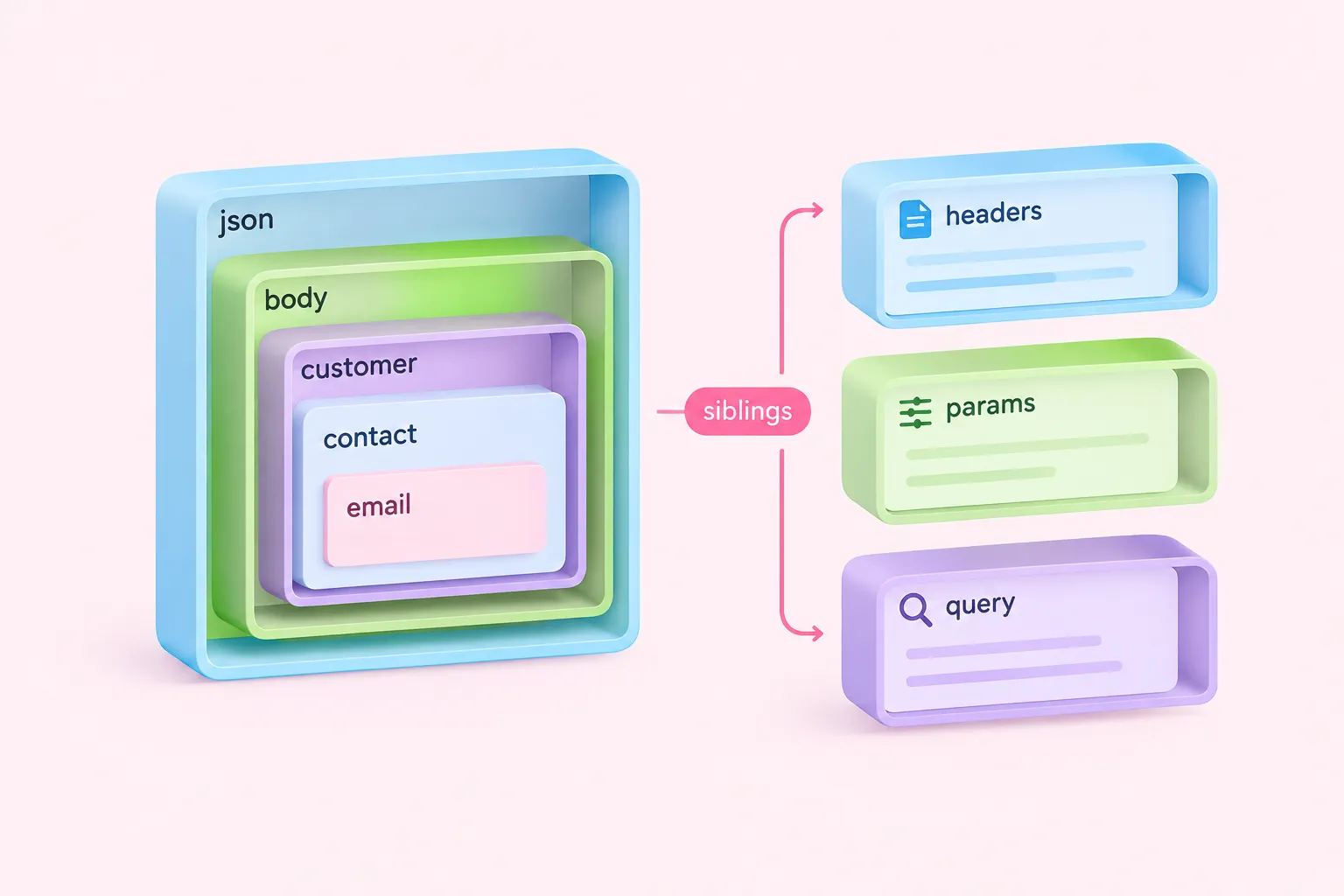
Open the captured Webhook output and expand its structure instead of searching only the top level. n8n passes data between nodes as arrays of items, and ordinary item content is wrapped under json. Within a Webhook item, the request is then divided into sections such as headers, params, query and body. A field inside a nested body therefore needs a path that reflects every relevant layer.
Suppose the captured body visibly contains an illustrative structure in which customer contains contact and contact contains email. The required reference must follow that observed nesting; looking for email directly at the item root would target a different location. Treat this example only as a model for reading structure. Your expression should be based on the names and nesting shown in your own captured input.
Check capitalization, spelling and array positions as displayed. Also distinguish a key that is absent from one whose value is empty or null. Those states can require different follow-up questions for the sending system. At this stage, the aim is not to repair the payload but to state precisely what the Webhook output contains.
Build and test the exact nested JSON path
Once you can see the value, use the input pane’s mapper to drag the field into the relevant node parameter. n8n can generate an expression from the incoming field path. This avoids manually transcribing a long nested reference, although the generated expression should still be inspected and tested against the captured item.
Compare the generated reference with any expression you wrote by hand. Work from the outside inward: confirm the current item, its json data, the request section and each nested object or array. If an intermediate property is missing, the final field cannot be reached through that path. A suggested diagnostic question is: “At which exact segment does the observed structure stop matching the expression?” This is an editorial prompt, not a validated assessment instrument.
Test the expression with the same controlled request used earlier. If the mapper can see the value but a downstream node cannot, compare the downstream node’s actual input with the original Webhook output. An intervening transformation may have changed the item structure. The documentation establishes the item model and mapper behavior, but it does not establish that this sequence is optimal or that it reduces debugging time.
Compare test and production executions

A request can be difficult to find simply because you are looking in the wrong execution context. Test webhook activity appears in the editor during the test procedure, while production webhook activity is available through the executions list. If a live system called the production URL, do not expect that call to appear as though it were the current editor test.
Open the relevant production execution and inspect the Webhook node’s captured output there. Compare its timestamp and distinctive value with the sender’s request record, then compare its headers, params, query and body. Avoid using a nearby execution merely because it looks similar; repeated requests can carry different payloads.
When an earlier execution remains available, it can be loaded back into the canvas for examination. That can help you compare captured data with the current workflow. Remember that the current workflow may differ from the version or configuration involved in the earlier run, so frame any conclusion around the evidence visible in that execution rather than treating it as proof of what every run contained.
Account for saving and pruning
If no historical payload is available, check whether execution data was saved and whether retention or pruning removed it. Workflow settings can control which execution data n8n saves, while instance configuration, edition and retention rules can affect availability. These conditions and defaults may vary, so verify the settings in the environment you are debugging.
Missing history is not proof that the request never arrived. It means the historical execution is unavailable through the place you checked. If appropriate for the system and safe for its data, reproduce the request with a non-sensitive distinctive value, then capture the resulting Webhook output. That reproduction is a suggested troubleshooting step, not evidence about the original call.
Finish with a short evidence record: the URL type and method used, the declared Content-Type, the request section containing the value, the exact observed path, the execution context and whether execution data was retained. This checklist helps keep observations separate from assumptions. Webhook behavior can still vary with version, raw-body or binary options, multipart requests and instance configuration, so document those details when they matter.