n8n Google Sheets: Match IDs and Update Designated Columns
Build an n8n Google Sheets workflow that checks record IDs, updates designated columns and routes missing or duplicate matches to review.

Checked against the cited sources on .
Prepare your n8n Google Sheets integration
This n8n Google Sheets tutorial proposes a controlled practice workflow: accept one update request, count exact ID matches, update automation_status only for a unique match, and append exceptions to a separate review sheet. The steps and code are a tutorial design, with acceptance criteria below; no firsthand execution results are supplied.
Start with an n8n workspace, an existing working Google Sheets credential and a copied practice spreadsheet. Credential creation, production scheduling, batch processing, scaling and quota optimization are outside scope. Prepare the following fixtures before building. The example Records table supplies suggested practice data: keep the IDs as text. Submit four requests separately, one per execution, using record_id values A-001, A-002, A-999 and an empty string, each with automation_status set to ready. Leave A-999 absent from Records.
| Location | Fields | Purpose |
|---|---|---|
| Records sheet | record_id, automation_status, team_notes | Operational practice data |
| Review sheet | requested_id, proposed_value, classification, match_count | Exception review |
| Request | record_id, automation_status | One proposed update |
| record_id | automation_status | team_notes |
|---|---|---|
| A-001 | pending | Confirm delivery address |
| A-002 | pending | Waiting for finance |
| A-002 | on_hold | Call before dispatch |
We think column ownership is worth deciding before connecting a write node: it makes the intended change easier for a teammate to review.
1. Prepare one request and read the rows

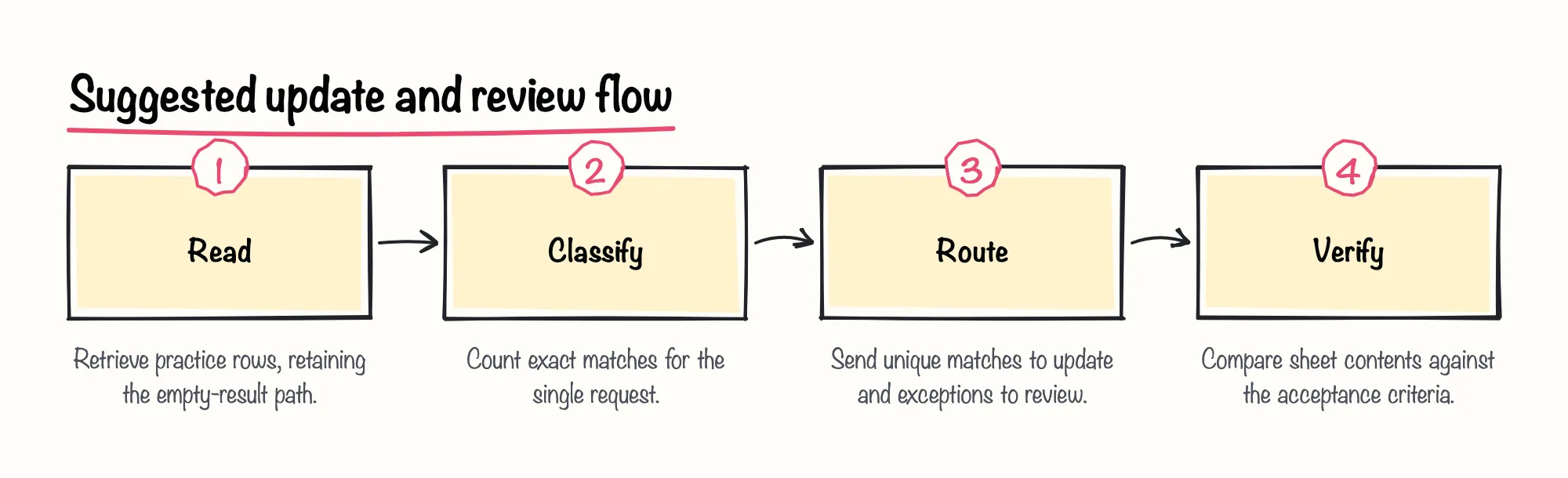
Use stable text identifiers in record_id. This exercise uses exact text equality: no trimming, case conversion or numeric conversion. For example, A-001 differs from a-001. Reading every row keeps this small practice exercise straightforward. Build the first nodes as follows.
- Add Manual Trigger, then Edit Fields named Request.
- In Request, set record_id to A-001 and automation_status to ready. Keep one request per execution.
- Add the Google Sheets node with Get Row(s). Select the existing credential, document and Records sheet; leave read filters unset.
- In the read node's Settings, enable Always Output Data.
n8n documents existing credential selection and default all-row retrieval for Get Row(s). Always Output Data emits an empty item when a node returns no data; the matching code must exclude that placeholder.
Sources: n8n-docs/docs/integrations/builtin/app-nodes/n8n-nodes-base.googlesheets/sheet-operations.md at main · n8n-io/n8n-docs · GitHub, n8n-docs/docs/build/understand-workflows/workflow-components/work-with-nodes.md at main · n8n-io/n8n-docs · GitHub, n8n-docs/docs/integrations/builtin/core-nodes/n8n-nodes-base.set.md at main · n8n-io/n8n-docs · GitHub
2. Count matches and route the request

Add a Code node after the read and select JavaScript, Run Once for All Items. n8n supports accessing all input items and referencing a named node's first item. Enter this proposed tutorial code:
const request = $('Request').first().json; const id = request.record_id; const valid = typeof id === 'string' && id.trim().length > 0; const rows = $input.all().map(item => item.json).filter(row => Object.prototype.hasOwnProperty.call(row, 'record_id')); const count = valid ? rows.filter(row => typeof row.record_id === 'string' && row.record_id === id).length : 0; return [{ json: { requested_id: id ?? '', proposed_value: request.automation_status, classification: !valid ? 'invalid' : count === 1 ? 'unique' : count === 0 ? 'missing' : 'duplicate', match_count: count } }];
Add a Switch node with rules for classification equal to unique, missing, duplicate and invalid. Enable its Extra Output fallback. These classifications are editorial conventions. Connect unique toward the update branch; connect the other outputs and fallback toward review.
In our view, an unexpected classification belongs in review rather than on a write path. That makes the fallback a deliberate decision.
Sources: Using the Code node, n8n-docs/docs/build/work-with-data/transform-data/expression-reference/nodeinputdata.md at main · n8n-io/n8n-docs · GitHub, n8n-docs/docs/build/work-with-data/reference-data/reference-previous-nodes.md at main · n8n-io/n8n-docs · GitHub, n8n-docs/docs/integrations/builtin/core-nodes/n8n-nodes-base.switch.md at main · n8n-io/n8n-docs · GitHub
3. Restrict the write and append exceptions

On the unique branch, configure the n8n Google Sheets node using the steps below. Update Row updates existing rows, and manual mapping specifies individual columns. Edit Fields can discard fields that were not explicitly set.
- Add Edit Fields to the unique branch. Set record_id from requested_id and automation_status from proposed_value.
- Enable the option that discards other input fields.
- Add Google Sheets Update Row for the Records sheet and select record_id as the matching column.
- Choose Map Each Column Manually. Map record_id and automation_status only; do not use Append or Update Row.
Omit team_notes entirely; remove its mapping instead of leaving it blank. Supplied master-branch implementation evidence shows that manual mapping for Google Sheets node versions 4 and later converts mapped null or undefined values to empty strings. Another helper skips null or undefined properties it receives, so upstream mapping matters. The documentation is undated and the implementation is unpinned; installed releases and interface labels may differ.
For the review branch, use Google Sheets Append Row on the Review sheet. Manually map requested_id, proposed_value, classification and match_count from classification output. Append Row adds a row at the end; this review procedure is our suggested design, not a built-in exception-review feature.
Sources: n8n-docs/docs/integrations/builtin/app-nodes/n8n-nodes-base.googlesheets/sheet-operations.md at main · n8n-io/n8n-docs · GitHub, n8n-docs/docs/integrations/builtin/core-nodes/n8n-nodes-base.set.md at main · n8n-io/n8n-docs · GitHub, n8n/packages/nodes-base/nodes/Google/Sheet/v2/helpers/GoogleSheet.ts at master · n8n-io/n8n · GitHub, n8n/packages/nodes-base/nodes/Google/Sheet/v2/actions/sheet/update.operation.ts at master · n8n-io/n8n · GitHub
4. Verify changes and troubleshoot

Record team_notes before each run, execute the workflow, then re-read the sheet. Use these suggested acceptance criteria for your n8n Google Sheets workflow.
| Request | Records sheet | Review sheet |
|---|---|---|
| Unique ID | Only automation_status changes; team_notes preserved | No entry |
| Missing ID | Unchanged | Missing entry, count 0 |
| Duplicated ID | Both matching rows unchanged | Duplicate entry, matching count |
| Blank ID | Unchanged | Invalid entry, count 0 |
For unexpected results, inspect Executions and use Execute step to inspect individual nodes. Check the selected document, sheet, header and data locations, ID types, classification output and write mappings. If replacing the all-row read with a filtered read, explicitly select Return All Matches: otherwise n8n documents returning only the first matching result.
Column ownership reduces the write surface, but the supplied sources establish no transactional uniqueness, locking or conflict detection between lookup and update. Concurrent edits to automation-owned cells can therefore fall outside this practice workflow's protection.
Sources: Sheet Within Document operations | Nodes | n8n Docs, n8n-docs/docs/integrations/builtin/app-nodes/n8n-nodes-base.googlesheets/sheet-operations.md at main · n8n-io/n8n-docs · GitHub, n8n-docs/docs/build/understand-workflows/workflow-components/work-with-nodes.md at main · n8n-io/n8n-docs · GitHub, n8n-docs/docs/build/flow-logic/handle-errors-gracefully.md at main · n8n-io/n8n-docs · GitHub