Exercise: Cloud Run vs Kubernetes (GKE) for a Practice n8n Instance
A hands-on exercise comparing Cloud Run vs Kubernetes for self-hosted n8n, measuring startup time, storage, worker scaling and idle cost.

Checked against the cited sources on .
Editorial exercise: task and goal
Cloud Run vs Kubernetes is one of the first decisions ops and IT teams face once they move self-hosted n8n from a trial into something meant to carry real production traffic. This editorial exercise gives you a hands-on way to compare the two platforms directly, using your own practice n8n instance rather than someone else's benchmark. The goal is narrow: deploy the same self-hosted n8n setup to Google Cloud Run and to Kubernetes on GKE, then measure startup time, persistent storage behavior, queue-mode worker scaling and cost at idle on each.
This is a labeled editorial exercise, not a validated benchmark. We did not run these deployments ourselves, and no official source quantifies cold-start or pod-startup latency in seconds for either platform. You are the one generating the numbers; the steps below just make sure you measure the same things, the same way, on both sides.
Prerequisites, inputs and constraints
Before starting, you need a Google Cloud project with billing enabled, working knowledge of self-hosting n8n (Docker, environment variables, a database), and a practice n8n instance you are willing to throw away. Do not point this exercise at a production instance: you will be forcing restarts, scale-to-zero events and redeploys on purpose.
Scope this narrowly. A vendor blog from LOW/CODE Agency estimates, in a September 2026 comparison, that a first-time Docker-based self-hosted n8n setup takes two to four hours, while separately noting that large-scale Kubernetes self-hosting adds significant configuration complexity for teams without DevOps experience; treat that as a directional estimate, not a measured result, and time your own setup instead. We'd skip trying to replicate a full high-availability cluster for this exercise — a single Standard GKE node pool and a single Cloud Run service are enough to compare the platforms honestly.
Sources: n8n Self-Hosted vs Cloud: Which Is Right? | LOW/CODE
Cloud Run vs Kubernetes: deploying and timing startup
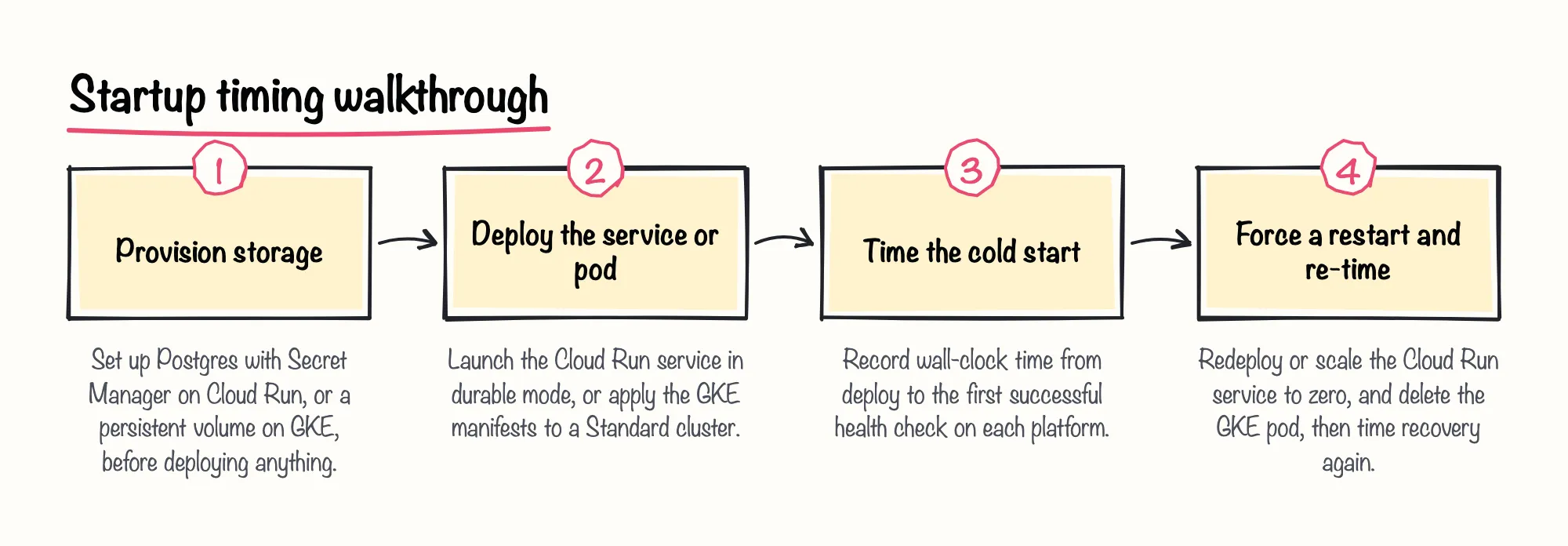
On Cloud Run, n8n's own deployment guide documents two modes. The simpler "easy mode" keeps n8n data in memory, and that data is lost whenever the Cloud Run service scales to zero or is redeployed, according to n8n's official guide. The sturdier "durable mode" adds Postgres and Secret Manager; deploy that path, not easy mode, if you want numbers that mean anything for a production decision. The same guide notes that Cloud Run reserves the default /healthz path for its own platform health checks, which conflicts with n8n's default health endpoint, so you will need to set N8N_ENDPOINT_HEALTH before the service reports healthy.
On Kubernetes, n8n's official GKE guide requires a "Standard" cluster; n8n doesn't work with an Autopilot cluster, per that guide. The same guide says the Postgres deployment needs a persistent volume to keep data between pod restarts. Provision that volume before you start timing anything.
Sources: Deploy to Google Cloud Run | Deploy | n8n Docs, Deploy to Google Kubernetes | Deploy | n8n Docs
Testing persistent storage on each platform
Persistent storage is where the Cloud Run vs Kubernetes gap shows up fastest, before you even get to worker scaling. Run the same three events on both platforms: a plain restart, a redeploy, and — on Cloud Run — a scale-to-zero. On the Cloud Run easy-mode path, expect data loss at the scale-to-zero or redeploy step, exactly as n8n's official deployment guide describes. On the durable-mode path, Postgres is meant to survive all three, provided Secret Manager keeps the connection details intact across revisions, though this exercise's findings do not document that outcome directly.
On GKE, the behavior is simpler to reason about once the persistent volume from n8n's own manifests is in place, since the volume rather than the pod holds state, per n8n's official guide. Record exactly what happens on each platform for each event rather than assuming either will behave the way its documentation implies.
| Platform / mode | Restart | Redeploy | Scale-to-zero |
|---|---|---|---|
| Cloud Run easy mode | Data lost (documented) | Data lost (documented) | Data lost (documented) |
| Cloud Run durable mode (Postgres) | Not documented — verify yourself | Not documented — verify yourself | Not documented — verify yourself |
| GKE with persistent volume (n8n's manifests) | Volume expected to retain data per n8n's guide | Not documented — verify yourself | Not applicable in n8n's documented worker setup |
Sources: Deploy to Google Cloud Run | Deploy | n8n Docs, Deploy to Google Kubernetes | Deploy | n8n Docs
Queue mode worker scaling: the weak point on both sides

Queue mode changes the storage requirements again. n8n's own documentation says running queue mode with an SQLite database isn't recommended for self-hosted n8n on any host, and that queue mode doesn't support binary data storage in the filesystem. Plan on Postgres before turning queue mode on, on either platform, and check n8n's own documentation directly for the alternative binary-data storage option it describes, since the specifics of that alternative aren't captured in this exercise's research.
Autoscaling the workers is where both platforms get uncomfortable. In a July 2026 n8n community forum post, a team self-hosting n8n in queue mode on Cloud Run reported that Cloud Run's autoscaler is completely blind to Redis queue depth, so it never scales out workers under load; their workaround was limiting each worker to one vCPU and running a continuous health-ping to force the CPU-based autoscaler to add instances. We think that workaround is a reasonable stopgap, but it is a sign the platform's default autoscaling signal doesn't match how n8n workers actually behave.
| Option | Scaling signal | Known limitation |
|---|---|---|
| Cloud Run default autoscaler | Cloud Run's own CPU/concurrency signal | Reported blind to Redis queue depth by one community team |
| Cloud Run worker pools (GA April 2026) | None — fixed worker count | No autoscaling and no load-balanced endpoint, per Google's documentation |
| GKE with CPU-based HPA | Pod CPU utilization | Often fails to trigger for I/O-bound n8n workers, per a community report |
| GKE with KEDA Redis scaler | Redis / Bull queue length | Community-discussed, not n8n's official deployment path |
Kubernetes doesn't automatically solve this either. A contributor to a February–March 2026 n8n community forum thread explained that n8n workers are I/O-bound — they wait on external responses rather than consuming CPU — which is why plain CPU-based Horizontal Pod Autoscaling often fails to trigger for n8n worker scaling. The same contributor pointed to KEDA's Redis scaler, which watches actual queue length, as an alternative worth evaluating. A community-maintained n8n Helm chart's own documentation also warns that worker nodes using ReadWriteOnce persistence cannot use autoscaling, so the storage choice you tested in the previous step can quietly block scaling too.
There are two newer escape routes worth testing rather than assuming away. Google's GKE documentation states that GKE 1.37 or later can configure the Horizontal Pod Autoscaler to scale a workload down to zero replicas when there is no demand, though n8n's own Kubernetes guide doesn't document this for worker pods. On Cloud Run, worker pools reached General Availability on April 14, 2026 according to Google's release notes — a deployment option without autoscaling or a load-balanced URL, per Google's own worker pools documentation, that some teams could use to host queue-mode workers more predictably.
In our view, KEDA's Redis-based scaler is the more promising fix of the two for n8n specifically, since it reacts to the thing that actually matters — queue depth — rather than a CPU signal that I/O-bound workers rarely trip.
Sources: Enable queue mode | Deploy | n8n Docs, Autoscaling Queue Workers on Google Cloud Run (Redis/BullMQ) – How do you solve the HTTP-blindness? - Feedback - n8n Community, Horizontal Pod autoscaling | Google Kubernetes Engine (GKE) | Google Cloud Documentation, Redis Lists | KEDA, n8n Queue Mode Setup | OpenCharts, N8n Kubernetes Queue Mode: Jobs Not Distributed Across Multiple Workers (HPA/Scaling Not Working) - Questions - n8n Community, Implantar pools de worker no Cloud Run | Google Cloud Documentation, Cloud Run release notes | Google Cloud Documentation
Recording cost at idle
Record idle cost as two separate line items instead of one blended number. On Cloud Run, Google's pricing page states that idle instances that are not minimum instances are not charged, so a scale-to-zero n8n deployment should show no idle compute cost between invocations — unless you pin a minimum instance, which n8n's durable-mode guide suggests to reduce data-loss risk, in which case that instance is billed continuously. The same pricing page lists a monthly free tier of the first 240,000 vCPU-seconds free per month for CPU-based instance billing, according to Google's Cloud Run pricing page, which further reduces idle-period cost for a low-traffic practice instance.
On GKE, Google's pricing page states a flat cluster management fee of $0.10 per cluster per hour applies to all GKE clusters regardless of mode, size or topology, and that fee accrues even while an n8n GKE cluster sits idle, on top of whatever compute nodes you leave running. That flat fee is the one line Cloud Run doesn't have at all, and it's worth writing down separately rather than folding it into a single "GKE cost" figure.
| Platform | Idle line item | Note |
|---|---|---|
| Cloud Run, no minimum instances | No idle compute charge, per Google's pricing page | First 240,000 vCPU-seconds per month are free |
| Cloud Run, with a pinned minimum instance | Continuous charge for that instance | Durable-mode guidance suggests pinning one to reduce data-loss risk |
| GKE | $0.10 per cluster per hour flat fee | Applies regardless of mode, size or topology, plus running node costs |
Sources: Cloud Run pricing | Google Cloud, Google Kubernetes Engine pricing | Google Cloud
Completion criteria and suggested reflection
You've completed this exercise when you have, for both platforms: a recorded cold-start and restart time, a filled-in persistent storage table from your own tests, a tested (or at least attempted) queue-mode worker-scaling configuration, and two idle-cost line items broken out as shown above.
A suggested reflection, not a verified conclusion: teams with little Kubernetes experience may find Cloud Run's durable mode faster to get running, while teams already operating GKE for other workloads may find the cluster fee and worker-pool limits easier to absorb than adopting a new serverless platform. Making this Cloud Run vs Kubernetes decision for production is likely less about startup time or idle cost and more about which worker-scaling failure mode your team can live with and fix, since neither platform's defaults clearly work for n8n queue mode yet.