n8n Version Control for GitHub: A Hands-On Exercise
A hands-on exercise in setting up n8n version control for GitHub: connect a repository, push a baseline, review a pull request, and prove a rollback.

Checked against the cited sources on .
Editorial exercise: the task and why onboarding needs it
This is an editorial exercise, not a guaranteed procedure: the task is to set up n8n version control for GitHub on one real workflow, so every change is tracked and a bad change is reversible, then to prove the rollback actually works. It matters most for teams onboarding developers, because a new hire's first few changes on a shared n8n instance are exactly the ones nobody wants to debug blind. Without a Git history behind the workflow, there's no diff to read and no safe way back to the last good version.
We think this drill is worth running before a new developer touches a shared n8n instance, because reviewing a change in a GitHub pull request is a habit that's far easier to build on day one than to retrofit after something breaks in production.
n8n Version Control for GitHub: Prerequisites and Inputs
Before starting, confirm your team's n8n plan actually includes this feature. As of n8n's documentation retrieved 2026-10-08, Git-based source control for workflows is available only on the Business and Enterprise plans, not the free Community edition. n8n's own edition-comparison page lists version control using Git specifically among the features reserved for self-hosted Business and Enterprise plans, and describes the Community edition as otherwise close to feature-complete. That makes this plan gap the main limitation a free self-hosted team will hit when attempting this exercise.
You'll also need the basics most teams already have: comfort with Git branches, commits and GitHub pull requests, plus a Git repository reachable by either SSH deploy keys or HTTPS personal access tokens, which n8n's setup documentation lists as the two supported access methods. Gather an existing workflow to use as your baseline, a GitHub account that can create repositories, and whichever key or token your repository needs. In our view, the plan restriction above is the real barrier for small teams here, so check licensing before promising this exercise to a new hire.
Sources: Tutorial: Create environments with source control | Administer | n8n Docs, Compare editions | Deploy | n8n Docs, Set up source control | Administer | n8n Docs
Constraints: what n8n's Git integration does and doesn't cover
n8n's own documentation is direct about one constraint: its source control feature doesn't provide an in-app pull-request-style review and merge process, so that review has to happen outside n8n, in your Git provider. n8n's own end-to-end tutorial, using GitHub as its example, demonstrates this by having the team open and merge an actual GitHub pull request to bring a development branch into production. That pull-request step belongs to the multi-instance, multi-branch pattern the tutorial covers; the simpler single-branch pattern skips it entirely.
Our take: skip n8n's single-branch shortcut for this exercise and set up two instances instead, because the whole point of practicing n8n version control for GitHub is getting a reviewable pull request, not just a second copy of the workflow.
Sources: Use Git in n8n | Administer | n8n Docs, Tutorial: Create environments with source control | Administer | n8n Docs
Steps: connect, push, review and roll back a workflow
With plan and repository ready, setting up n8n version control for GitHub follows n8n's own documentation closely. Create a dedicated GitHub repository for the n8n instance first; n8n's setup guide names this as the first configuration step. Then link the instance to that repository: n8n's tutorial has you open Settings, go to Environments, and select Connect, after which n8n connects to the repository using the SSH or HTTPS access you set up earlier.
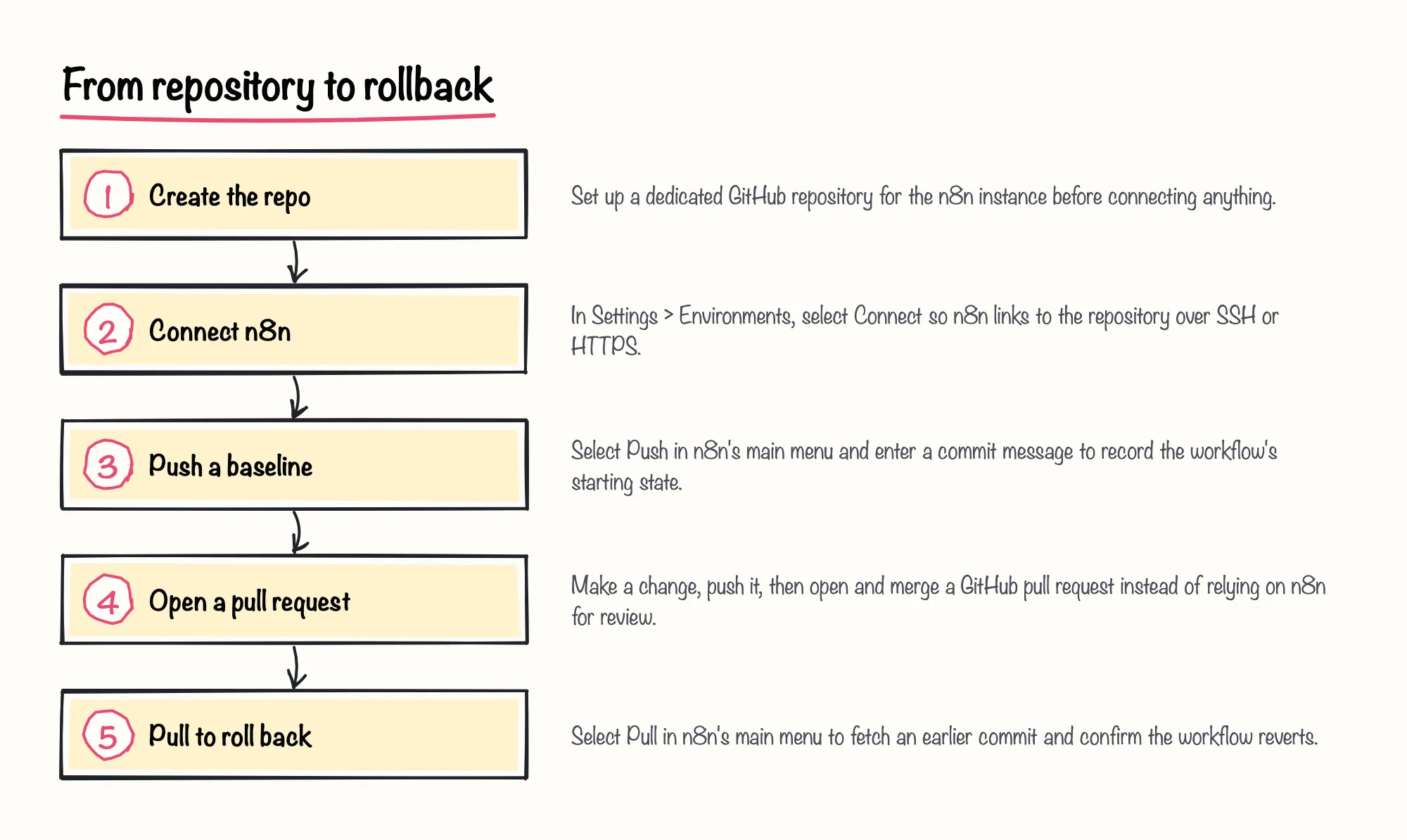
Push your current workflow as the baseline: select Push in n8n's main menu, then enter a commit message, which is what later identifies this change in Git history. For the reviewable change, edit the workflow, push again with a new commit message, and open the pull request in GitHub rather than inside n8n. To prove reversibility, select Pull in n8n's main menu to fetch an earlier commit; n8n warns that accepting the override will overwrite your local copy, which is exactly the mechanism that makes a rollback take effect.
If a push fails because the repository has moved on since your last pull, a vendor blog about n8n consulting, n8nlab.io, writing in 2026, reports that teams resolve this by using the Pull button in n8n's own source-control interface to fetch the remote changes before retrying the push. Treat that as community troubleshooting advice rather than documented n8n behavior, since it refers to an interface name that may differ from the Environments settings n8n documents today.
Sources: Set up source control | Administer | n8n Docs, Tutorial: Create environments with source control | Administer | n8n Docs, Push and pull changes | Administer | n8n Docs, OpenAI
Completion criteria and troubleshooting
Treat the exercise as done once three things are true: the change exists as a real GitHub pull request rather than a note in chat, the push carries a commit message that actually describes it, and someone has personally pulled an earlier commit back into n8n and watched the workflow revert. That last check matters: n8n's documentation warning that pulling will overwrite local, unpushed changes is also the confirmation that your rollback path genuinely works, not just that it exists on paper.
Two failures come up often in this kind of exercise. One is a push conflict when the repository has moved on since your last pull; the pull-then-retry fix for that is already covered in the steps above, where it's attributed to a vendor blog's troubleshooting advice rather than to official n8n documentation. What n8n's own documentation confirms is narrower: pulling fetches the remote version of the workflow, and accepting the override prompt will overwrite your local copy if you haven't pushed your own changes first. The other common failure is a teammate's unpushed local changes getting silently overwritten by someone else's pull, which is that same override behaviour, just triggered by a different person.
Sources: Push and pull changes | Administer | n8n Docs, OpenAI
Reflection and suggested solution
Once you've pushed a baseline, opened a pull request, and pulled a rollback through, you've rehearsed the three habits this exercise is really testing: visibility into what changed, a human review step outside n8n, and a tested way back. As a suggested solution sketch, not a validated script, the sequence to follow is the same one above: dedicated repository, Connect under Settings > Environments, push with a commit message, a GitHub pull request, then Pull to confirm the rollback.
Sources: Set up source control | Administer | n8n Docs, Tutorial: Create environments with source control | Administer | n8n Docs, Push and pull changes | Administer | n8n Docs, Use Git in n8n | Administer | n8n Docs