n8n PDF extraction: an editorial exercise in OCR and review
Practise an n8n PDF extraction workflow with text PDFs, scanned documents, separate error paths and manual approval before downstream use.

Checked against the cited sources on .
Set your n8n PDF extraction task
This editorial exercise asks you to design and demonstrate n8n PDF extraction in your own environment: route a text PDF to Extract From File, a scanned PDF to Mistral AI, and withhold unusable results before downstream use. The proposed exercise has not been executed or validated here.
Start with access to the relevant nodes, an existing source that emits binary files, and configured Mistral credentials. n8n’s credential documentation says payment information and activated payments are required to enable Mistral API keys. This exercise starts after file intake; building an upload interface and automatically detecting PDF types are outside its scope.
We think the most useful learning goal is knowing when to withhold a document result, rather than merely getting text to appear.
Sources: How to Extract Text and Structured Data From PDFs in n8n, n8n-docs/docs/integrations/builtin/app-nodes/n8n-nodes-base.mistralai.md at main · n8n-io/n8n-docs · GitHub, n8n-docs/docs/integrations/builtin/credentials/mistral.md at main · n8n-io/n8n-docs · GitHub
Prepare labelled fixtures and reference text

Use synthetic, non-sensitive documents: the supplied sources do not establish provider retention, residency or contractual privacy protections. Give each fixture a manual route label and retain its original for comparison. These suggested inputs define the exercise rather than a validated test suite.
Prepare the following fixtures. iTechGuides explains that image-only pages require OCR, which supports giving the scanned document its own route.
| Fixture | Manual route | Reference |
|---|---|---|
| Text-layer PDF | Extract From File | Known text in the original |
| Scanned PDF | Mistral AI | Manually transcribed text |
| Unreadable file | A chosen extraction route | Expected withholding |
Sources: How to Extract Text and Structured Data From PDFs in n8n
Build the extraction and OCR routes

For this n8n PDF extraction workflow, use manual fixture labels to choose the route. iTechGuides describes selecting Extract From PDF inside Extract From File; its guidance specifies no deployed n8n version. If you searched for an “n8n PDF extract node,” that is the node and operation used in this proposed design.
Mistral’s documentation describes OCR for text and structured content in PDFs and images. For the implementation described in n8n’s Mistral AI documentation, use Document → Extract Text with Binary Data and mistral-ocr-latest. The documentation supplies no numbered node version, and the model alias can change. This route sends the document to an external service.
Follow this suggested sequence to assemble your n8n PDF extractor. Inspect actual outputs before deciding which field contains the candidate text; no fixed response-field mapping is prescribed here.
- Inspect the upstream item and identify its actual binary property.
- Route the manually labelled text fixture to Extract From File → Extract From PDF.
- Route the scanned fixture to Mistral AI using its binary-input option.
- Match each extraction node’s binary-field setting to the upstream property.
- Inspect each result and identify the text to send to the quality gate.
Sources: How to Extract Text and Structured Data From PDFs in n8n, OCR Processor | Mistral Docs, n8n-docs/docs/integrations/builtin/app-nodes/n8n-nodes-base.mistralai.md at main · n8n-io/n8n-docs · GitHub
Separate review, approval and execution errors

n8n’s If node supports conditional comparisons. The diagram’s acceptance rules are editorial suggestions, not validated thresholds. The sources establish no OCR accuracy, confidence threshold, latency or savings.
In our view, readable-looking OCR deserves the same scrutiny as an obviously incomplete result.
For execution failures, n8n documents Continue (using error output) and Stop Workflow. Error isolation depends on workflow wiring; a successful node execution does not establish usable text. The proposed routing below keeps those decisions separate; automated approval interfaces, production alerting, business-field parsing and deployment hardening remain outside this exercise.
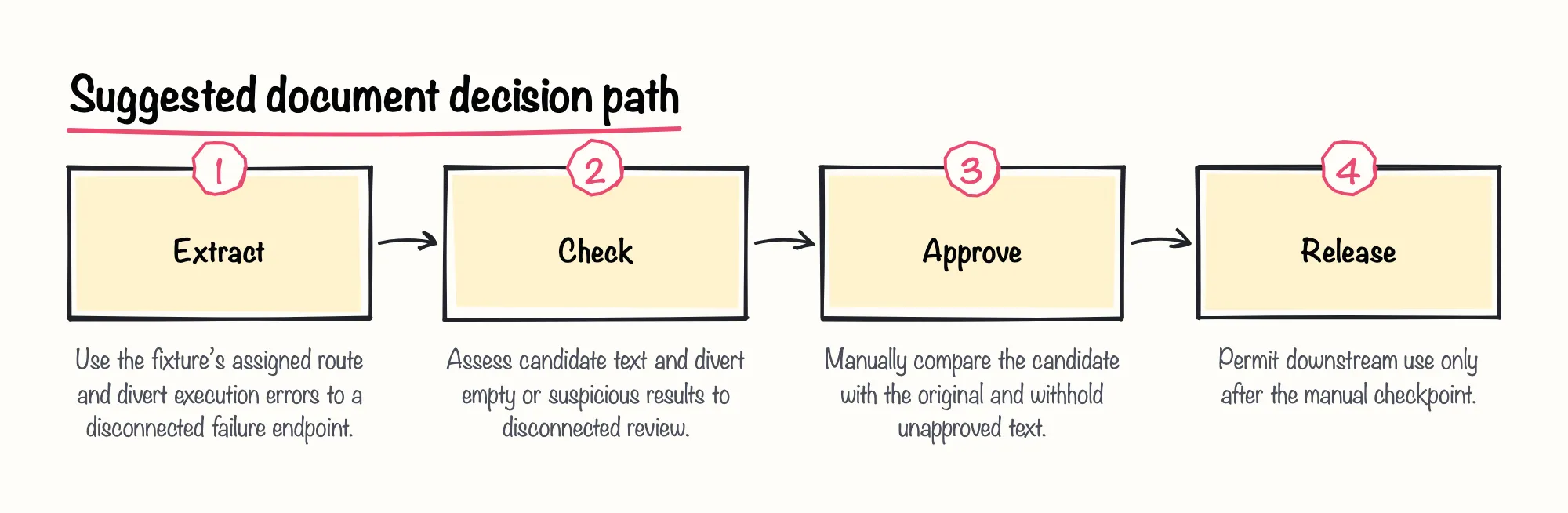
Sources: n8n-docs/docs/integrations/builtin/core-nodes/n8n-nodes-base.if.md at main · n8n-io/n8n-docs · GitHub, n8n-docs/docs/build/understand-workflows/workflow-components/work-with-nodes.md at main · n8n-io/n8n-docs · GitHub
Demonstrate completion and reflect

Finish your n8n PDF extraction exercise by demonstrating the proposed criteria below. If a node cannot find its file, inspect upstream binary presence and match the property name. If it executes but returns no useful text, inspect the actual output field before treating that as an execution failure.
Suggested reflection: why might OCR text look readable yet disagree with the original? A suggested solution is to show the discrepancy against your reference, withhold the result, and explain which decision sent it to review.
Sources: How to Extract Text and Structured Data From PDFs in n8n, n8n-docs/docs/integrations/builtin/core-nodes/n8n-nodes-base.if.md at main · n8n-io/n8n-docs · GitHub, n8n-docs/docs/build/understand-workflows/workflow-components/work-with-nodes.md at main · n8n-io/n8n-docs · GitHub