n8n Community Nodes npm: Build and Publish a Custom Node
A practical guide to building n8n community nodes for npm: naming rules, style choices, testing, versioning and publishing.

Checked against the cited sources on .
What It Takes to Go From Node Idea to Published npm Package
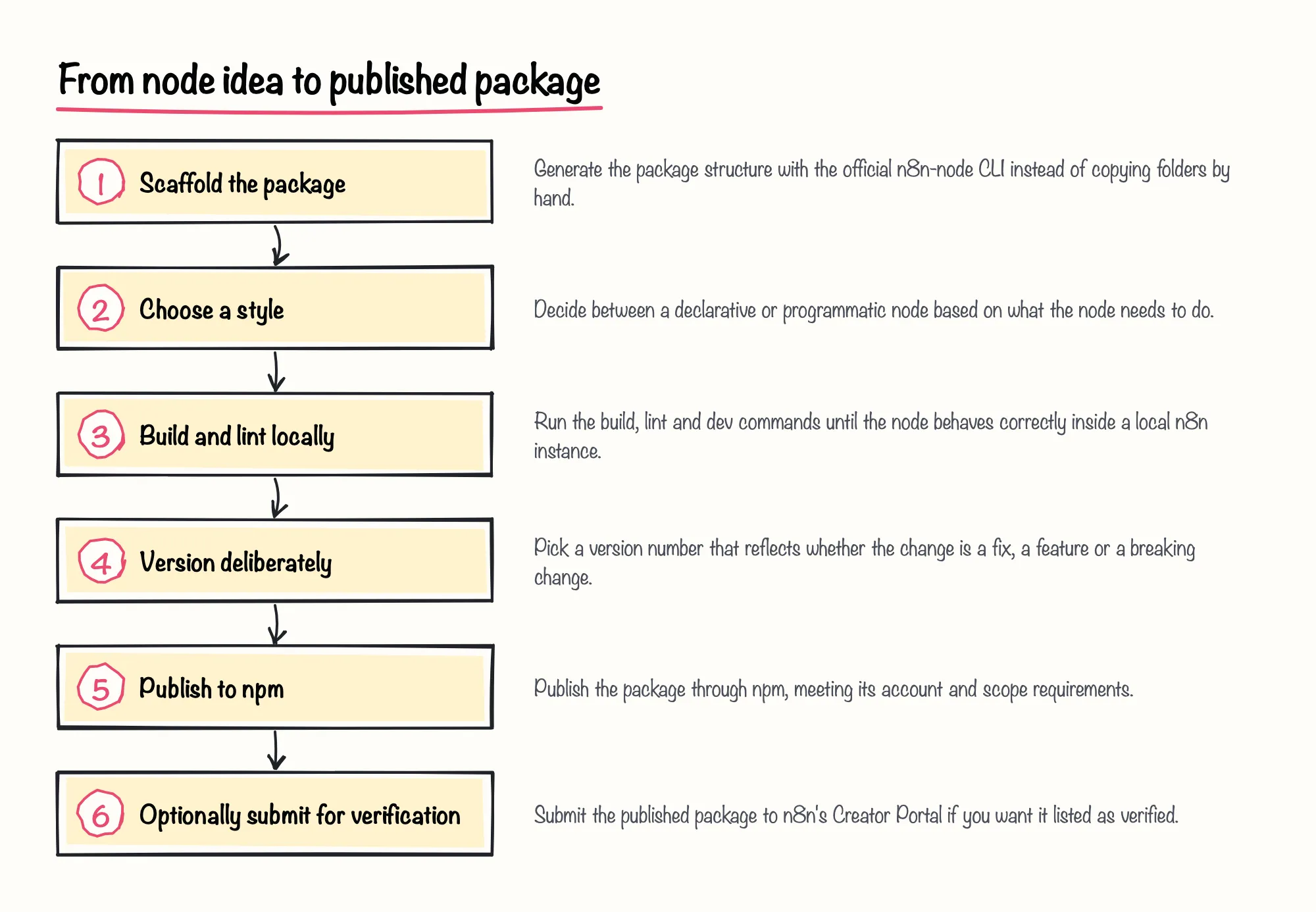
Turning a working node into one of the n8n community nodes on npm is less about writing clever code and more about following a sequence of conventions n8n and npm both check for. You need a package that follows n8n's naming and structure rules, a decision about whether the node should be declarative or programmatic, a local build-and-lint loop that catches problems before anyone installs your package, a deliberate versioning habit, and finally an npm account configured the way npm now requires. Optional n8n verification adds its own review step on top of that.
None of these steps is hard on its own, but skipping one tends to surface later as a rejected submission, a broken update for someone else's workflow, or a publish command that fails because of an account setting you didn't know existed. The rest of this guide walks through each stage in the order you'll actually hit it, starting with what officially makes a package a community node at all.
Sources: Using the n8n-node tool | Connect | n8n Docs, GitHub - n8n-io/n8n-nodes-starter: Example starter module for custom n8n nodes. · GitHub
Foundations: What Makes a Package an n8n Community Node
A plain npm package does not automatically count as a community node. n8n's own documentation states that a community node package name must start with n8n-nodes- (or the scoped equivalent) and must include the n8n-community-node-package keyword in its package metadata, so n8n's tooling can discover it among other community nodes on npm (F1).
The same documentation reserves the right to reject community nodes that compete with n8n's own paid or enterprise features, which draws a boundary around what a community package is meant to add rather than replace (F4). In our view, treating that naming and metadata convention as a first step rather than an afterthought is worth the five minutes it takes, because fixing a wrongly named package after people have already installed it is far messier than getting it right before the first publish.
Sources: Building community nodes | Nodes | n8n Docs, Submit community nodes | Connect | n8n Docs
Naming, package.json and Required Standards
In practice, this means your package.json needs the n8n-nodes- prefix in its name field and the community-node keyword listed among its keywords, exactly as n8n's documentation describes (F1). A community-authored tutorial on Medium, published in October 2025, independently restates the same naming rule, which corroborates the official guidance rather than adding new detail (F40).
That same tutorial also frames the basic unit clearly: each n8n node you publish lives in its own npm package, rather than several nodes being bundled loosely into one general-purpose library, according to the October 2025 Medium guide by Omar Walied (F38). Beyond the name and keyword, the package needs the usual npm metadata — a description, a repository link, and a license field — which later becomes relevant again if you pursue n8n's optional verification review.
Sources: Building community nodes | Nodes | n8n Docs, How to Create and Publish a Custom n8n Community Node | by Omar Walied | Medium
Choosing a Declarative or Programmatic Node Style
Every node needs a base file with a description object that defines the node inside the node class, according to n8n's documentation (F13). From there, you choose between two styles. A programmatic-style node needs an execute() method that reads incoming data and parameters before it builds a request, which gives you full control over the request and the data it returns (F14).
n8n's documentation also gives two concrete rules for choosing between the two styles: build every trigger node in the programmatic style, even when the companion action node for the same service is declarative, and when you're unsure which style a node needs, default to the declarative style (F15, F16). We'd back that default: starting declarative and only reaching for programmatic once a trigger, a non-REST API or heavier data transformation forces the issue keeps the first version of a node simpler to review, test and maintain.
| Style | When n8n's docs recommend it | Versioning support |
|---|---|---|
| Declarative | Default choice when unsure; suits most REST-style services (F16) | Light versioning only — declarative nodes cannot use full versioning (F25) |
| Programmatic | Required for trigger nodes and non-REST or transform-heavy logic (F14, F15) | Not limited to light versioning in n8n's documentation; light versioning is available for all node types regardless of style (F26) |
Sources: Structure | Connect | n8n Docs, Choose a node building style | Connect | n8n Docs, Versioning | Connect | n8n Docs
Building and Testing Your Node
Once you know which style you're building, the day-to-day work happens in a local build-test-fix loop, using the tooling n8n ships specifically for this job rather than ad hoc scripts.
Scaffolding and Developing with the n8n-node CLI
n8n describes n8n-node as the official CLI for developing community nodes, used to scaffold, build, lint and release a package, and the official @n8n/node-cli package on npm describes itself the same way (F5, F10). The starter repository that ships alongside it lists Node.js v22 or higher and npm as prerequisites before you start (F9).
When a node doesn't show up inside n8n after you've built it, the n8n-nodes-starter README's own troubleshooting section suggests checking that you actually ran npm install to pull in dependencies first (F8). If the local dev server behaves oddly instead, the @n8n/node-cli README's troubleshooting section suggests clearing n8n's custom nodes cache, which resolves a surprising share of local-only glitches (F12).
Sources: Using the n8n-node tool | Connect | n8n Docs, GitHub - n8n-io/n8n-nodes-starter: Example starter module for custom n8n nodes. · GitHub, @n8n/node-cli - npm
Code Standards, Linting and the Local Dev Loop
n8n's code standards documentation instructs developers to never change the incoming data a node receives, since multiple nodes can share that same data in memory (F17). It also directs node authors to use n8n's built-in HTTP request helper module instead of pulling in a third-party service library for the same job (F18).
Before publishing anything, the documentation says you should ensure your node passes the linter's checks (F19). n8n's node linter documentation describes its ESLint plugin as detecting issues and automatically fixing many of them to help authors follow best practices, and it instructs authors to run the lint command to see detected issues in the console (F31, F32).
Sources: Code standards | Connect | n8n Docs, Node linter | Connect | n8n Docs
Versioning Your Node for Safe Updates
npm's own documentation recommends package authors start versioning at 1.0.0 and increment from there following semantic versioning rules (F29). It strongly recommends incrementing the major version number specifically when a change breaks a package's dependents (F30) — which, for a community node, means anyone whose saved workflow relies on the previous behavior.
The version number is the one signal downstream users see before an update lands, so treating it carelessly risks breaking other people's workflows without warning. A patch release should only ever fix a bug, a minor release should only ever add backward-compatible behavior, and a major release is the only honest place for anything that could change what an existing workflow does.
- Patch (x.x.1): bug fixes that don't change how the node behaves for existing users
- Minor (x.1.x): new, backward-compatible features or parameters
- Major (1.x.x): changes that could break an existing workflow built on the node
Sources: About semantic versioning | npm Docs
Publishing n8n Community Nodes to npm
Once your node passes locally, publishing n8n community nodes on npm itself is mostly a matter of running one command. n8n's documentation states that the release command in the n8n-node CLI publishes the community node package to npm, and the @n8n/node-cli README describes that same command as handling the complete release process using the release-it tool before the publish step runs (F6, F11).
Sources: Using the n8n-node tool | Connect | n8n Docs, @n8n/node-cli - npm
GitHub Actions, Provenance and Trusted Publishers
n8n's own starter repository states that its included GitHub Actions workflow handles npm publishing automatically on every version tag push, which removes the temptation to run a manual publish from a laptop (F7). That matters more than it might seem: n8n's documentation states that, starting May 1st 2026, nodes submitted for Creator Portal verification must be published using GitHub Actions with a provenance statement (F2).
A second, near-identical page on docs.n8n.io restates that n8n won't accept verified nodes published directly from a developer's local machine, which corroborates rather than independently confirms the same rule (F3). If verification is on your roadmap at all, setting up that GitHub Actions workflow before your first release saves you from reconfiguring your publishing pipeline later.
Sources: GitHub - n8n-io/n8n-nodes-starter: Example starter module for custom n8n nodes. · GitHub, Building community nodes | Nodes | n8n Docs, Submit community nodes | Connect | n8n Docs
npm Account Requirements: 2FA and Scoped Packages
If your package name is scoped, npm's documentation states that scoped packages are published with private visibility by default, so you need the public access flag to make one installable by anyone (F33, F34). Separately, npm's documentation states that all packages now require two-factor authentication, or a granular access token with bypass-2FA enabled, in order to create and publish packages at all (F35).
Sources: Creating and publishing scoped public packages | npm Docs, Requiring 2FA for package publishing and settings modification | npm Docs
Submitting for n8n Verification (Optional)

Publishing to npm makes your node installable; it does not make it verified. Verification is a separate, optional step through n8n's Creator Portal, and it comes with its own technical checklist and its own, sometimes unpredictable, review timeline.
Verification Requirements and Technical Guidelines
n8n's verification guidelines state that each submitted community node package should integrate exactly one third-party service, rather than bundling several integrations into one package (F20). The same guidelines require that a package intended for verification include no external runtime dependencies, and that its license be MIT (F21, F22).
Sources: Verification guidelines | Connect | n8n Docs, Building community nodes | Nodes | n8n Docs
Troubleshooting Review Delays and Scanner Issues
No source in this guide's research gives an official, stated average or guaranteed timeline for Creator Portal review, so treat the following only as scattered community reports rather than a service-level promise. A user identified as ondics reported in a July 2026 n8n community forum post that their node update sat in an "Update Changes Required" status with an empty feedback page (F43); another forum reply from July 2026 suggested a common cause is that the new version wasn't published to npm before the portal update was submitted (F44).
| When reported | What the report described |
|---|---|
| July 2026 | A node update's status showed "Update Changes Required" with no visible feedback for several days |
| December 2025 | A new node submission stayed "Under Review" for several weeks |
| July 2026 | The Creator Portal rejected a package that the current public scanner tool passed |
| August 2026 | A new node review stayed pending for 11 days with no feedback |
Separately, a user reported in a December 2025 forum post that a new node submission still showed "Under Review" after several weeks, and a user reported in an August 2026 forum post that a review was still pending after 11 days with no feedback (F45, F48). A developer named atacan also reported in a July 2026 forum post that the Creator Portal rejected their package while the scanner tool available at the time passed it, and a community reply suggested asking n8n to update the vetting worker, clear the cache, and rerun the submission (F46, F47).
We'd treat these as a reason for caution rather than alarm: they're isolated, unverified reports tied to specific packages, not a documented pattern. Our practical takeaway is to keep your npm package version, your GitHub repository metadata, and your Creator Portal submission tightly in sync before you submit, since a mismatch between them appears in more than one of these reports as the likely trigger for delay.
Sources: Creators portal: Node still in review. Why? - Questions - n8n Community, I submitted a node, but it still shows “Under Review” after several weeks - Questions - n8n Community, Creator Portal False Rejection for n8n-nodes-speechall - Questions - n8n Community, Creators Portal: Node Review taking too long! - Questions - n8n Community
Security, Risk and Ongoing Maintenance
Publishing a node is only half the relationship: once someone installs it, n8n's documentation states that community nodes have full access to the machine that n8n runs on and can perform any action, including malicious ones, and that any installed community node has access to data flowing through that user's workflows (F23, F24). That's a limitation worth stating plainly once: publishing responsibly means the code you ship carries real trust, not just functionality.
| Risk type | What n8n's documentation states |
|---|---|
| System security | An installed community node has full access to the machine running n8n and can perform any action, including malicious ones |
| Data security | Any installed community node has access to data flowing through that user's workflows |
Independent developer Carlos Aragon illustrates the demand side of this in his own March 2026 blog post, where he describes building the n8n-nodes-hyros community node because he was copying the same raw HTTP pattern across more than 20 client workflows and wanted other Hyros-plus-n8n users to avoid starting from scratch (F36). According to that same March 2026 blog post, his package had reached 4,525 npm installs by that point, a self-reported figure from the author's own commercial blog rather than an independently audited count. His post also documents how n8n community nodes install into a workflow in practice: a user goes to Settings and then Community Nodes inside their own n8n instance (F37).
Looking ahead, n8n's documentation for the planned 3.0 release, which its changelog describes as scheduled for October 2026, states that self-hosted n8n will require a Docker-based deployment and will end support for npm and npx installs, and that the default for the unverified-community-packages setting will switch from enabled to disabled in that release (F27, F28). Shifting unverified installs to opt-in by default could push more node authors toward the verification path this guide describes, but teams running self-hosted n8n should plan their deployment and update process around the Docker requirement well before it ships.
Sources: Risks | Nodes | n8n Docs, I Built an n8n Node for Hyros — 4,525 Installs and Counting | Carlos Aragon, v3.0 Breaking changes | Changelog | n8n Docs
Conclusion: A Practical Checklist
Going from a working node idea to a maintained package on npm is a sequence of small, checkable decisions more than a single hard problem: name and scaffold the package correctly, pick the right style, build and lint it until it behaves, version it with your users' saved workflows in mind, publish through an account that meets npm's current requirements, and decide deliberately whether n8n's optional verification is worth the review process for your use case.
The checklist below pulls together the concrete, source-backed steps this guide covered, in the order you're likely to use them.