n8n vs SAP Integration Suite: A Checklist for Orders and Invoices
n8n vs SAP Integration Suite as a working checklist: how to split jobs, then check authentication, OData access, retries, error routing and audit before n8n touches SAP.

Checked against the cited sources on .
n8n vs SAP Integration Suite: decide the split first
The n8n vs SAP Integration Suite question is easier to answer as a division of jobs than as a product contest. This checklist is for SAP architects and integration developers adding n8n to an existing landscape. Only statements attributed to documentation are documented behavior; the split rule, ordering and completion criteria are our editorial suggestions, and we have not tested any of this ourselves.
A practitioner post on SAP Community, by an SAP Product and Topic Expert, argues that the two tools should coexist. It places S/4HANA, finance interfaces and compliance-driven processes with Integration Suite, and AI agents and rapid prototypes with n8n. The author says the post is not an official SAP or n8n comparison, so treat it as one informed opinion rather than tested evidence.
We think a written split rule beats a feature-by-feature comparison. The criteria below are our editorial suggestions, not a validated instrument: keep high-value, guaranteed-delivery interfaces such as invoice posting, IDoc, RFC and B2B in Integration Suite, and give n8n the orchestration, AI, notification and human-in-the-loop steps around them.
- Needs guaranteed delivery, queuing or transaction management: Integration Suite
- Compliance-bound or finance interface: Integration Suite
- IDoc, RFC or B2B connectivity: Integration Suite
- Orchestration across several systems: n8n
- AI agent, notification or human-in-the-loop step: n8n
n8n's own partnership page announces n8n as a managed environment inside Joule Studio on SAP BTP. It is marketing copy with no availability statement in the material we reviewed, so nothing below depends on it.
Sources: Why n8n Workflows Will Not Replace Solid SAP Integ... - SAP Community, n8n SAP partnership
Authentication and access

For S/4HANA Cloud Public Edition, an SAP Community blog describes a communication arrangement for scenario SAP_COM_0109 (Sales Order Integration) as the route to the Sales Order A2X API. That blog says that with Basic Auth or OAuth 2.0 client credentials, documents are processed by the technical user bound to the communication system. This matters for audit attribution, but it is community guidance covering that one API. The post was published in 2024 and modified in 2025, so it may not match your release.
The same blog says OAuth 2.0 Authorization Code with PKCE binds operations to a user, but it demonstrates this with an API testing tool, not n8n. A 2026 community Q&A leaves the supported grant type unresolved. No source we reviewed states which flow an n8n credential supports against these APIs, so we do not claim one.
We'd be cautious about choosing a grant type from forum threads. Confirm it for your release with your SAP team before building anything in an n8n vs SAP Integration Suite design.
Sources: Enable OAuth 2.0 Authorization Code for Sales Orde... - SAP Community, How to Configure OAuth 2.0 Authentication Between ... - SAP Community
OData and API access for orders and invoices
SAP's S/4HANA Cloud Public Edition help (version 2608) lists a Supplier Invoice OData V2 API with operations including create, hold or park, read and reverse. The page we reviewed was truncated, so authorizations and required fields are unconfirmed. Decide which operations your workflow needs and verify them there.
For writes, the same SAP help says the NetWeaver Gateway protects modifying requests such as POST against CSRF. The client fetches a token with a non-modifying call, setting the X-CSRF-Token header to Fetch. That page describes the content upload service, so verify it for your service. One community member's January 2026 on-premise setup over VPN reports that the token is tied to session cookies and that deep inserts need items nested under to_Item.results. That is a single self-reported experience, not a Public Cloud procedure.
Avanai, the vendor of an n8n SAP OData community node, says in its 2026 blog that the node handles CSRF tokens, OData V2/V4 differences, retries and throttling, and it advises testing in your own environment first. These are the vendor's own claims. Its production readiness is unverified, and RFC/BAPI support is described as still in development.
Sources: Obtaining the CSRF Token | SAP Help Portal, Building an Email-Based SAP Sales Order Automation... - SAP Community, Supplier Invoice - OData V2 | SAP Help Portal, How I Built the First Real SAP OData Node for n8n | Avanai
Retries, rate limits and duplicates

n8n's documentation suggests two ways to handle rate limits (error 429): Retry On Fail with Wait Between Tries set above the limit, or Loop Over Items with a Wait node. The HTTP Request node also offers Batching. SAP-specific rate limits were not in our sources, so read them from your own landscape.
The n8n page does not address retrying a non-idempotent POST, which can create duplicate orders or invoices. SAP Cloud Integration lists a Define Idempotent Process Call step, but only its navigation title was captured, so we cannot describe its behavior. Unless a call goes through such a step, duplicate protection is your own design.
We'd keep automatic retries off for writes until a duplicate-prevention design has been tested in a non-production client.
Sources: Handle rate limits | Nodes | n8n Docs, Idempotent Process Call Handles Duplicates | SAP Help Portal
Exception routing with error workflows

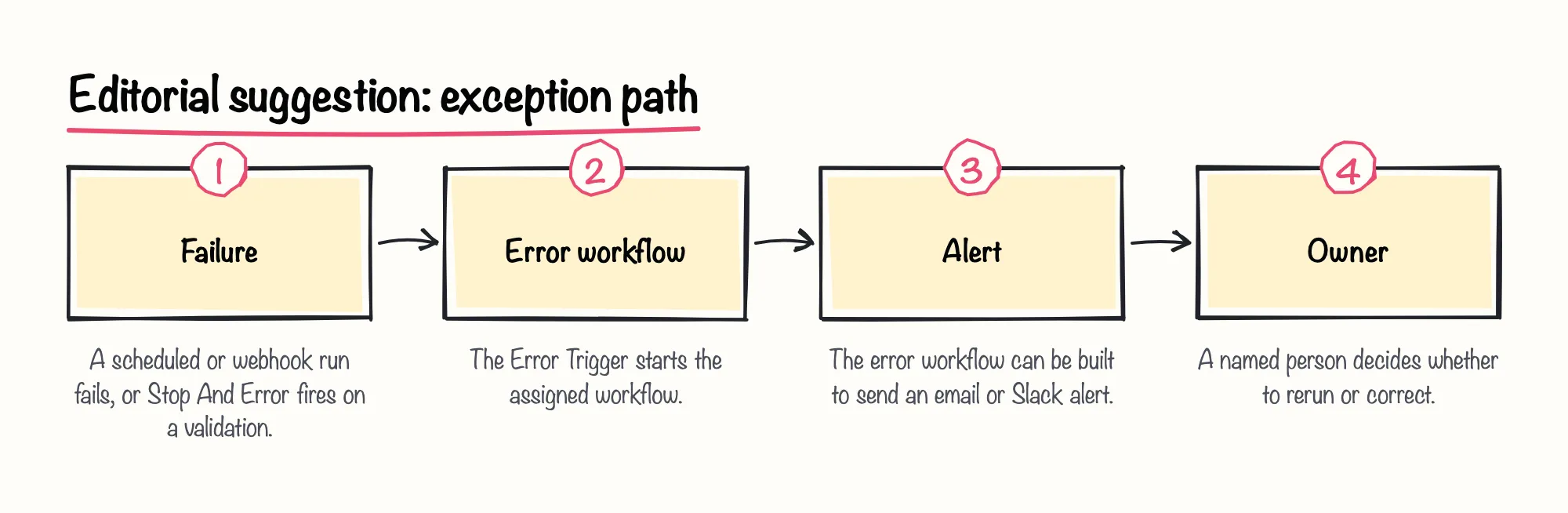
Error handling is where n8n vs SAP Integration Suite ownership must be explicit. According to n8n documentation, an error workflow is chosen in Workflow Settings and runs when an execution fails. It must start with the Error Trigger, can serve several workflows, and can send email or Slack alerts. Assign one to every SAP-facing workflow.
The Error Trigger fires only on automatic executions, so manual runs cannot test it. Use a scheduled or webhook-triggered failure instead. Error data includes the execution ID, URL, retryOf and lastNodeExecuted, though the ID and URL need the execution saved and are absent when the trigger node fails.
The Stop And Error node can force a failure on chosen conditions, such as a failed business validation. Which conditions deserve that is a design choice; we suggest routing each to a named owner.
Sources: Handle errors gracefully | Build | n8n Docs, Error Trigger | Nodes | n8n Docs
Audit and logging
In an n8n vs SAP Integration Suite design, attribution starts on the SAP side, as the authentication section describes. For the log, we suggest storing the SAP document number of each run in your own record. n8n's side depends on edition and version.
Log streaming sends workflow, user, credential and audit events to syslog, a webhook or Sentry. n8n documents it as Enterprise only, on both Cloud and self-hosted, and some destination options need specific versions such as 2.19.0. Basic logging options are on all Cloud plans and self-hosted editions, but they are operational logs, and the sources do not address retention or compliance suitability for orders and invoices.
| Capability | Availability |
|---|---|
| Log level, console or file output, file size and count | All n8n Cloud plans and all self-hosted editions |
| Log streaming | Enterprise only, on Cloud and self-hosted |
Sources: Stream logs to external systems | Administer | n8n Docs, Set up logging | Deploy | n8n Docs