n8n 2.42 Release Notes: Anthropic Node Prompt Caching
n8n 2.42 release notes explain the new Anthropic node prompt caching option and the update's other 13 features, exactly as n8n's own announcement states them.

Checked against the cited sources on .
What Changed in n8n 2.42
The n8n 2.42 release notes on docs.n8n.io, published September 29, 2026, describe this update as adding Anthropic node prompt caching support alongside 13 other features.
n8n's public GitHub release page separately lists n8n@2.42.0 as published on the same date, September 29, 2026, matching the docs changelog, though the GitHub page's own chrome marks this release as a pre-release.
Sources: Release notes | Changelog | n8n Docs, Release n8n@2.42.0 · n8n-io/n8n · GitHub
The Main Update: n8n Anthropic Node Prompt Caching

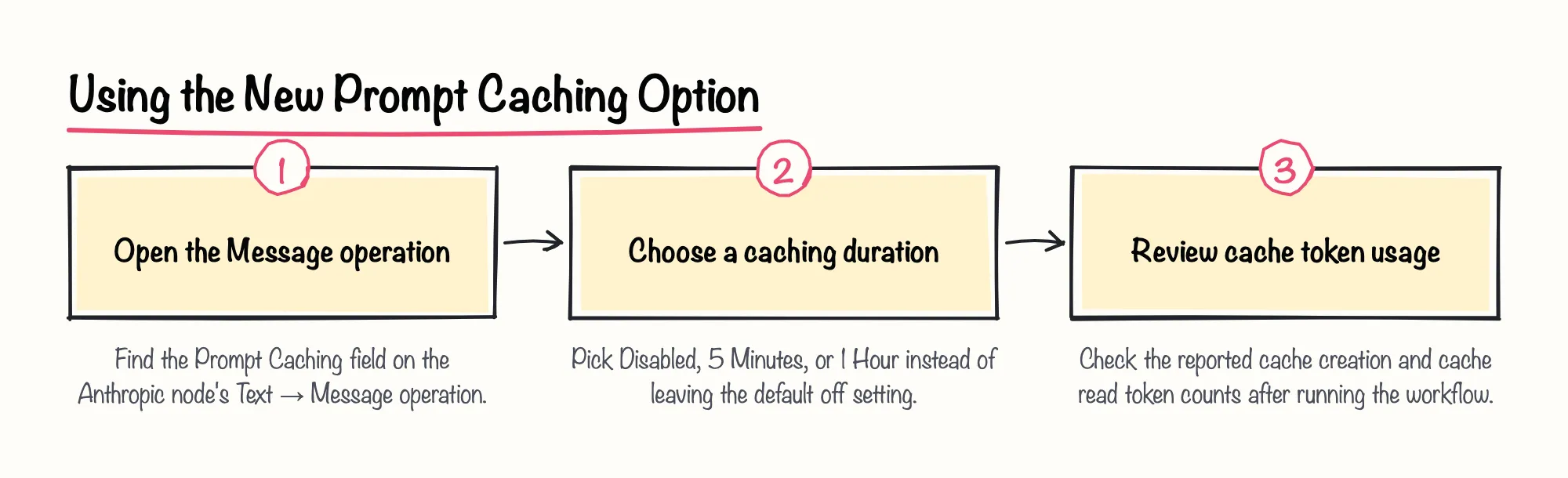
The centerpiece of these n8n 2.42 release notes is a new Prompt Caching option added to the Anthropic node's Text → Message operation. The option offers three settings, and it ships disabled by default, so workflows already using the Anthropic node keep behaving exactly as before unless someone opts in. Once turned on, the node's reported token usage also starts including separate cache creation and cache read token counts.
- Disabled – caching turned off, the default setting
- 5 Minutes – the cache is held for five minutes between requests
- 1 Hour – the cache is held for one hour between requests
n8n's release notes state that when caching is enabled, repeated tool-call loops and large system prompts are billed at reduced rates for the cached portion of the tokens. We're optimistic about what this means for workflows that loop through repeated tool calls or resend a large, mostly unchanged system prompt on every run: caching that repeated content is exactly the pattern this feature targets.
n8n's GitHub release confirms the same addition under its Features list, tracked as pull request 35804, titled as adding prompt caching to the Message operation.
Sources: Release notes | Changelog | n8n Docs, Release n8n@2.42.0 · n8n-io/n8n · GitHub
Background: What Prompt Caching Means for Claude Requests
Prompt caching is not new with n8n version 2.42 alone. n8n's own documentation for the separate Anthropic Chat Model sub-node already offered the identical Disabled, 5 Minutes, or 1 Hour setting, used to cache the system prompt, tool definitions and conversation history between requests for conversational agents.
Because the Message operation's new option now matches a setting conversational-agent builders already had, we think it is worth lining both nodes up to the same caching duration inside a single workflow rather than leaving one cached and one not.
Sources: Anthropic Chat Model | Nodes | n8n Docs
Who This Affects
The release notes describe this update mainly in terms of the Anthropic node's Message operation rather than by plan or deployment type. We'd be cautious about assuming every team gets this at once, since the announcement is simply silent on that point.
n8n's own versioning guidance describes a MINOR version increase, such as the jump from 2.41 to 2.42, as adding functionality in a backward-compatible manner rather than introducing breaking changes; that guidance page is archived and no longer updated, so it is read here only as general background, not as a 2.42-specific statement.
- Teams using the Anthropic node's Message operation for AI agents
- Teams whose workflows repeat tool calls or resend long system prompts
- Teams on any plan may be affected, but the announcement does not say which plans or deployment types receive the change
Sources: Release notes | Changelog | n8n Docs, Release notes 2.x | Changelog | n8n Docs
The Other 13 n8n 2.42 New Features at a Glance
Beyond Anthropic node prompt caching, n8n 2.42 release notes count 13 other features in the same update. The GitHub release page gives one concrete example among them: n8n made SSO the primary option on the sign-in page when SAML or OIDC login is enabled.
The GitHub list otherwise gives short, one-line commit titles for the remaining changes, so this article does not restate each one as a separate claim beyond what the announcement itself names.
- Anthropic node prompt caching, the main update covered above
- SSO made the primary sign-in option when SAML or OIDC login is enabled
- The remaining items, listed only as short commit titles in n8n's GitHub release
Sources: Release notes | Changelog | n8n Docs, Release n8n@2.42.0 · n8n-io/n8n · GitHub
What Readers Should Do Now
As editorial guidance rather than anything the release notes themselves recommend, teams whose Anthropic node workflows repeat tool-call loops or send large, mostly unchanged system prompts might want to evaluate turning on the new Prompt Caching option, remembering it must be enabled per node since it stays off by default.
Before enabling it, it is worth reading the Message operation's new option alongside the existing Anthropic Chat Model sub-node's identical setting, so both are configured with the same caching duration across a single workflow.
Self-hosted teams can treat 2.42 as a routine minor update, consistent with n8n's own backward-compatible MINOR version policy, and should check their own instance version after updating to confirm the Prompt Caching option is present before relying on it.
Sources: Release notes | Changelog | n8n Docs, Anthropic Chat Model | Nodes | n8n Docs, Release notes 2.x | Changelog | n8n Docs
What the n8n 2.42 Release Notes Do Not Say
Several details are simply not stated in these n8n 2.42 release notes. The announcement does not say which plans or deployment types the Anthropic node change applies to, nor its rollout timing.
It also does not give a specific cost-reduction percentage for cached tokens; it states only, in qualitative terms, that cached tokens are billed at reduced rates. Anything beyond the features the announcement itself names, including outcomes for other editions or hosted plans, is simply not stated here.
- Which n8n plans or deployment types receive the Anthropic node change, or on what schedule
- The exact cost-reduction percentage for cached tokens
- Any change beyond the features the announcement itself names
Sources: Release notes | Changelog | n8n Docs, Release notes 2.x | Changelog | n8n Docs